Disable downloads on a sharing link
Replace an active sharing URL with a view-only link, confirm file and folder download controls are blocked, and send recipients the new address.
Last reviewed
The web app sets View only when a link is created. To remove downloads from an existing URL, revoke that link and create a replacement for the same target with View only selected. The replacement has a different address, so every recipient needs the new URL. Use this creation workflow for a single file or folder: the current bundle endpoint ignores the dialog’s view-only field. For a bundle, set and verify view-only through the mobile link editor before delivery.
Before you start
- Identify the exact active row in Shared → By me and note its target, recipients, password, expiry and any download limit. These settings are not copied to the replacement automatically.
- Warn recipients that the original URL will end immediately. Revocation cannot be undone.
- Confirm the file type can open in Dosya’s browser preview. A view-only link refuses attachment bytes; an item without a supported preview may therefore be unusable to the recipient.
- Understand the boundary: removing a download button reduces ordinary saving, but visible information can still be photographed, transcribed or captured from the screen.
Steps
- Open Shared, stay on By me, and locate the link whose downloads should stop.
- Open its detail page and confirm Downloads currently reads Allowed. Copy the target name, not the URL, for reference.
- Return to the list, select Revoke, and confirm the warning. The old token immediately returns This share link has been revoked and can never be restored.
- Open Files, find that same file or folder, and choose Share.
- Select By link for a public URL. Use By email and leave Only these people can open it. selected when named addresses must verify access.
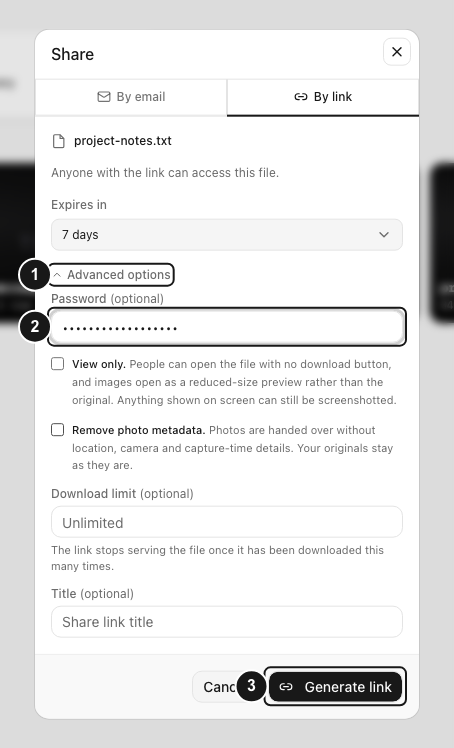
- Review Expires in, expand Advanced options, then select View only. It blocks ordinary attachment downloads. The dialog summarizes images as lower-resolution previews, but the exact byte behavior depends on format as described below.
- Re-enter the old delivery’s required password, expiry, named-recipient mode and metadata choice from its Shared detail; none of those controls migrate automatically.
- Replace the revoked delivery with Generate link or Send according to its recipient mode:
- For By link, select Generate link, copy the address under Share link created, select Done, and open that copy privately.
- For By email, select Send, note the sent count and any failed addresses, then let the modal reset and close. Open Shared → By me, find the new row, and retrieve its URL there for a private test with an invited inbox; email mode does not present a generated-link result.
- Verify that a previewable file opens without a download control. An eligible View-only preview still claims one configured download slot when its first bytes are served; Range requests for that file reuse the claim only within the same one-hour signed session. Do not perform this byte test on a one-slot replacement intended for somebody else. For a folder, browse its visible tree and confirm Download all is unavailable.
- Distribute a By link replacement manually. For By email, the invitations were sent by Send; correct reported failures. In either mode, update messages, bookmarks or documents that still point at the Revoked token.
Expected result
The original address is permanently revoked. Its replacement opens supported previews without file-download or folder-archive controls, appears as Downloads: View only in the owner detail, and is the only URL sent for future access.
Expected recipient behavior
- A normal download request is refused with This file is view-only. Downloads are not allowed.
- A folder archive request is refused with This folder is view-only. Downloads are not allowed.
- Previewable document, media and image families can still open inline. JPEG, PNG and HEIC images are re-encoded as WebP derivatives capped at 1,600 px on the longest edge.
- WebP, AVIF, GIF, SVG, BMP and ICO have no server-side decoder in this path, so the browser receives their original bytes inline. View only therefore cannot promise original-byte withholding for every previewable image format.
- Folder browsing can remain available while the ZIP action is blocked. Opening an eligible descendant preview still consumes one link slot when a download ceiling is configured; View only does not bypass that counter.
- Unsupported preview formats do not become downloadable merely because the recipient holds the URL.
- Files downloaded before revocation remain on recipients’ devices. View-only cannot recall those copies.
The target’s configured lock can also determine the effective result. A file set to workspace View only remains view-only even when its share link was created without that option. A target or ancestor changed to Full lock makes the public link unavailable rather than asking the recipient for the workspace lock password.
Locks and unlock grants
A member’s personal folder or file unlock lasts for that signed-in member and does not weaken public sharing. It cannot make a full-locked target shareable, cannot enable downloads on a view-only link, and cannot revive a public link while the configured target lock remains.
Changing the configured lock is a workspace action with wider consequences. Ask an authorized owner to decide whether the target itself should change, or leave the target protected and share a suitable copy instead.
Troubleshooting
View only is absent. Expand Advanced options in the current Share dialog. If link creation itself is unavailable, confirm your role has create share links permission and check workspace policy.
The old URL still shows content in an open tab. An already-rendered page is not a valid revocation test. Reload or open the exact URL privately; new API access must be refused.
A recipient still has a download button. Compare the complete address with the replacement shown in Shared → By me, then verify its detail page says Downloads: View only. Multiple links can point to the same target, and changing one does not change the others.
The recipient cannot preview the item. The link may be correctly view-only while the format lacks an eligible inline renderer. For JPEG, PNG and HEIC, a source larger than 32 MiB or one the server cannot decode is refused instead of falling back to the original. Convert or provide a previewable delivery copy if downloading must remain disabled.
A folder ZIP is missing but individual previews work. This is expected for a view-only folder. Remember that each first logical preview byte session can still spend a configured link slot. If the link is not view-only, also check its download count, Free-plan transfer allowance and the archive’s 10,000-entry and 5 GiB ceilings.
Frequently asked questions
Can I turn downloads back on for the same URL?
The current web workflow does not edit this field in place. Revoke and replace the link again with View only cleared. The authenticated share API has broader update capabilities, but that does not change what the web controls currently offer.
Does view-only stop screenshots?
No. It changes the bytes and controls Dosya serves; it cannot prevent someone from capturing content displayed on their device.
Does a password also disable downloads?
No. A password gates entry. Select View only separately when the unlocked recipient should preview without downloading.
Related guides
Was this helpful?
Loading helpfulness results…
Voting saves a necessary ballot cookie for up to 180 days so you can change your answer.
Questions and replies
Ask about the steps in this guide. Questions are reviewed before publication.
Keep account details, credentials and private files out of public questions. Use private support for those.
Loading questions…
Sign in to your Dosya account to ask a question.