What to include in a Dosya support request
Prepare a Dosya support request with the exact time, steps and redacted evidence while keeping passwords, recovery codes and API keys private.
Last reviewed
Before you send a ticket from Profile > Get help, record the action, exact time and timezone, expected result, actual result, client version and any visible error. Remove passwords, sign-in codes, recovery codes, API keys, cookies and private link tokens from the message and attachments.
Use the signed-in Get help page for account-specific assistance. If you need the complete ticket workflow, follow how to contact Dosya support.
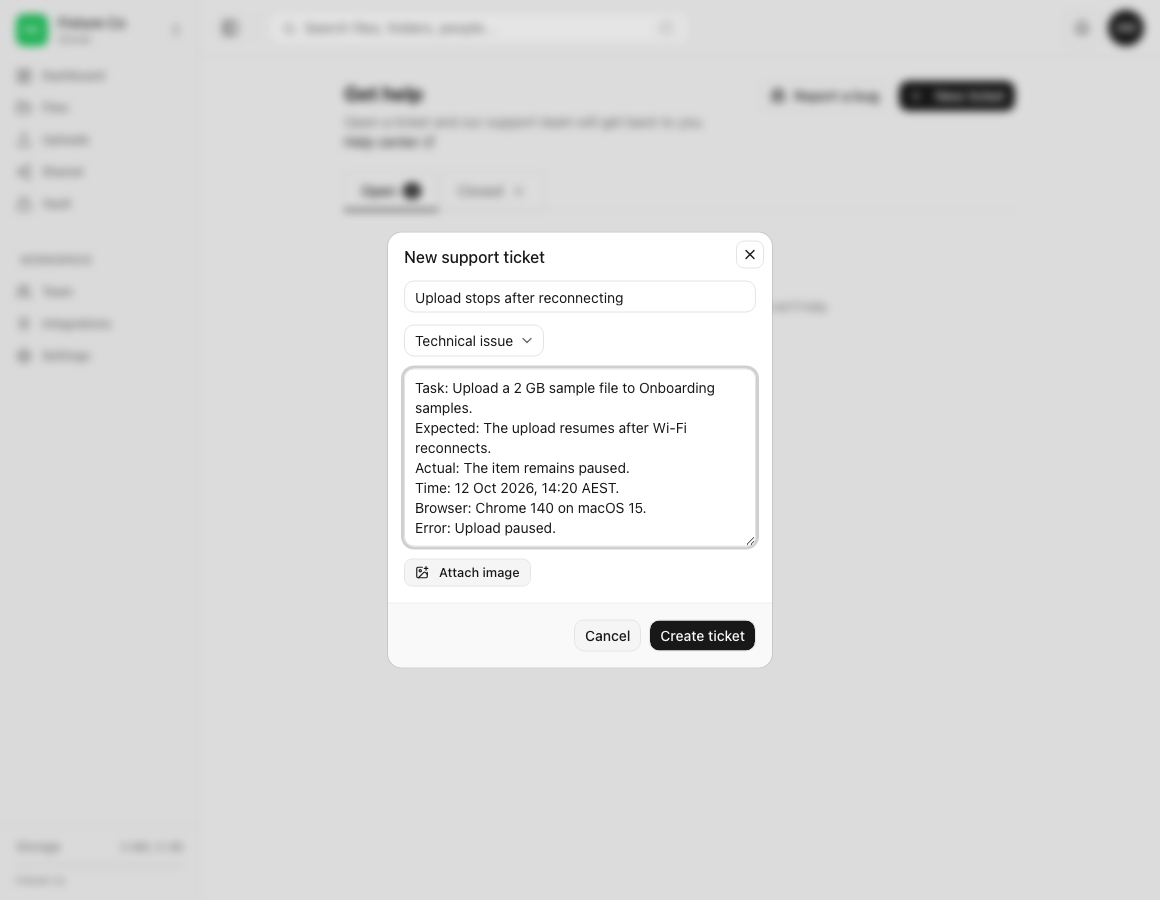
Steps: prepare useful support details
- From Profile, open Get help and select New ticket.
- In Subject, name the failed task and result in one line.
- In Description, list the exact actions that produced the issue, in order.
- Add Expected and Actual lines so the difference is clear.
- In Description, add the date, local time and timezone, plus when the action last worked if the issue is intermittent.
- Add the Dosya app or browser version and the operating system.
- In Description, paste the exact error text after removing tokens, private URLs and personal data.
Use a harmless sample when you can reproduce the problem safely. For upload or download issues, include the file type, approximate size, destination and visible progress state. For protocol or API issues, include the request method, HTTP status, timestamp and a redacted request identifier.
Information you must remove
Do not send a password, verification code, two-factor code, recovery code, session cookie, API key, S3 secret, WebDAV credential, private share URL or complete payment-card number. Dosya support does not need an authentication secret to investigate a ticket.
If a secret is already visible in a draft or screenshot, remove the attachment and redact the text. If you already sent or exposed the secret, revoke or rotate it first, then tell support that it was replaced. Use the suspicious activity response steps if you do not recognize access to the account.
Prepare a redacted screenshot
- Capture only the control, status or error needed to explain the issue.
- Cover private filenames, email addresses, local user paths, payment details and link tokens.
- Check the redacted image at full size before attaching it.
- Keep the label and error readable so support can identify the failing step.
The ticket form accepts up to three PNG, JPEG, WebP or GIF images per message. Each image must be under 5 MB. For more detail about safe diagnostic evidence, read how to share diagnostic information safely.
Expected result
The ticket describes one reproducible problem and includes enough nonsecret context to investigate it. After Create ticket succeeds, the conversation opens under Open and you can keep later evidence in the same thread.
Related guides
Was this helpful?
Loading helpfulness results…
Voting saves a necessary ballot cookie for up to 180 days so you can change your answer.
Questions and replies
Ask about the steps in this guide. Questions are reviewed before publication.
Keep account details, credentials and private files out of public questions. Use private support for those.
Loading questions…
Sign in to your Dosya account to ask a question.