Clear filters that hide files
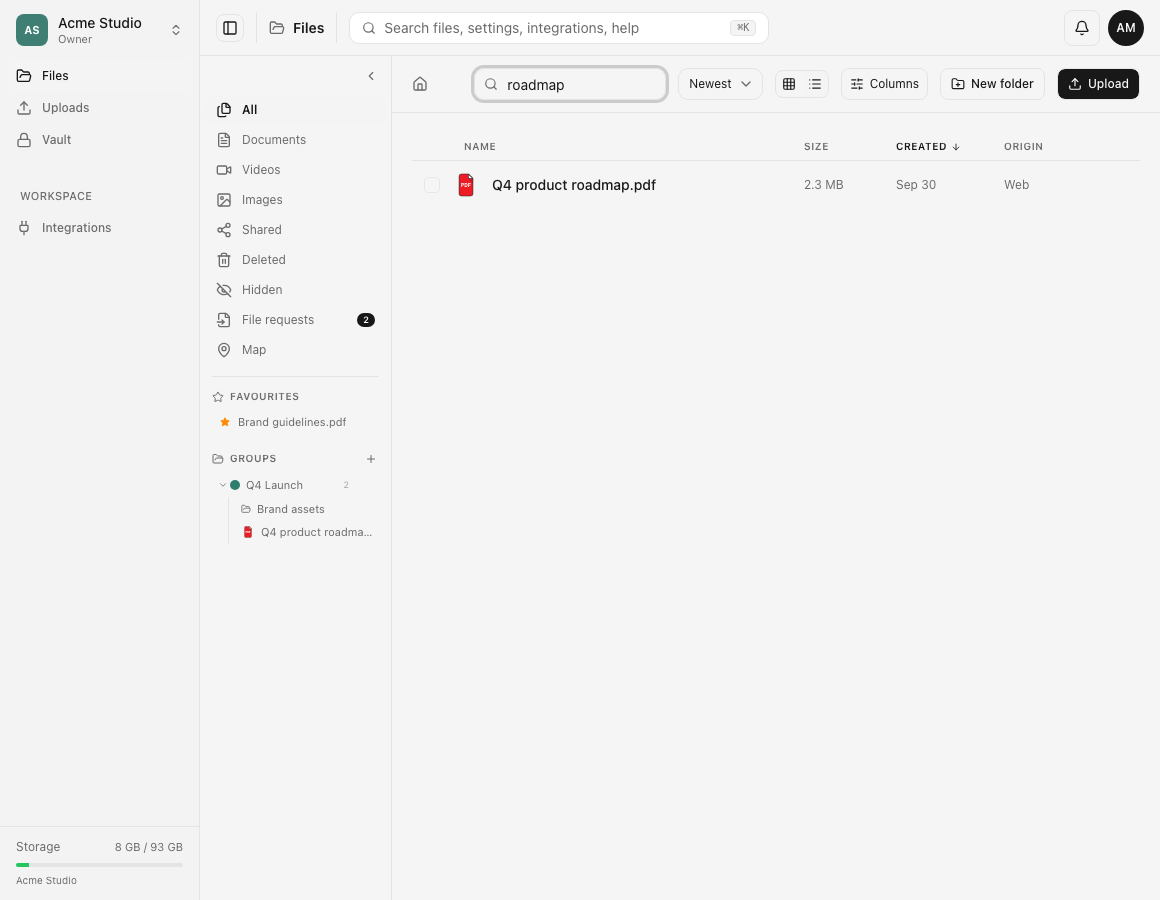
Clear search text, sidebar filters, group views, and map date or folder filters so the intended Dosya file list becomes visible again on web.
Last reviewed
The web Files page has independent query, folder, sidebar-filter, and group state. It does not have one clear-all button, so remove the state that is hiding the item while preserving any scope you still need.

Steps
- Check the breadcrumb first. If the wrong folder is open, choose the required breadcrumb or Home. Folder navigation preserves the current search text and type filter, so continue through the remaining checks.
- Clear the Search files… field. The page waits 300 milliseconds before applying the empty query and automatically returns pagination to page 1.
- In the sidebar, select All to leave Documents, Videos, Images, Shared, Deleted, or Hidden, and to close an active group view. All keeps your current folder and any text query. Entering or leaving Deleted instead returns to that view’s root because trashed folder IDs have a separate meaning.
- Confirm the URL no longer contains an unwanted q, filter, or group value. A folder is represented separately, so keep or clear it according to the intended scope.
- Do not reset layout, tile size, columns, or sort unless you want to change presentation; those are view preferences rather than filters.
- If the hidden item was on Map, use its Clear button. Map Clear removes the selected folder, From, and To, but leaves Show approximate locations unchanged.
Expected result
The Files list returns to the chosen folder without an active query, group, or sidebar filter. Query, filter, and folder transitions reset pagination, so the first result page is shown. Clearing controls is read-only and does not restore deleted files, unlock protected files, or reveal items outside the member’s assigned folder tree.
Troubleshooting
- Files remain missing after selecting All. Empty Search files…, verify the breadcrumb, and check whether the item is deleted, hidden, or fully locked.
- Folders remain while a search is active. This is expected. The filename query filters direct file rows; folder rows are loaded independently.
- The result says No files match your search. Clear or change the filename query. If loading failed instead, use Try again under Could not load this folder.
- A map pin remains hidden after Clear. Turn on Show approximate locations if the item has only an upload-origin coordinate.
Related guides
Was this helpful?
Loading helpfulness results…
Voting saves a necessary ballot cookie for up to 180 days so you can change your answer.
Questions and replies
Ask about the steps in this guide. Questions are reviewed before publication.
Keep account details, credentials and private files out of public questions. Use private support for those.
Loading questions…
Sign in to your Dosya account to ask a question.