Correct a workspace invitation sent to the wrong email
Revoke the incorrect pending invitation, verify its old link is unusable and create a new invitation with the intended address, role and folder access.
Last reviewed
A pending Dosya invitation cannot have its recipient address edited in place. If it was sent to the wrong email, revoke that invitation first, then create a replacement for the verified address. This prevents both addresses from holding valid access links.
Before you start
- Confirm the active workspace at the top of the sidebar.
- Obtain the intended address through a trusted conversation with the recipient.
- Record the role and any folder boundary the person should receive.
- Treat copied invitation URLs as access credentials until they expire, are accepted or are revoked.
Steps: revoke the incorrect invitation
- Open Team in the intended workspace.
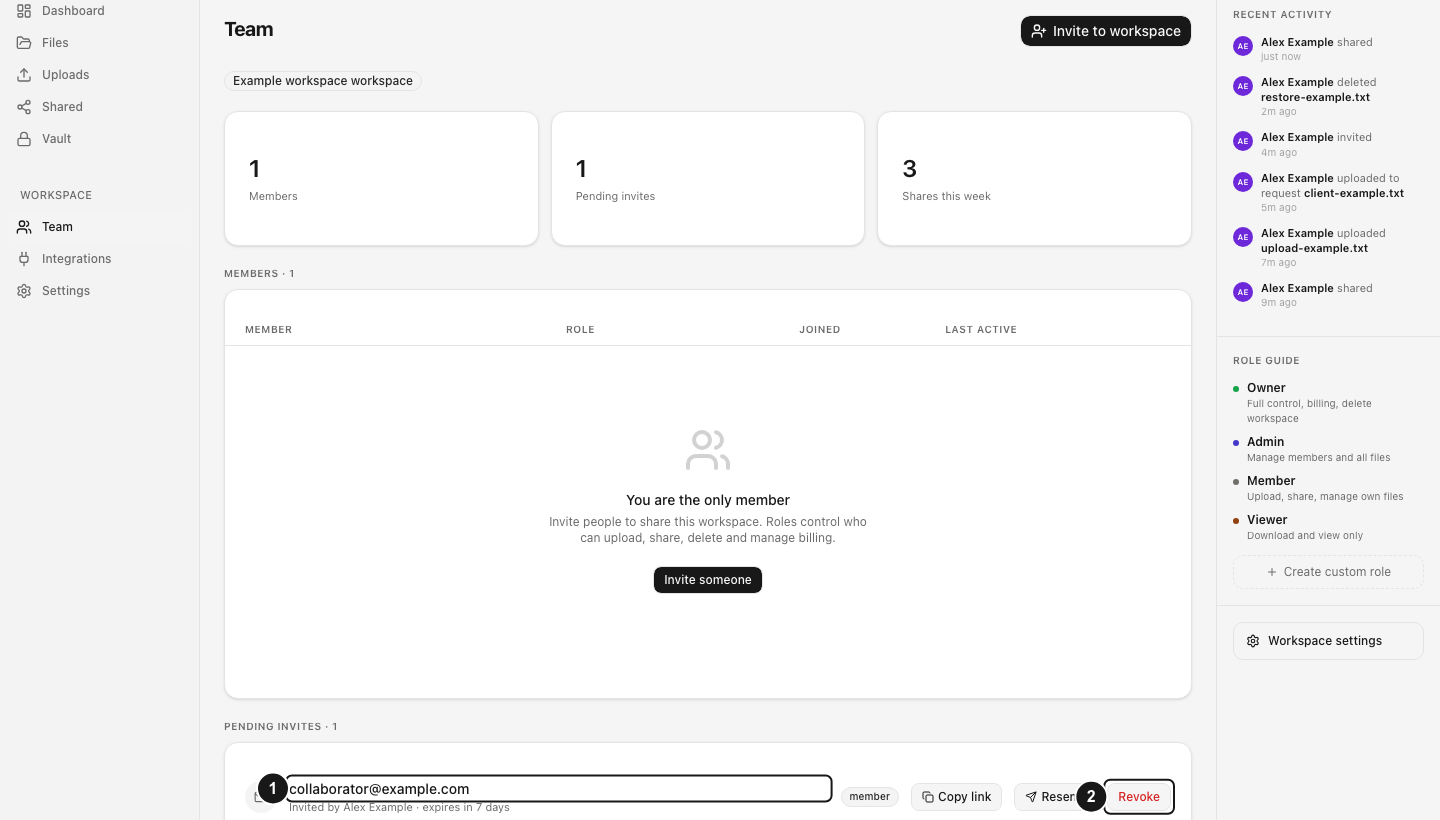
- Under Pending invites, locate the incorrect email. Compare the inviter, role and expiry so you do not revoke a similarly named invitation.
- Select Revoke on that row.
- In Revoke invite, read the displayed address and confirm the action.
- Wait for Invite revoked and confirm the row disappears from Pending invites.
- If the old link was copied or sent elsewhere, open it in a private window. It must no longer allow the invitation to be accepted.
Create the corrected invitation
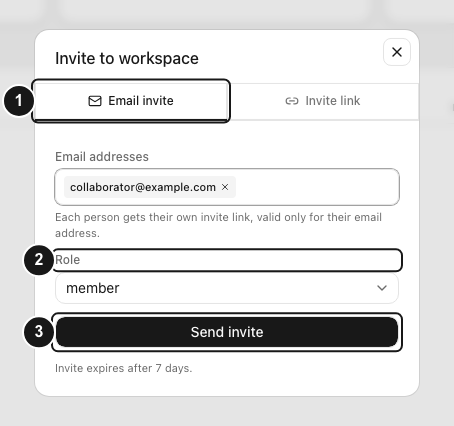
- Select Invite to workspace.
- Enter the verified email address exactly.
- Choose the intended role and any folder boundary.
- Send the invitation and confirm that one new row appears for the correct address.
- Ask the recipient to confirm the workspace name and role before accepting.
Expected result
The incorrect invitation is revoked and its old URL cannot be accepted. Pending invites contains one replacement for the intended address with the correct role and access boundary.
Limits and important details
- Revoking an invitation does not remove an account that already accepted it. Review Members separately.
- A custom role can invite or revoke only when it has the
invite_memberspermission. - If the incorrect address belongs to an existing Dosya user, that user can receive an in-product revocation notice.
- Invitation expiry does not correct the address; revoke promptly when the wrong person could access the mailbox.
Troubleshooting
The incorrect address is already a member. Review the member row, folder access and activity, then follow the member-removal workflow if access was unintended.
Revoke is unavailable or rejected. Confirm the workspace and your invitation permission. Ask an owner or authorized admin to revoke it.
The corrected invite also looks wrong. Revoke it before acceptance and verify the address outside Dosya.
Related guides
Was this helpful?
Loading helpfulness results…
Voting saves a necessary ballot cookie for up to 180 days so you can change your answer.
Questions and replies
Ask about the steps in this guide. Questions are reviewed before publication.
Keep account details, credentials and private files out of public questions. Use private support for those.
Loading questions…
Sign in to your Dosya account to ask a question.