Review pending workspace invitations
Review active workspace invitations by recipient, inviter, role, and expiry, then resend, copy, or revoke each invitation without creating duplicates.
Last reviewed
The Pending invites section is the current action queue for email invitations. It contains only records that remain unaccepted, unrevoked, and unexpired. Use it to deliver a missed link, withdraw incorrect access, or decide when a replacement invitation is necessary.

What the list contains
Open the correct workspace and select Team. The Pending invites · N heading reports the number of active email invitations. Each row contains:
- the normalized recipient email address;
- Invited by followed by the sender name, or Unknown when no name is available;
- expires in followed by days, hours, or minutes;
- the built-in or custom role assigned at creation;
- Copy link, Resend, and Revoke actions.
The page displays an expiry countdown, not a sent date. Email invitations start with a seven-day lifetime. Once a row expires, the Team API omits it; once accepted, the recipient moves into Members instead.
Viewing this roster requires Access Team plus View team members. Sending, resending, and revoking are protected separately by Invite members. A visible button does not override the server permission check.
Steps
- Confirm the workspace badge near the Team heading.
- Match each Pending invites email address to the person who should receive workspace access.
- Check the role badge against the access that person needs. The role cannot be edited on a pending row.
- Read Invited by and expires in to decide whether the access request is still expected.
- For a correct invitation, leave it pending, use Copy link, or select Resend after the five-minute resend cooldown.
- For an incorrect address or role, select Revoke, review the Revoke invite dialog, and confirm Revoke.
- Use Invite to workspace only after the previous row has been revoked or has expired.
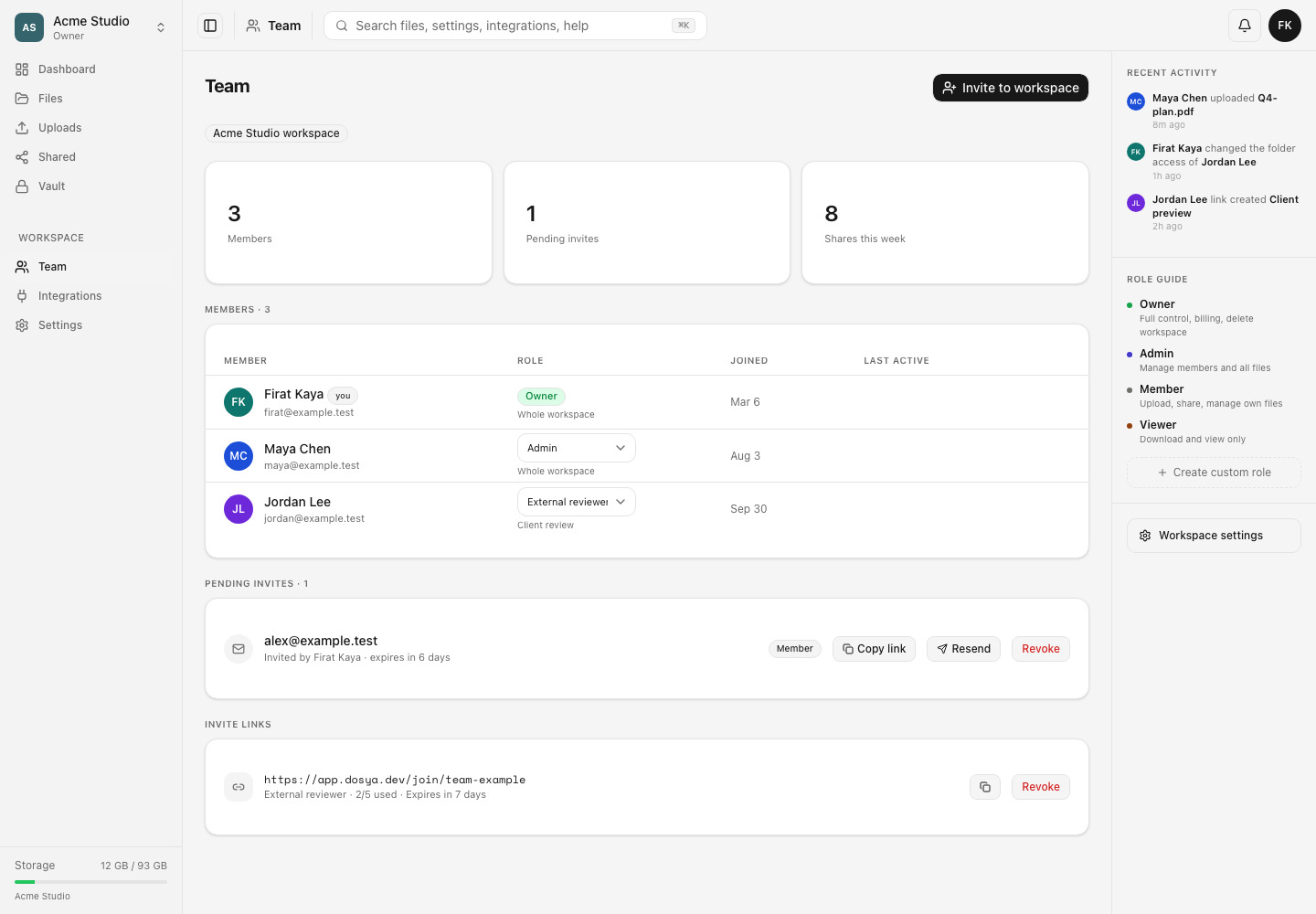
Choose the correct action
Copy link places the same bearer acceptance URL on the clipboard. Anyone can open the URL, but acceptance is bound to the invited email: a signed-in user with another address receives a message naming both accounts and must sign in correctly.
Resend sends the existing invite again. It keeps the token, email, role, and original expiry. The same invitation cannot be mailed more than once within five minutes.
Revoke sets a permanent withdrawal time. Its link stops working immediately and reports This invite has been revoked if opened later. If the email belongs to an existing Dosya account, that user also receives an in-app notice that the invitation was withdrawn; a person without an account receives no additional withdrawal email.
Creating a second active record for the same workspace and email is blocked with An invite is already pending for this email. Inviting an address already present in Members returns This person is already a member. Expired, revoked, or previously accepted rows can be replaced with a newly issued token after the person is no longer a member.
A pending row is not a reserved seat. Free-plan workspaces allow five added members, excluding the owner, and the acceptance write checks that cap atomically. Review unnecessary invitations, but upgrading or removing a member is required if an approved recipient reaches Free plan workspaces can have at most 5 members. Upgrade to add more.
Expected result
Every remaining pending row has a valid recipient and suitable role, its deadline is understood, and any unwanted link has been revoked before acceptance. Correct invitations remain singular rather than duplicated.
Related guides
Was this helpful?
Loading helpfulness results…
Voting saves a necessary ballot cookie for up to 180 days so you can change your answer.
Questions and replies
Ask about the steps in this guide. Questions are reviewed before publication.
Keep account details, credentials and private files out of public questions. Use private support for those.
Loading questions…
Sign in to your Dosya account to ask a question.