Reply to a file comment
Reply beneath a top-level file comment, use mentions within current limits, and recover safely when access changes or the post request fails.
Last reviewed
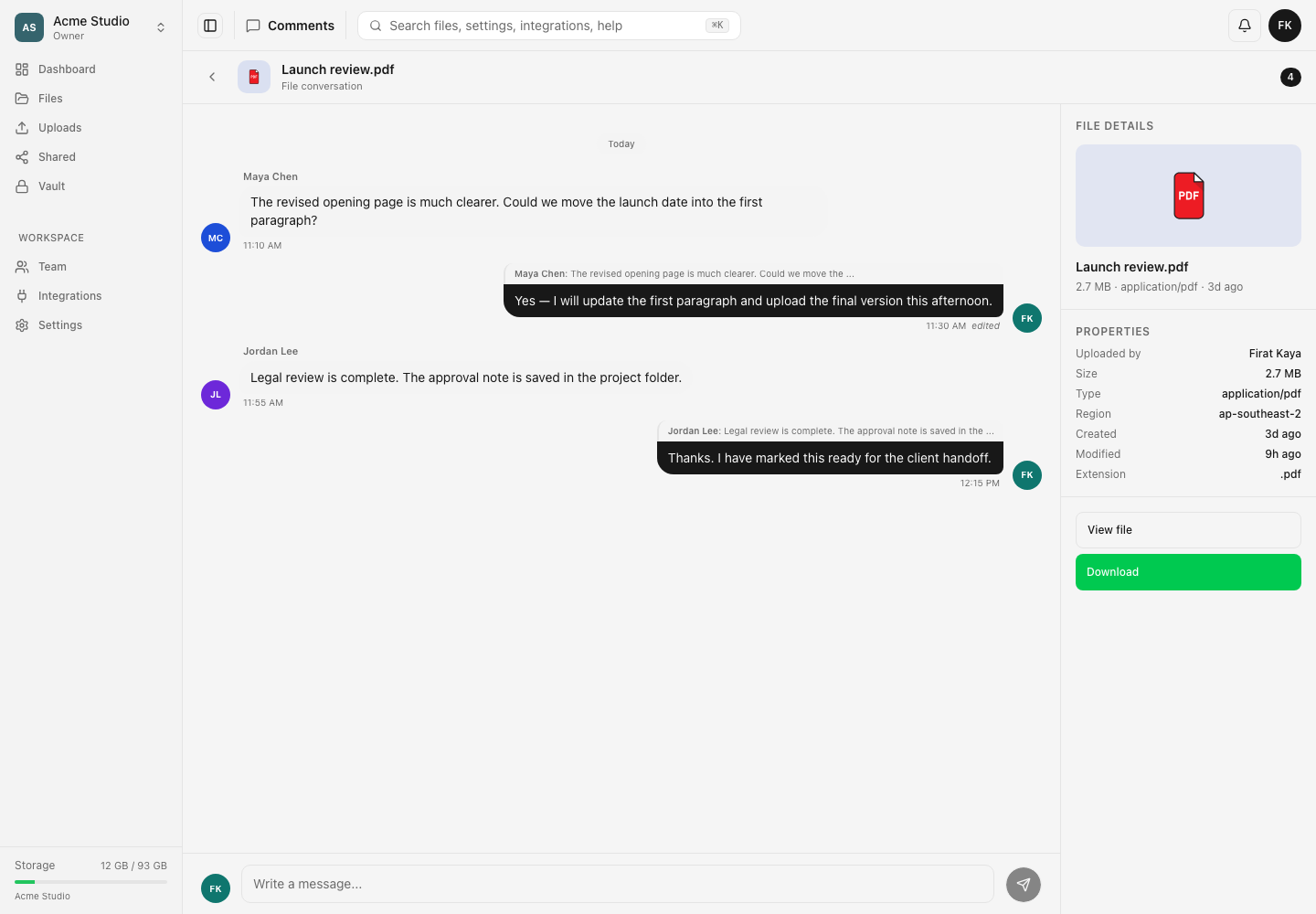
A reply belongs to the same file thread as its parent. The browser nests replies under a top-level comment; mobile keeps a flat chat layout and shows a quote from the parent.
You need current workspace membership, Files page access, and visibility of the target file. Folder confinement, hidden rules, and an unopened full-lock ancestor can refuse the thread.

Before you start
- Open the file preview and select Comments, or open Comments from the file’s action menu on mobile.
- Confirm the filename and parent author’s name before composing.
- A comment body is limited to 5,000 characters. The counter appears after 4,500 characters; the send control is disabled for blank or over-limit text.
Steps
- In the browser, choose Reply below the top-level comment. Replies themselves do not expose another Reply button there.
- On mobile, press the reply action on the desired bubble; mobile permits selecting any visible comment as the parent.
- Confirm the composer says Replying to NAME. Use cancel in the browser or Cancel reply on mobile if it names the wrong person.
- Enter the response. In the browser, typing @ searches eligible people after a 150 ms debounce; at most 20 distinct other users can be submitted.
- Browser users select Send or press Enter; Shift+Enter inserts a line break. Mobile users tap Send comment.
- Wait for success before leaving the file. Browser adds the returned comment to the current thread; mobile clears the composer and reloads only after the server accepts it.
Replies cannot carry a time or PDF-page anchor. The server trims surrounding whitespace, checks that the parent still exists on the same file, and answers “Parent comment not found” with 404 if it was deleted or belongs elsewhere. Mention recipients who cannot see the file are silently omitted to avoid exposing restricted membership.
Expected result
The accepted response appears once with the signed-in author and its parent relationship. A browser reply sits under the root comment; the mobile row quotes the parent author and excerpt.
Posting is reversible by deleting your reply. Be careful when deleting a top-level parent: the mobile confirmation warns that its replies are deleted too, while the web delete controls do not ask for confirmation. The server removes that subtree.
Troubleshooting
The conversation will not load. Browser shows “Couldn’t load comments”; mobile shows “Could not load this conversation.” Retry after confirming workspace, Files access, target visibility, and folder unlock state.
Send stayed disabled. Remove whitespace-only content or reduce the trimmed response to 5,000 characters.
The post failed. Both clients preserve the typed body, and the reply target remains selected. Read the error toast, correct access or connectivity, and submit once rather than duplicating the draft.
Related guides
Was this helpful?
Loading helpfulness results…
Voting saves a necessary ballot cookie for up to 180 days so you can change your answer.
Questions and replies
Ask about the steps in this guide. Questions are reviewed before publication.
Keep account details, credentials and private files out of public questions. Use private support for those.
Loading questions…
Sign in to your Dosya account to ask a question.