Resume an upload after a network interruption
Recover a network-interrupted cloud upload by retrying in the same tab or reselecting its original source after a browser reload.
Last reviewed
A failed transfer can show Network error under an Error row. If the same tab still holds the source, Retry requeues that row. Reloading preserves a failed Error row but removes its file bytes. Choose Retry all failed to change that row to Interrupted, then use Resume to reselect the source. A row that was still Queued or Uploading at reload becomes Interrupted immediately.
Before you start
- Keep the original file at the same name and size. Resume rejects a different selection with That file does not match (name or size differs).
- Confirm the row’s workspace and destination before continuing. Retry does not move the upload to whichever folder is currently open.
- Restore a stable connection before selecting an action. Repeated retries cannot repair an unavailable network.
Steps: resume an upload after a network interruption
- Open Uploads or expand the upload list at the bottom right.
- Match the failed row by filename, size, workspace and destination. Record the error before changing anything.
- Restore the connection and confirm the Network error condition has ended with an ordinary page request.
- If the tab stayed open and Retry is enabled on the Error row, choose it. Dosya clears the old error and returns that same item to Queued.
- After a reload, expect a failed row to remain Error with Retry disabled. Review every failed row, then choose Retry all failed. Rows without retained source files move to Interrupted and keep their previous error for reference.
- Choose Resume on the affected Interrupted row, select the unchanged original file, and confirm the picker. A row that was Queued or Uploading during the reload can start at this step because hydration already marked it Interrupted.
- Watch the row return to Queued or Uploading. Wait for Done, then use View file or Go to location to inspect the stored result.
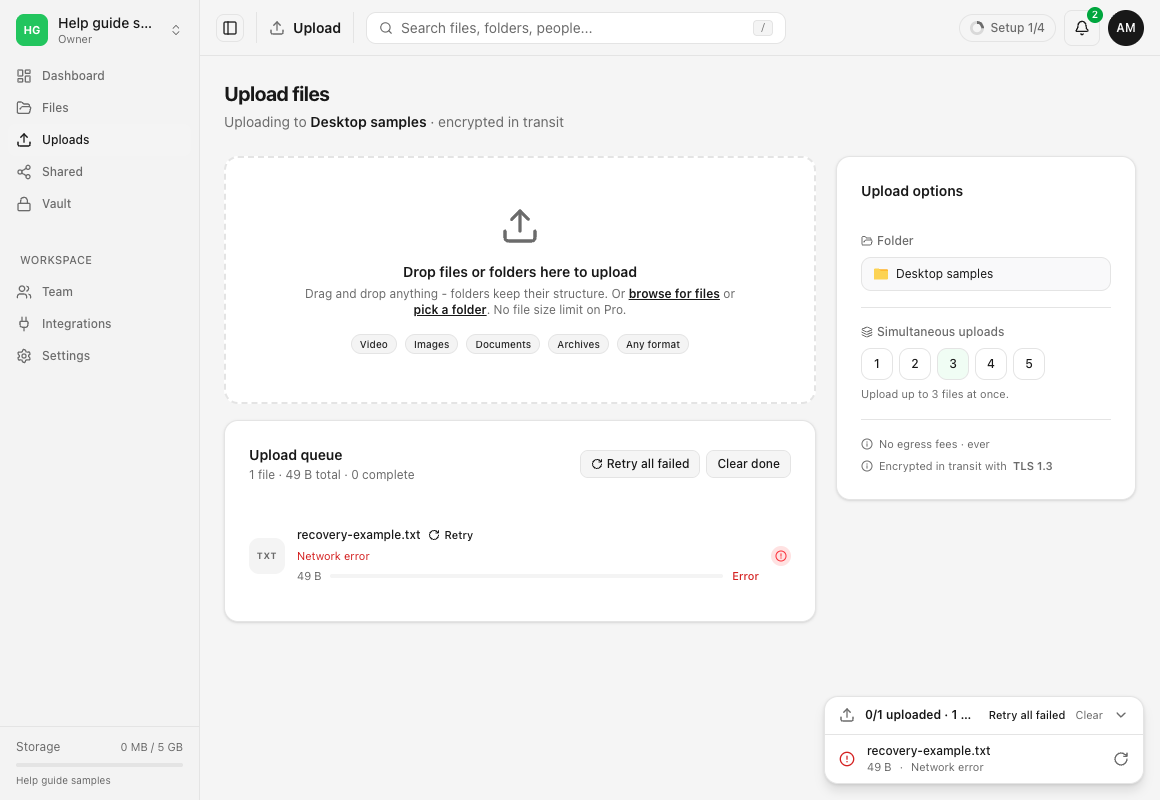
Retry one affected item first. Retry all failed requeues only rows whose files are still available to this tab; reloaded rows are parked as Interrupted so you can reselect them.
Expected result
The original queue row reaches Done, and one file appears in its original destination. A file larger than 50 MiB uses multipart transfer with 10 MiB parts and can reuse parts the server still reports as uploaded. A file at or below 50 MiB restarts its single request from zero after you reselect it.
If the server reports that a resumed session is already complete, the row changes to Done without uploading again. The recovered row can lack a direct View file or Go to location shortcut; open Files and verify the recorded destination manually.
Limits and important details
- Retry continues the same queue item. Dropping the file into the main upload area creates another item and can produce a duplicate or name conflict.
- Files larger than 50 MiB use 10 MiB multipart pieces and can resume from parts still reported by the server. Resume reads server status rather than trusting the percentage stored in the browser.
- Files at or below 50 MiB use one request. They have no reusable part boundary, so resume begins that request again from zero.
- Resume validates only name and size at selection time. Keep the source unchanged because another file can share both values.
- A page reload preserves at most the latest 50 queue records in that browser. It preserves metadata, not the local file contents.
- Dosya warns before closing or reloading while rows are Queued or Uploading. Browser or device shutdown can still interrupt them.
- A deliberately Canceled row cannot resume. Check Files, then start a new upload if no completed copy exists.
Troubleshooting
Retry is disabled after a reload. The failed row correctly remains Error, but the browser no longer has its source bytes. Choose Retry all failed to move that row to Interrupted, then select Resume and reselect the original file with the same name and size.
The row is already Interrupted after reload. It was Queued or Uploading when the page reloaded. Select Resume directly; Retry all failed is only needed to park retained Error rows.
Resume says the file does not match. Select the original filename at its original byte size. If that source was edited or replaced, keep the interrupted row for reference and begin a deliberate new upload.
The row fails again immediately. Copy the new message. Storage, extension, permission, destination-lock and workspace-limit failures need their stated cause corrected before another network retry.
You see two rows for the same file. Do not keep retrying both. Verify whether either copy reached Files, cancel the unnecessary active attempt, and retain the row whose destination is correct.
Related guides
Was this helpful?
Loading helpfulness results…
Voting saves a necessary ballot cookie for up to 180 days so you can change your answer.
Questions and replies
Ask about the steps in this guide. Questions are reviewed before publication.
Keep account details, credentials and private files out of public questions. Use private support for those.
Loading questions…
Sign in to your Dosya account to ask a question.