Read sharing-link visitor counts
Separate all-time hashed visitor reach from verified recipients and the 7-, 30-, or 90-day first-open chart when measuring a shared file's audience.
Last reviewed
Dosya presents three different audience measures: all-time distinct public visitors, verified invited addresses, and first opens in a chosen chart window. They answer different questions and should not be added together.

Steps
- Open Shared → By me in the browser, then choose the link. Confirm its display name and URL so another link with the same file does not contaminate the comparison.
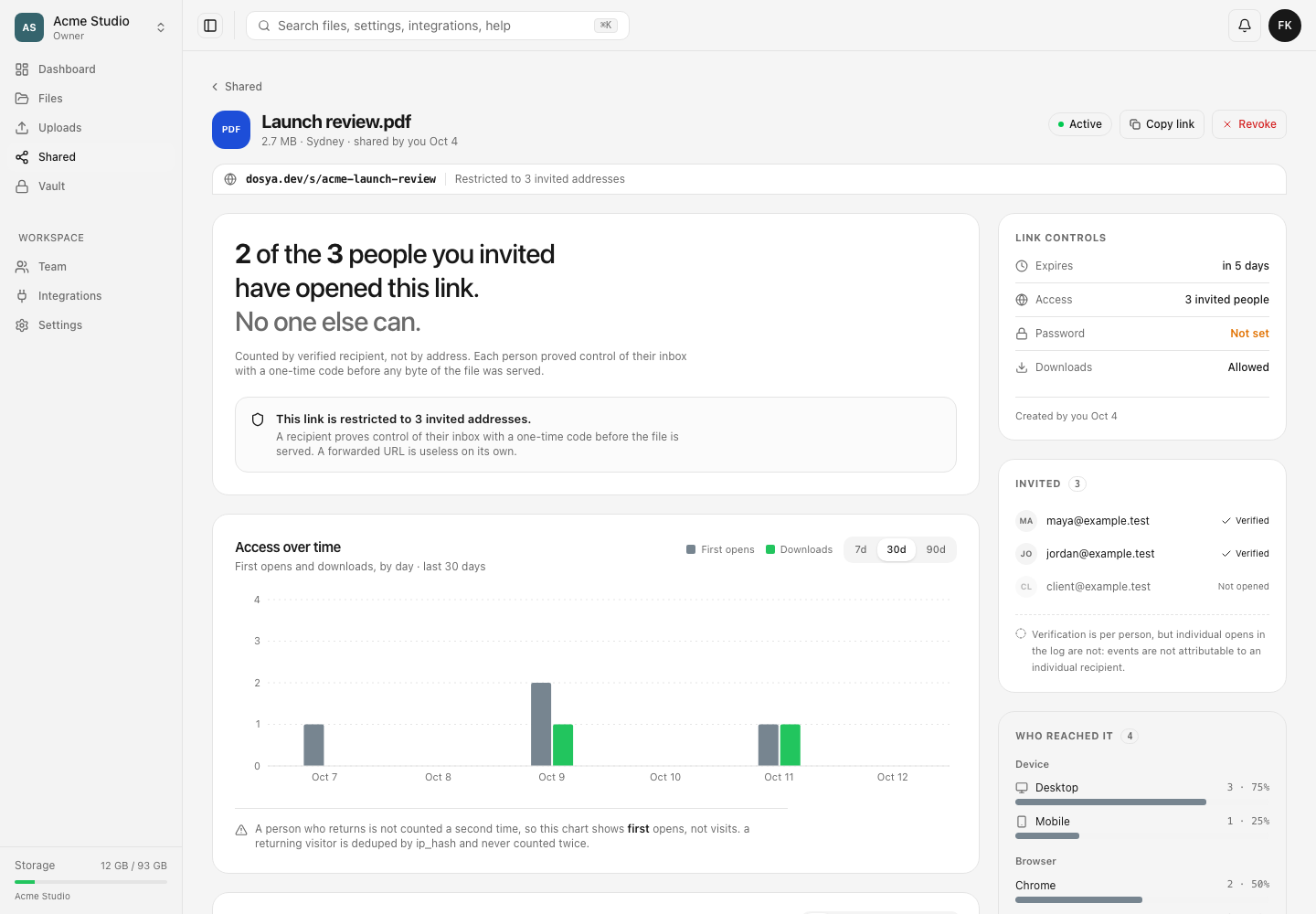
- Read the URL strip. Open to anyone with the URL identifies a public share; Restricted to N invited addresses identifies a named-recipient share. A dead link instead says This link no longer works, although its earlier evidence remains available.
- For a public link, use the exposure headline for all-time distinct reach. Dosya deduplicates a visitor by a non-reversible IP hash forever, so a return from the same hash does not add another person. Shared networks may collapse multiple people, while changing networks may separate one person; the count is reach evidence rather than identity.
- For a restricted link, use the verified-recipient statement and Invited list. Verified means the email address accepted a one-time code before any bytes were served; Not opened means no verification time is stored. This is an all-time verification state and does not identify who produced a later event row.
- Choose 7d, 30d or 90d under Access over time to measure recent activity. The default is 30 days. First opens counts the first open for each distinct stored hash when that first open falls inside the chosen period. Changing the selector does not recalculate exposure, verified-recipient totals, access-log totals or reach.
- Read Downloads separately from visitors. Each recorded download contributes to the selected-range chart without first-open deduplication. For the link’s lifetime download count, return to its Shared → By me row; the analytics detail does not render that counter.
- Consult Who reached it for the device and browser mix among distinct visitors. Its backend reads at most 5,000 visitor rows. When truncated, the page discloses Counted from the first 5,000 visitors.
- Treat the country breakdown as a snapshot of currently loaded access events, not of all visitors. At most 25 newest events feed that table, and absent country values are grouped as unknown.
- Record the measure with its scope: for example, “12 all-time hashed visitors,” “4 of 7 invited addresses verified,” or “8 first opens in the last 30 days.” Include the link identifier and observation time.
Empty and unavailable states
With no traffic, the chart displays Nothing recorded yet and says the first open will appear within a minute. If all recorded opens are older than the current range, it reports No opens in the last N days. Try a wider range. Select a wider option before concluding that the link was never visited.
Access follows workspace scope rather than a separate analytics plan. You need view_own_shares for a link you created or view_all_shares for someone else’s. Hidden, removed or out-of-scope targets may appear as This share link is not available.
Expected result
The audience statement names the correct all-time or range-limited measure and does not infer a person from a hash, device or event. Viewing these figures does not contact recipients or modify the link.
Related guides
Was this helpful?
Loading helpfulness results…
Voting saves a necessary ballot cookie for up to 180 days so you can change your answer.
Questions and replies
Ask about the steps in this guide. Questions are reviewed before publication.
Keep account details, credentials and private files out of public questions. Use private support for those.
Loading questions…
Sign in to your Dosya account to ask a question.