Reading link access and download activity
Use a sharing link's analytics to review first opens, downloads, devices, countries and recipient verification without overstating identity.
Last reviewed
Open Shared, select a link, and use its analytics page to review first opens, downloads and recent access events. Treat the data as delivery evidence rather than a complete identity record: public visitors are represented by an irreversible hashed-address handle, and even private-link events are not attached to a named recipient.
Before you start
- Select the workspace where the link was created.
- Your role needs View own shared links for links you created or View all shared links for teammates’ links. Folder confinement and hidden-item rules still apply.
- Perform a controlled test in a fresh browser when you need to learn how a known action appears.
- Do not compare these counters directly with Help Center page views or website analytics. They measure different events on different systems.
Steps: open a link’s analytics
- Open Shared.
- Stay on By me and find the link by file name, status or expiry.
- Select the row or linked file name.
- Check the header and URL bar to confirm the exact link. Different URLs for the same file have separate histories.
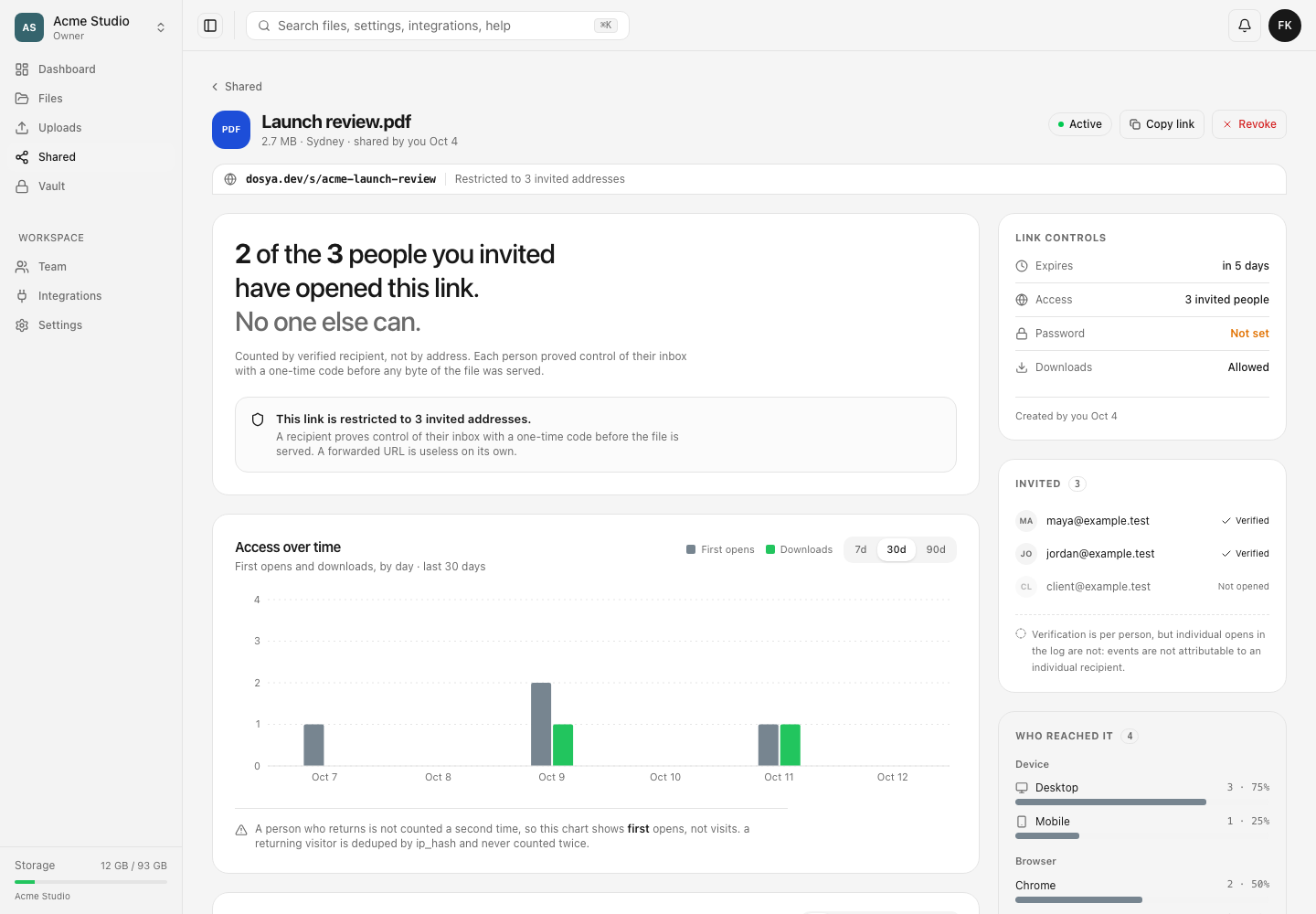
- Review the exposure statement, link controls and access settings before interpreting the chart.
Measurement limits and chart interpretation
- Exposure reports distinct first-time visitors for a public link, or how many invited addresses completed verification for a restricted link.
- Access over time separates First opens and Downloads by day. Choose 7d, 30d or 90d to change the analysis window.
- A returning visitor is deduplicated by its hashed IP address and does not create another first-open count. The system stores the hash rather than the raw address and cannot recover the address from it.
- Downloads are counted separately and are not proof of unique people. One visitor can create more than one download event.
- Device and browser summaries are derived from the request’s user-agent string. They can be incomplete or misleading when software masks or changes that value.
- The reach breakdown reads at most 5,000 rows and marks the result when that cap truncates it.
For a restricted link, Invited shows each address and whether it has verified. A verification timestamp proves control of that inbox at that moment. It is not a record of every later open.
Read the access log
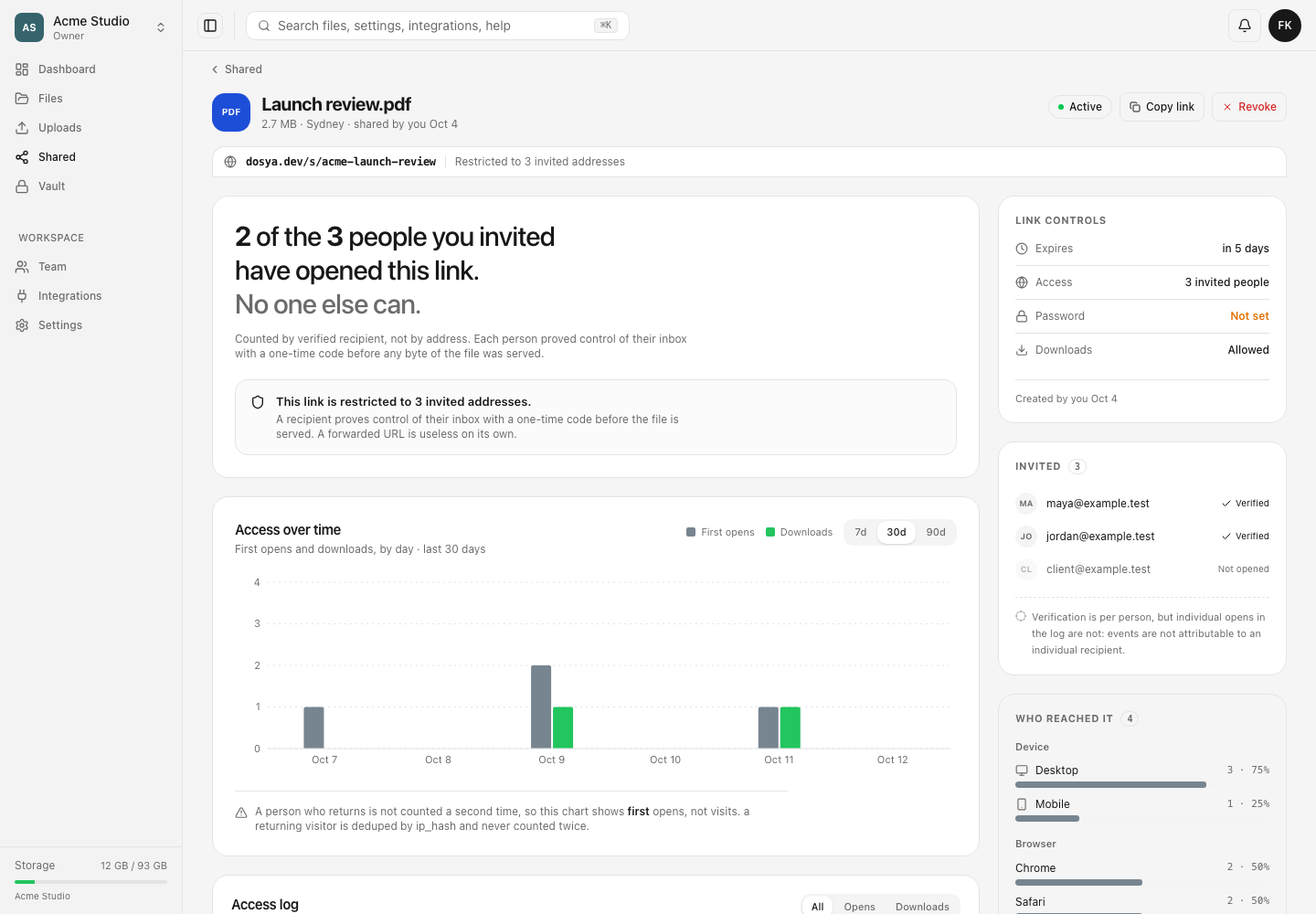
- Scroll to Access log.
- Use All, Opens or Downloads to filter the currently loaded events.
- Read When, Event, Visitor, Country and Device together.
- Treat the eight-character visitor value as an opaque grouping handle. It is a shortened hash, not an account ID or recoverable IP address.
- A dash in Country means the edge could not place that event or the row predates country collection.
- The current response loads up to 25 newest log rows and reports how many events exist in total.
Run a controlled test
- Note the current first-open and download totals.
- Open the exact URL in a fresh private browser or separate network you control.
- Complete any email or password gate.
- Open the file, then download it once if downloads are enabled.
- Return to the analytics page and refresh. The first open can appear within about a minute; the download should be a separate event.
- Compare the visitor handle, time, country and device with the test context, allowing for proxy, VPN and browser user-agent differences.
Repeated opens from the same hashed address do not raise the first-open count again. This is why a manual sequence of three refreshes can produce one first open.
Revoke when activity is unexpected
If the link appears in a place you did not intend or the activity pattern is concerning, choose Revoke in the header, read the confirmation and revoke the link. The URL then stops working. The analytics record remains so you can review its earlier activity, but revocation cannot remove copies already downloaded.
Expected result
The analytics page shows the selected link’s status, security controls, first-open timeline, download events, broad client context and, for restricted links, recipient verification state. It also explains the measurement gaps so the data is not mistaken for proof of a particular person’s action.
Troubleshooting
A known open does not increase the count. The same hashed address may have opened the link before, the counter write may still be settling, or the workspace was temporarily migrating and skipped a statistical write rather than blocking the recipient.
The download total is larger than the visitor count. Downloads are not deduplicated as unique people. One visitor can download more than once.
Country is missing or surprising. Country comes from the network edge at event time. VPNs, corporate gateways and unavailable edge data can change or remove it.
A private link shows verified recipients but anonymous log rows. This is expected. The recipient list records who completed the code check; access events have no recipient column and cannot be attributed to one invited address.
Link counts differ from Help Center views. Share analytics records access to one delivery URL. Help Center views measure visits to documentation pages through a separate system, so the definitions and deduplication are unrelated.
Frequently asked questions
Do view and download counts identify a specific person?
No. A public visitor is represented by a hashed-address handle, and restricted-link events are not joined to a named recipient. Recipient verification is shown separately.
Why does refreshing the link not add another view?
The view metric represents first opens by hashed address. Returning visits from the same address are deduplicated.
Can I keep the history after revoking a link?
Yes. The analytics record remains available for permitted workspace members while the public URL returns a revoked response.
Related guides
Was this helpful?
Loading helpfulness results…
Voting saves a necessary ballot cookie for up to 180 days so you can change your answer.
Questions and replies
Ask about the steps in this guide. Questions are reviewed before publication.
Keep account details, credentials and private files out of public questions. Use private support for those.
Loading questions…
Sign in to your Dosya account to ask a question.