Rotate a protocol credential safely
Duplicate a protocol key’s restrictions, test the replacement secret on its intended surface, migrate every client, and revoke the old key safely.
Last reviewed
Dosya API keys cannot be edited. Rotation uses Duplicate settings to create a separate key, a controlled protocol test, client migration, and the irreversible Revoke action on the retired row.

Before you start
Inventory every client using the old key and identify whether it authenticates with the dos_… secret over REST, WebDAV, or SFTP, or with a separate S3 access-key pair. The new-key dialog can preserve scope, protocols, workspace or folder reach, IP ranges, and active hours; usage limits return blank and expiry returns to Never expires, so review those manually.
Each API-key secret is shown once. S3 additionally creates a 21-character DOSYA… access key ID and a 40-character secret that is also shown once.
Steps
- Open Profile > API keys, expand the old row, record its visible restrictions and Last used value, then choose Duplicate settings.
- Give the replacement a distinct name, verify What can it do? and every item under Restrictions and expiry, and select Generate key.
- Copy the one-time secret into the client’s protected credential store; for S3, choose Enable on the new row and save both values from S3 credentials.
- Test a read or write permitted by the new key against the exact workspace, folder, protocol, address, and time window it is meant to use.
- Update every scheduled job and interactive client, then repeat the test with only the replacement credential configured.
- Open the old row, choose Revoke, read Anything still using it stops working immediately. This can’t be undone., and confirm only after migration evidence is complete.
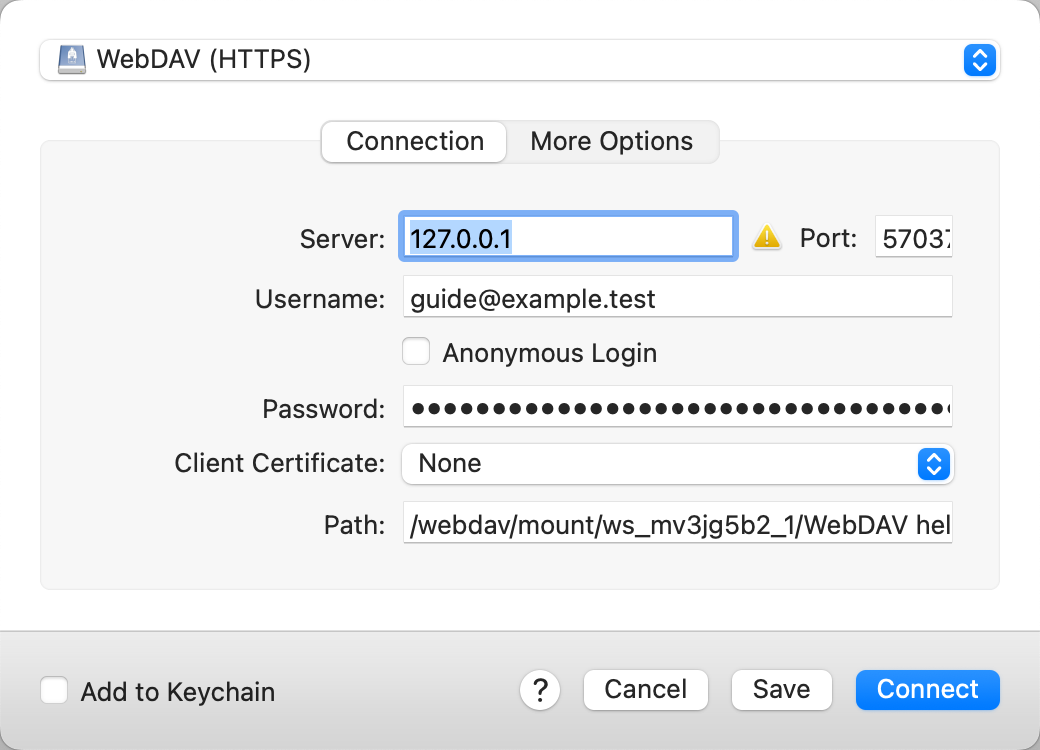
Expected result
The replacement authenticates within the same intended boundaries, every client has moved, and the old API key is deleted. Deleting the old key initiates invalidation of both its API-key cache and any linked S3 credential cache. Another worker isolate or edge cache can briefly retain authorization beyond the UI confirmation. The API-key cache TTL is five minutes. Send harmless requests with the retired credential until authentication is refused rather than treating the UI receipt as proof.
If Generate key is refused, the account may have reached its cap: 20 keys generally and three under free-plan fair use. Revoke an unrelated stale key only after verifying it is unused.
Related guides
Was this helpful?
Loading helpfulness results…
Voting saves a necessary ballot cookie for up to 180 days so you can change your answer.
Questions and replies
Ask about the steps in this guide. Questions are reviewed before publication.
Keep account details, credentials and private files out of public questions. Use private support for those.
Loading questions…
Sign in to your Dosya account to ask a question.