Limit an API key to selected protocol surfaces
Allow a credential to work only with the REST API, WebDAV, S3, SFTP or another selected surface, then verify cross-protocol rejection.
Last reviewed
Protocol restrictions stop one secret from being reused at every supported gateway. Select only the surface used by the client.
Before you start
- Use a disposable workspace and non-confidential test file.
- Choose the smallest permissions and surfaces the task requires.
- Prepare a password manager or secret store; never place a real key in a screenshot, URL or repository.
- Plan to revoke the test key after verification.
Steps: limit an api key to selected protocol surfaces
- Open the key creation flow and configure permission and location.
- Under protocol restrictions, choose selected protocols.
- Enable only the client surface required.
- Create and store the secret.
- Authenticate through the allowed surface.
- Try the same key on an unselected surface and confirm rejection.
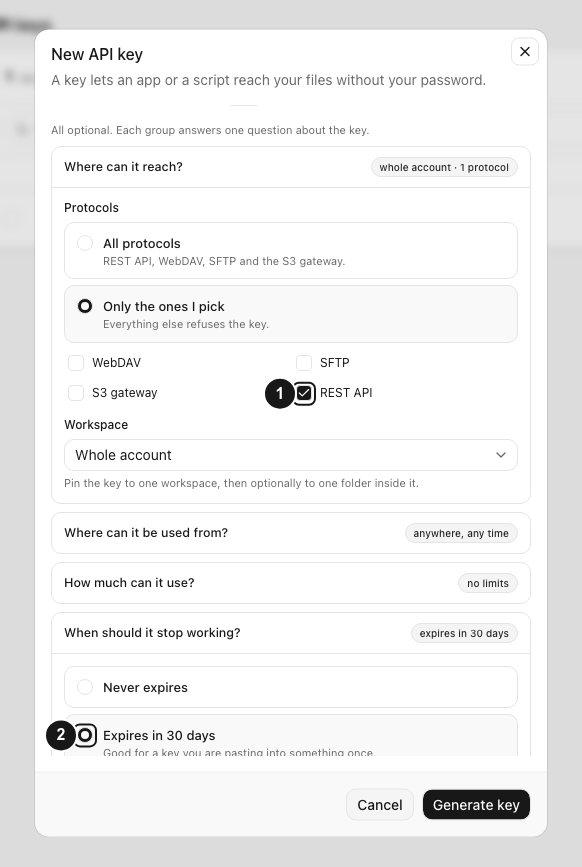
Expected result
The test key performs its allowed operation, rejects an operation outside its boundary, and can be identified and revoked without changing the account password.
Limits and important details
- Compatibility clients may require a particular surface even when they use familiar credentials.
- Selecting a protocol does not grant write permission by itself.
- Create separate keys for unrelated clients so each can be revoked independently.
Troubleshooting
The request returns unauthorized. Check the complete secret, API endpoint and whether the key was revoked.
The request returns forbidden. Compare the operation with the key permission, protocol surface, workspace and folder anchor.
A secret was exposed. Revoke it immediately, create a replacement with least privilege and remove the exposed value from logs and history.
Related guides
Was this helpful?
Loading helpfulness results…
Voting saves a necessary ballot cookie for up to 180 days so you can change your answer.
Questions and replies
Ask about the steps in this guide. Questions are reviewed before publication.
Keep account details, credentials and private files out of public questions. Use private support for those.
Loading questions…
Sign in to your Dosya account to ask a question.