Compare entries in file version history
Compare version number, Latest state, exact timestamp, size, uploader, and previewed bytes before restoring; understand fields history does not show.
Last reviewed
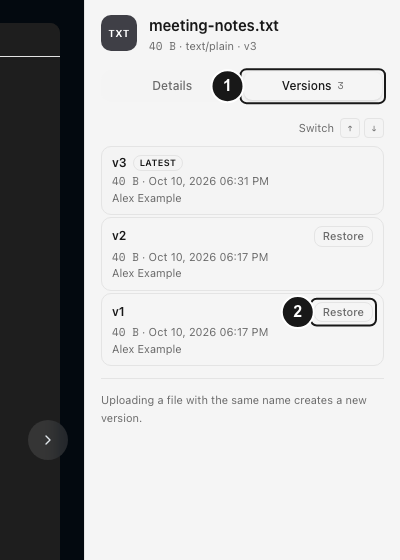
The viewer’s Versions tab lists rows newest first. Each row shows a version number, byte size, local date and time, and uploader when available; only the current top row carries Latest.

Steps
- Open the file preview and make sure the inspector is visible. On a phone-width viewport, open the inspector bottom sheet.
- Choose Versions. Its count includes the implicit first version even when an untouched file has no historical database row.
- Compare
vN, size, date, time, and uploader. The panel does not show a change summary, checksum, filename per revision, or side-by-side diff. - Select an older row to preview its bytes. Use ↑ and ↓ when multiple versions exist; the selected row gains the active styling.
- Inspect the previewed content against Latest. Comments can carry a version association, but the version row itself does not summarize those comments.
- Return to the top Latest row if you only needed comparison. Choose Restore only when you intend to create a new current version from older bytes.
Access rules. Listing history requires workspace membership, Files-page access, folder scope, and visibility. A full-locked ancestor folder blocks history until that folder is unlocked for the requester. The version-list route does not separately gate metadata on the file’s own full lock; previewing or downloading its bytes still follows the byte-access rules.
Expected result
You identify the intended revision by version number, timestamp, size, uploader, and actual previewed content, while leaving Latest unchanged until a deliberate restore action.
Related guides
Was this helpful?
Loading helpfulness results…
Voting saves a necessary ballot cookie for up to 180 days so you can change your answer.
Questions and replies
Ask about the steps in this guide. Questions are reviewed before publication.
Keep account details, credentials and private files out of public questions. Use private support for those.
Loading questions…
Sign in to your Dosya account to ask a question.