Review Deleted items before cleanup
Inspect names, deletion times, folders, permissions, and storage impact in Deleted before choosing a reversible restore or permanent cleanup.
Last reviewed
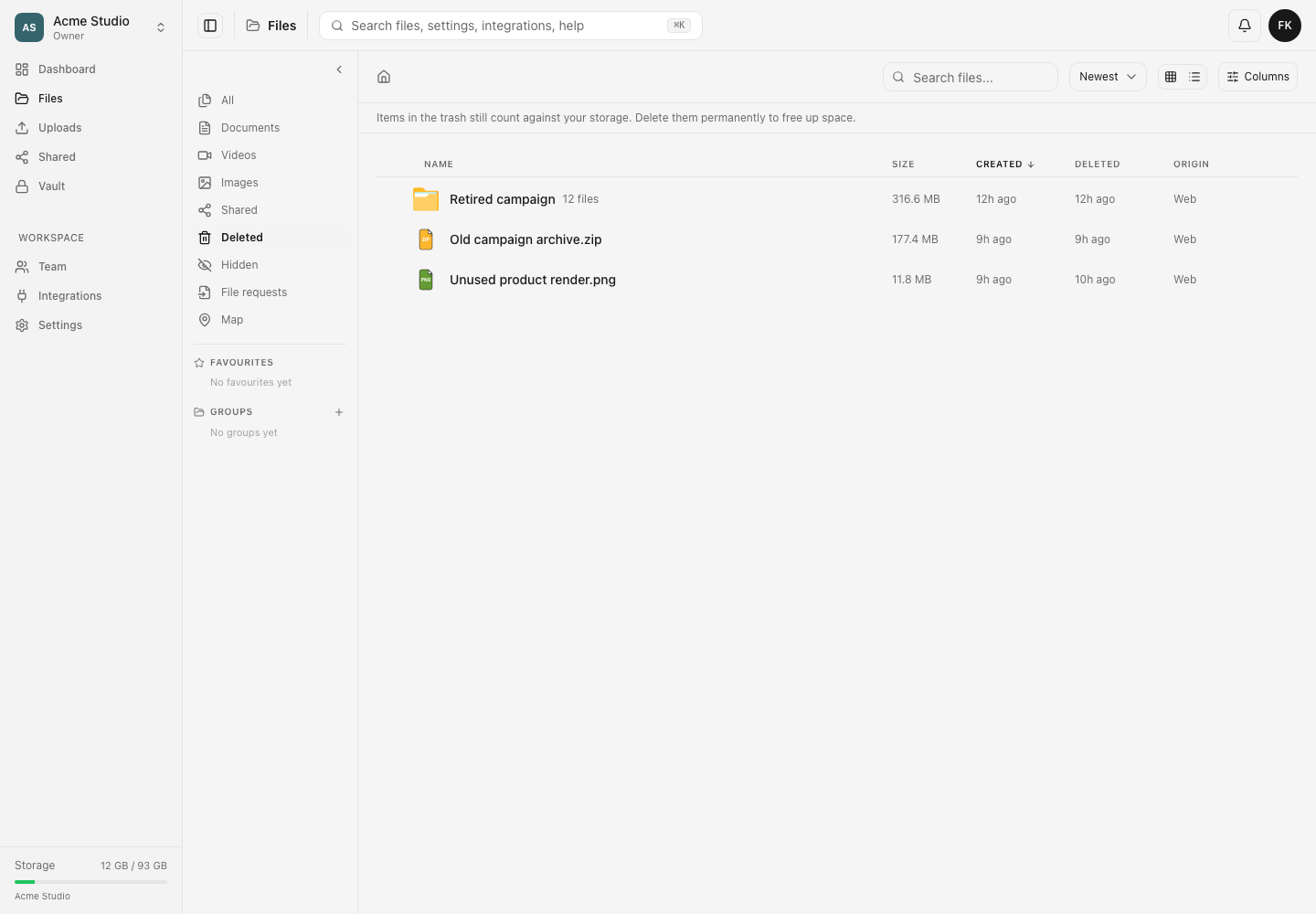
Use Deleted as a decision screen before restore or permanent removal. Trashed bytes still count toward workspace storage, but the recovery choice disappears once a file or folder is purged.

Steps
- Select the workspace, open Files, then choose Deleted in the sidebar. The row appears only for a role with Delete own files or Delete any file, because those same permissions govern restore and purge.
- Switch to list view when timing matters. In Deleted, the normal Modified column becomes the required Deleted column and displays
deleted_at. Open Columns and enable Exact dates to show full local date and time instead of a relative label. - Use Search files… and the Newest or Oldest sort to narrow the current trash listing. The 100-entry default and 500-entry maximum apply only to file rows. Trashed folders are fetched separately and are not divided by that file-page limit, so inspect later pages for additional files before concluding an item is absent.
- Open a trashed folder to inspect its descendants. Every folder row offers Open and Get info. Only a top-level trash-root folder that your role may act on also offers Restore and Delete permanently; a descendant removed with that folder must be handled through the root.
- Right-click a trashed file and check its permission-dependent menu. A file you may restore or purge shows only Restore and Delete permanently. A file you cannot act on shows only Get info. Trashed file rows do not open the normal viewer or detail panel, and they never offer rename, move, share, download, lock or hide.
- For recovery, choose Restore. A file whose containing folder is still in trash returns
This file's folder is in the trash - restore the folder first. A restored folder returns to its prior live parent when available; if that parent is also gone, the web message explains that it was restored to the workspace root. - For cleanup, select only verified rows and choose Delete permanently. Read This cannot be undone. A selected folder includes every file and subfolder beneath it.
A role with Delete own files may act only on files it uploaded and folders it created; Delete any file covers other members’ items. Hidden content remains subject to hidden-item visibility. A folder-confined member cannot open Deleted at all and receives Trash is not available to a folder-confined member. You don't have permission to restore this file or the equivalent folder message identifies a role or ownership mismatch.
Permanent file deletion removes stored objects and metadata and frees the charged bytes. A large folder is emptied through bounded repeated requests; the dialog reports files removed so far, and cancellation stops launching new requests after in-flight work settles. A partially emptied folder stays in trash and may require another pass. Do not interpret one completed progress step as proof that the entire tree is gone.
The banner states: Items in the trash still count against your storage. Delete them permanently to free up space. Restoration does not need extra quota because the bytes were charged throughout trash. Restored files retain hidden and lock state, while share links revoked by the original soft deletion are not recreated.
If nothing is present, the exact empty state is Trash is empty. If an expected row is missing, confirm workspace, ownership permission, folder scope, hidden visibility, search text, page number and whether scheduled retention has already purged it.
Expected result
You can account for each candidate by name, deletion time, trash folder and permitted action before cleanup. Restored records return to a live location; permanently deleted records and their bytes are removed without a recovery path.
Related guides
Was this helpful?
Loading helpfulness results…
Voting saves a necessary ballot cookie for up to 180 days so you can change your answer.
Questions and replies
Ask about the steps in this guide. Questions are reviewed before publication.
Keep account details, credentials and private files out of public questions. Use private support for those.
Loading questions…
Sign in to your Dosya account to ask a question.