Delete selected duplicate copies
Select exact copies, keep the right cloud file, interpret Dosya's reclaimable total, and move only permitted duplicates into recoverable workspace trash.
Last reviewed
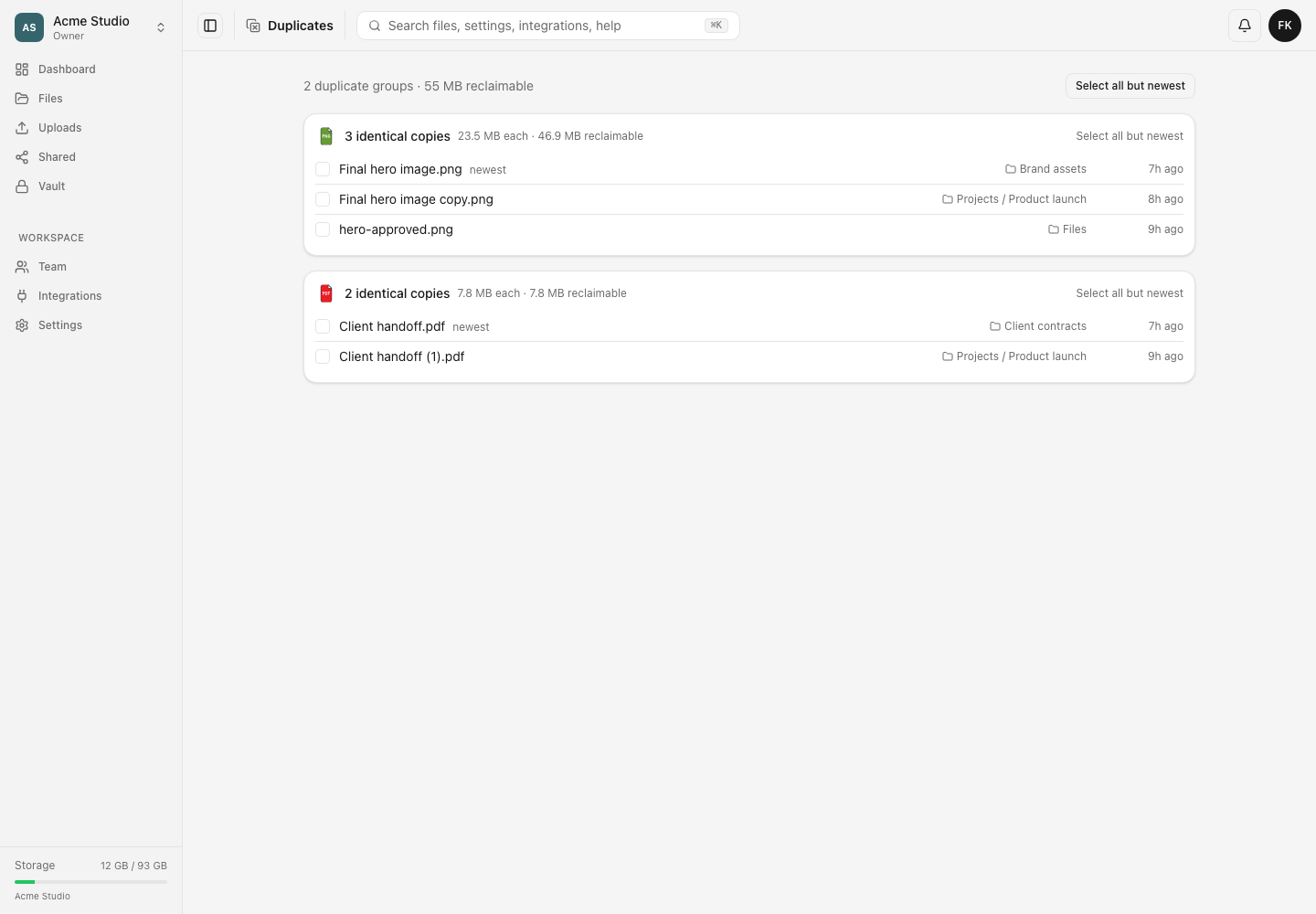
The Duplicates page groups files by exact content, but it does not decide which copy matters. Review names, folder locations, uploader context and creation times before moving anything. The newest badge describes the latest created_at value, not the best filename, preferred folder or most recently edited document.

Steps
- Open Duplicates in the correct workspace. Use the folder button on every candidate row to confirm where that copy lives; the button opens its containing folder, or Files for a root-level item.
- Select copies manually when folder placement or naming determines the keeper. To keep the creation-time leader in one group, choose that group’s Select all but newest. The page-level control applies the same choice to every displayed group.
- Inspect the selection again. Clear removes the current selection. Selecting the row marked newest is allowed, so do not treat the automatic choice as protection against deleting the wrong copy.
- Choose Move N to trash. The confirmation title repeats the number of selected files and shows the selected groups’ reclaimable byte total.
- Stop if the red message says In N groups you selected EVERY copy - nothing of those files will remain outside the trash. Clear at least one row in each affected group unless removing every live copy is intentional.
- Select Move to trash. The browser sends up to 500 file IDs per request and splits a larger choice across sequential requests. Wait for the result before navigating away.
- Reopen Duplicates and Files → Deleted to verify what moved. A successful web message reads Moved to trash and reports the selected count.
This action is a soft delete. The chosen rows leave ordinary folders, their direct share links are revoked, and the files remain recoverable in Deleted until manual or scheduled permanent purge. They continue using storage while in trash. The confirmation sentence This frees X describes duplicate bytes that become reclaimable after permanent deletion; moving them to trash does not immediately reduce workspace usage.
The server applies the role to each file. Delete any file covers every visible copy; Delete own files covers only uploads by the current member. The current Duplicates screen can still let an own-only member select a colleague’s row, and its success toast uses the requested count rather than the API’s moved count. Always verify the list after a mixed-owner cleanup.
A batch is refused if any visible live file has its own lock: This file is locked and cannot be deleted. An unopened password-locked ancestor refuses the request with This file is inside a locked folder. Unlock the folder to delete it. A folder-confined member cannot submit IDs outside the assigned subtree. Hidden items are silently excluded for viewers who cannot see them.
If a later 500-file chunk fails, earlier chunks may already be in trash. The page then shows Delete failed and refreshes its data; compare Deleted with the remaining groups instead of repeating the entire selection. Restoration returns file rows but does not recreate revoked share links.
Expected result
Only files accepted by the permission and protection gates move to Deleted. At least one reviewed keeper remains in each intended group, the Duplicates page recalculates its totals, and workspace storage falls only after permanent purge.
Related guides
Was this helpful?
Loading helpfulness results…
Voting saves a necessary ballot cookie for up to 180 days so you can change your answer.
Questions and replies
Ask about the steps in this guide. Questions are reviewed before publication.
Keep account details, credentials and private files out of public questions. Use private support for those.
Loading questions…
Sign in to your Dosya account to ask a question.