Open the comment thread for a file
Open the discussion for the intended file from Preview or Files, verify workspace and filename context, and resolve loading or access failures.
Last reviewed
Dosya exposes the same file discussion in the preview inspector and on a standalone Comments page. Use the file name and workspace context to avoid responding in a similarly named item’s thread.

Access rules. You must be a workspace member with access_files. Folder confinement and hidden-item visibility apply, and a still-locked enclosing full-lock folder blocks access. A lock placed directly on the file does not by itself hide its comments.
Steps
- In Files, identify the item by name and parent folder. Open its preview, then choose the inspector tab Comments; the tab also displays the current message count.
- Alternatively, open the file’s context menu and choose Comments. Dosya routes to
/commentswith the file ID, workspace ID, and display name in the query. - On the standalone page, confirm the title and the right-side FILE DETAILS values before reading or replying. Messages are displayed chronologically and grouped under Today, Yesterday, or a calendar date.
- If someone sent a direct comment URL, switch to the workspace named in the link before assuming the thread is empty.
- Refresh and verify that the same discussion returns for the same file ID. A filename alone is not a unique identifier because different folders can contain files with the same name.
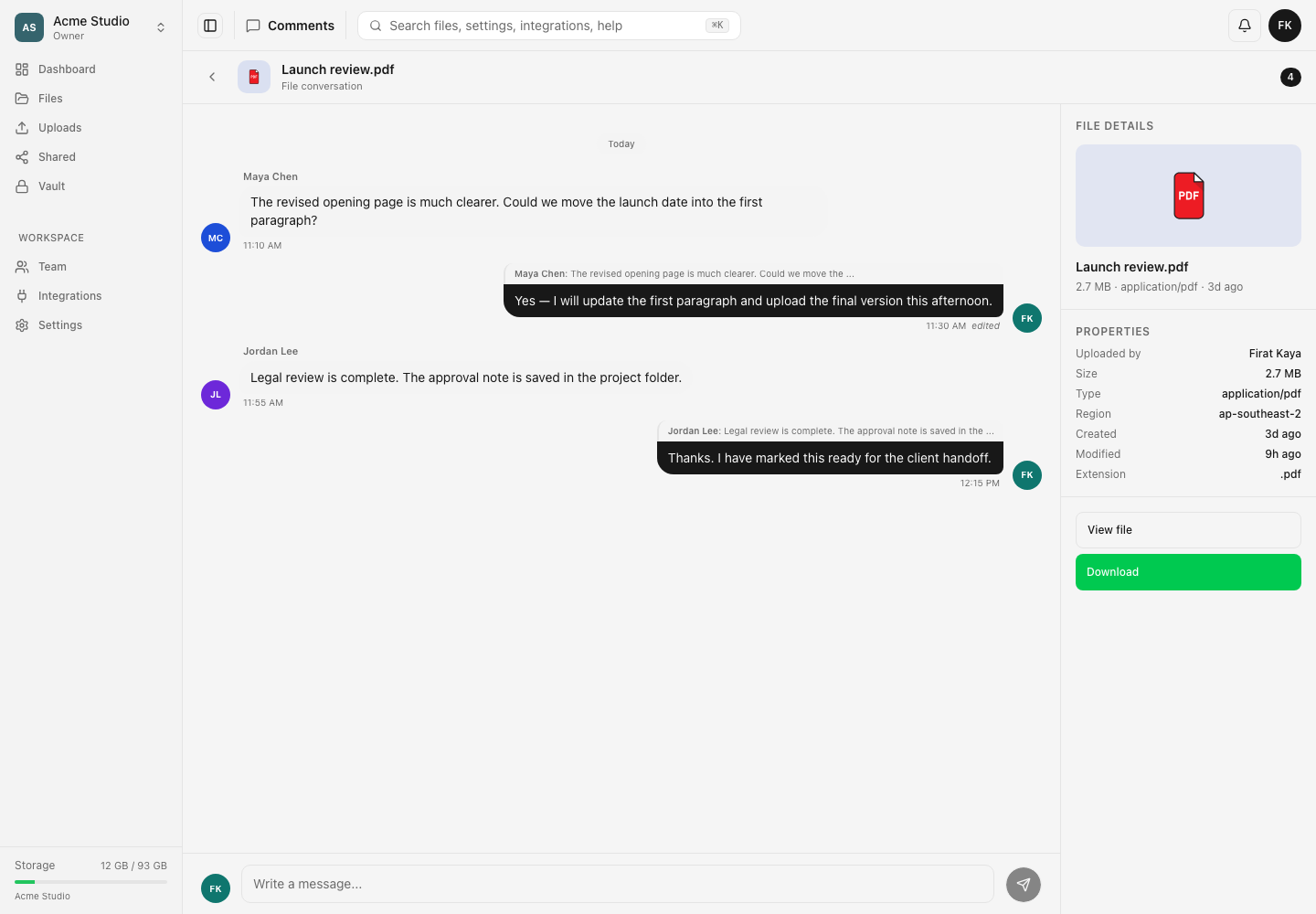
If the thread does not load. Return to Files and confirm the item is visible. A membership, access_files, confinement, hidden-file, or parent full-lock restriction can make the target unavailable. Unlock the enclosing protected folder through its normal flow when authorized. If the file moved, opening it from its new folder produces the same thread because comments follow the file ID.
Composer differences. The viewer says Write a comment… Use @ to mention and the standalone page says Write a message…. Both attach the resulting text to the selected file. Do not use an empty thread as proof that the similarly named file is correct; check its details first.
Expected result
The page or inspector shows the messages attached to the intended file, oldest first, with the correct workspace and file metadata. Refreshing preserves that association.
Related guides
Was this helpful?
Loading helpfulness results…
Voting saves a necessary ballot cookie for up to 180 days so you can change your answer.
Questions and replies
Ask about the steps in this guide. Questions are reviewed before publication.
Keep account details, credentials and private files out of public questions. Use private support for those.
Loading questions…
Sign in to your Dosya account to ask a question.