Capture the visible page with the extension
Capture the visible browser viewport, identify the resumable-upload refusal above 50 MiB, and safely verify the completed PNG from Recent saves.
Last reviewed
A visible-page capture records exactly the browser viewport at the moment you select Save visible screenshot. The extension queues the PNG immediately, so arrange the page before starting the save.

Steps
- Close menus, cookie notices, account details, or private overlays that must not appear in the image, then scroll the page to the exact viewport you want to preserve.
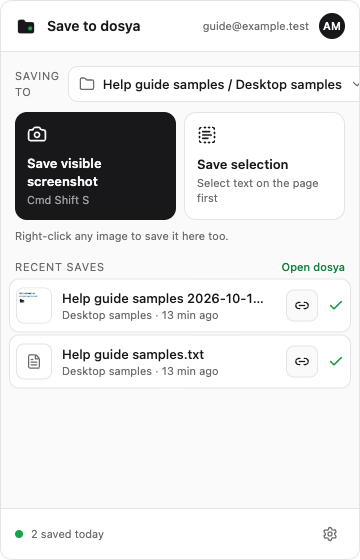
- Open Save to dosya and read the account email plus the Saving to workspace and folder. Change Choose a folder before capture if either destination is wrong.
- Select Save visible screenshot. The popup displays Cmd Shift S on macOS and Ctrl Shift S elsewhere, but that shortcut saves selected text first; use the button when a page selection is active.
- Let the queued row finish instead of capturing the same viewport again. The one-shot upload route refuses a PNG above 50 MiB with Files over 50 MB use /api/upload/init and the resumable upload; a restricted browser page reports This page cannot be captured.
- Find the generated PNG under Recent saves. Its name follows
<page title> YYYY-MM-DD HH.MM.png; unsafe filename characters become hyphens and an unusable title becomesuntitled. - Open the completed row and compare the stored PNG with the viewport you prepared. Browser notifications may also say Saved to dosya, but Safari verification happens in the popup.
Expected result
A completed PNG opens from Recent saves in the destination selected before capture. It contains the visible viewport only, uses the generated timestamped filename, and has one queue receipt.
If the row says Waiting for network, leave the capture queued. Use Retry now on that row after a terminal failure rather than creating another capture.
Related guides
Was this helpful?
Loading helpfulness results…
Voting saves a necessary ballot cookie for up to 180 days so you can change your answer.
Questions and replies
Ask about the steps in this guide. Questions are reviewed before publication.
Keep account details, credentials and private files out of public questions. Use private support for those.
Loading questions…
Sign in to your Dosya account to ask a question.