Reconnect sync after sleep or network change
Recover desktop sync after Wi-Fi, sleep, proxy, or session interruptions; understand automatic retry timing and verify resumed files at both ends.
Last reviewed
Dosya parks an affected pairing as Offline when it cannot reach the service and resumes after connectivity returns. The exact message is Cannot connect to dosya.dev right now. Sync resumes automatically when the connection is back. Keep the app running while you restore the network.

Before you start
- Confirm that the affected local folder or external drive is still mounted. A network recovery cannot repair a missing local path.
- Note the row’s status and full error tooltip before restarting anything. Offline, Waiting, Needs permission, Needs attention, and Error require different responses.
- Keep partial local files and Dosya temporary data in place during recovery. Removing them can discard resumable download state.
- Workspace and file permissions still apply after reconnecting; an authenticated member with insufficient access will not be fixed by Wi-Fi recovery.
Steps
- Open Sync → Overview and identify the pairing by cloud folder and local path. If status loading itself fails, the page says Couldn’t read sync status and The app couldn’t reach its sync engine - try restarting dosya. Select Try again before restarting.
- Restore Wi-Fi, Ethernet, VPN or proxy access. Open a normal Dosya workspace view to confirm the service is reachable, but do not create a replacement pairing.
- Leave the desktop process open. Network requests use retry delays of roughly 1, 3 and 8 seconds for retryable failures. A parked Offline pair is probed on the engine’s 30-second recovery cycle.
- A browser
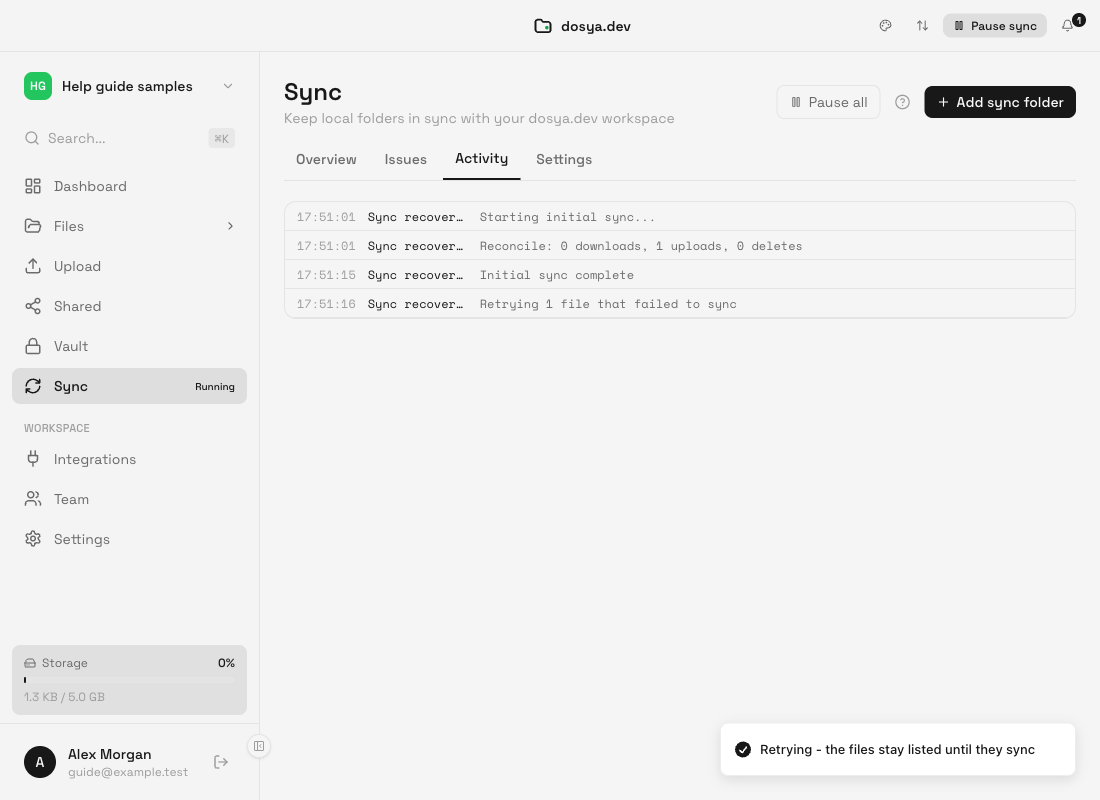
onlineevent or computer wake requests a recovery pass immediately and clears the cached proxy decision. Otherwise, a changed proxy route can remain cached for up to 60 seconds before being recalculated. - Watch Activity for Connection restored - resuming sync. Depending on mode, recovery restarts its watcher and poller and can run a new scan. A stalled active cycle becomes eligible for a Still working: entry only after inactivity exceeds 30 seconds; because the check runs on the next 30-second recovery tick, the entry normally appears about 30–60 seconds after the last progress.
- Select the row’s Sync now only after the connection is healthy when you want a fresh pass. If a configured pairing lost its runtime, that control also attempts to start it again.
- Verify one affected file at the destination. Resumable downloads use a
.dosya-sync-tmpfile and validators; multipart uploads can continue missing parts. The final filename should appear only after a completed download is promoted.
Expected result
The Offline warning clears after a successful server probe, the pairing returns to work, and pending eligible changes continue according to its mode. Files that completed before the interruption remain complete; resumed work should not require rebuilding the pairing.
Sleep and wake use a transient pause, so a matching wake resumes without persisting a manual global pause. A deliberate Pause sync or Pause all is different and must be resumed by the user. Timed snoozes retain their 30-minute, 1-hour, 4-hour or 8-hour deadline across an app restart.
Troubleshooting
The message is Session expired. Please log in again. Sign in again. A refreshed session triggers an immediate recovery check; the background loop also probes session-expired pairs every 30 seconds. Reconnecting the network alone does not renew authentication.
The row says Waiting. Respect the displayed rate-limit wait. The engine schedules recovery using the server retry interval plus a one-second buffer; repeatedly selecting Sync now does not shorten it.
macOS says it needs permission again. Select Reselect folder and choose the same local folder. This is a sandbox bookmark problem, not a network failure.
Connectivity changed without going offline. A VPN or corporate proxy switch may not emit the app’s online event. Wait out the 60-second proxy cache or restart Dosya if the route remains stale.
Errors remain after recovery. Expand N files not synced, fix each cause, then select that list’s Retry. Connectivity can resume transport while a lock, storage limit or filesystem permission continues to block a file.
Related guides
Was this helpful?
Loading helpfulness results…
Voting saves a necessary ballot cookie for up to 180 days so you can change your answer.
Questions and replies
Ask about the steps in this guide. Questions are reviewed before publication.
Keep account details, credentials and private files out of public questions. Use private support for those.
Loading questions…
Sign in to your Dosya account to ask a question.