Understand Offline desktop sync status
Understand the Offline state, its 30-second recovery probe, and the activity receipt that proves an existing sync pair resumed after reconnection.
Last reviewed
Offline means the desktop sync engine cannot currently reach Dosya. The pair is retained, local files remain in place, and the client checks for a usable session again instead of requiring a new configuration.

Before you start
Open Sync and identify the affected pair by its workspace, cloud folder, and local root. Its message can read Cannot connect to dosya.dev right now. Sync resumes automatically when the connection is back. The tray summary shows Offline when all pairs are disconnected or N offline when only some are affected.
Steps
- Record the pair name, current Offline status, and its latest entry under Activity.
- Confirm that the device has internet access and that a firewall, VPN, captive portal, or proxy is not blocking Dosya.
- Restore desktop connectivity without removing the sync pair, changing its folders, or duplicating the same local work.
- Bring Dosya online or wake the device to request an immediate sync check; otherwise allow up to 30 seconds for the periodic recovery probe.
- Wait while the successful workspace-region probe returns desktop sync to its normal scan and polling cycle.
- Verify a known pending sync change reaches the other side and the pair’s current status has recovered; the earlier connection-loss entry remains in Activity as history.
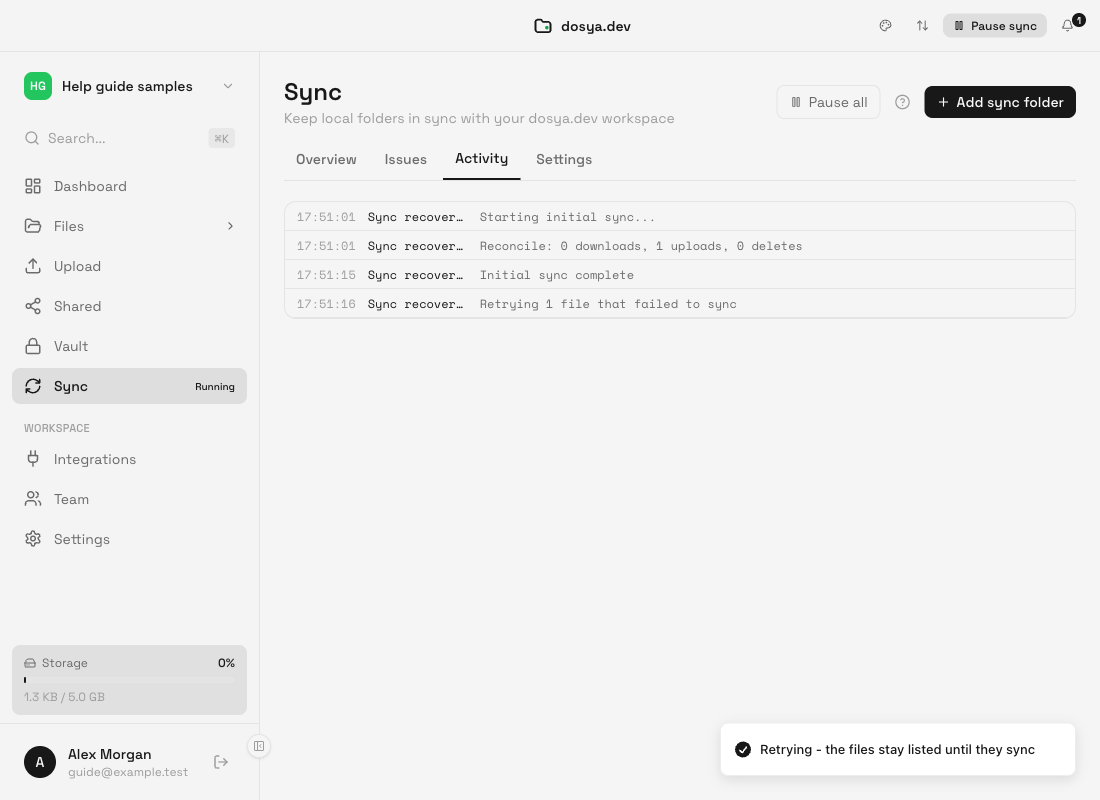
The activity receipt for this transition is Lost the connection to dosya.dev - sync will resume by itself when it is back. Recovery can pass through an idle or syncing state before Synced, so the label need not change directly from Offline to Synced.
Expected result
The existing pair reconnects and resumes its queued or newly detected work. No folder mapping is recreated, and a known pending change provides the final receipt.
A user-paused, rate-limited, permission-blocked, or confirmation-required pair keeps that condition instead of being replaced by Offline. Resolve the displayed state if connectivity is already healthy.
Related guides
Was this helpful?
Loading helpfulness results…
Voting saves a necessary ballot cookie for up to 180 days so you can change your answer.
Questions and replies
Ask about the steps in this guide. Questions are reviewed before publication.
Keep account details, credentials and private files out of public questions. Use private support for those.
Loading questions…
Sign in to your Dosya account to ask a question.