Secure your account after an unknown session
Respond to an unknown Dosya session by preserving evidence, changing the password, revoking other credentials, and reviewing identity security.
Last reviewed
An unknown session means someone may hold a live cookie or mobile refresh token. Work from a trusted device and preserve the notification or session details before removing access.

Steps
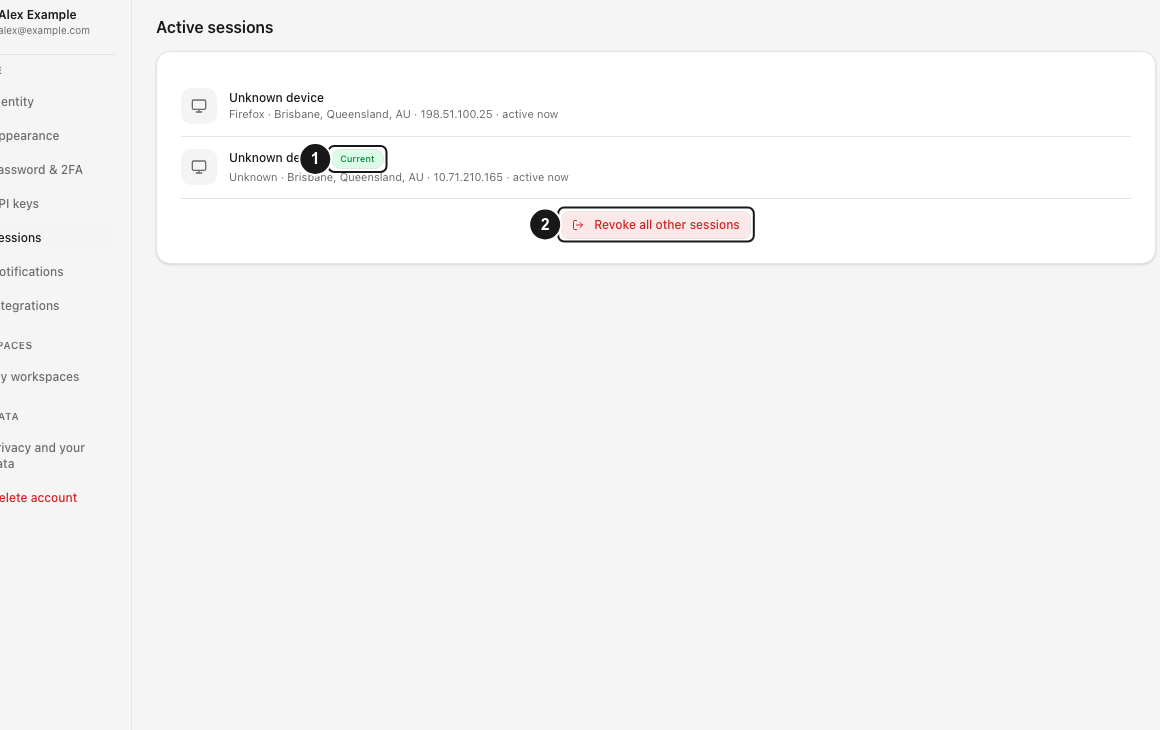
- Capture the unfamiliar row’s device label, browser/app label, location or IP when present, and displayed age. Keep any New sign-in from … email because it includes an absolute time and fuller context.
- Check whether a VPN, travel, another browser profile, or a recently reinstalled app explains it. Do not dismiss the event solely because the city is familiar.
- Open Profile → Password & 2FA → Change password and choose a new password of at least 8 characters that differs from the current one.
- The update preserves your current credential and its directly linked local credentials, revokes other web and mobile credentials, and starts cache invalidation. Verify the Password changed toast. A different worker isolate or edge cache can briefly retain authorization; check a controlled other device with a fresh authenticated request after invalidation settles.
- Visit Profile → Sessions and use Revoke all other sessions if an unexpected row remains.
- Review Profile → Identity for email-change notices and Password & 2FA for an unknown method change or recovery-code regeneration.
- Contact support if the account email changed, you cannot verify your current device, or suspicious activity continues.
Changing the password cannot erase data an intruder already downloaded. It also does not reverse file edits or shares; review workspace activity separately when the credential had time to act.
Expected result
After cache invalidation settles, only the trusted browser/mobile credential and its directly linked local credentials remain active. Password and 2FA settings match your choices, and mandatory security mail records the remediation. Escalate any data-control issue with the saved device, IP, and timestamp evidence.
Related guides
Was this helpful?
Loading helpfulness results…
Voting saves a necessary ballot cookie for up to 180 days so you can change your answer.
Questions and replies
Ask about the steps in this guide. Questions are reviewed before publication.
Keep account details, credentials and private files out of public questions. Use private support for those.
Loading questions…
Sign in to your Dosya account to ask a question.