Review every pending workspace invitation
Audit every pending workspace invitation, identify unexpected access, and revoke or replace email-bound links before a recipient can accept them.
Last reviewed
A periodic invitation audit finds access that has not become a membership yet. Treat each active link as a pending credential: it can add the addressed person with the preselected role until the seven-day deadline or an administrator revokes it.

Prepare the audit
Use an account with Access Team and View team members to open Team. To cancel or reissue access yourself, the same account must hold Invite members. Confirm the workspace badge before recording results, especially when your account belongs to several workspaces.
Gather the approved recipient, intended role, request owner, and required access period from your staffing or vendor record. The product shows the sender and remaining lifetime, but it cannot decide whether the business request is still valid.
An email invitation is identity-bound. During acceptance, Dosya compares the signed-in email with the invited address. A mismatch returns This invite was sent to invited address. You’re logged in as current address. Please log in with the correct account.
Steps
- Record the Pending invites · N count so additions or removals during the review are visible.
- Match every Pending invites recipient email to a currently approved person.
- Compare Invited by with the expected requester. Investigate Unknown or an unfamiliar sender before leaving the link active.
- Inspect the role badge at permission level. For a custom role, open its read-only permission view and check page, file, sharing, team, and protocol grants.
- Read the expires in value. Leave a soon-to-expire row active only if the person still needs to join.
- Revoke any wrong address, excessive role, departed contractor, duplicate business request, or unexplained invitation.
- Refresh Team and reconcile the new pending count with your approved list.
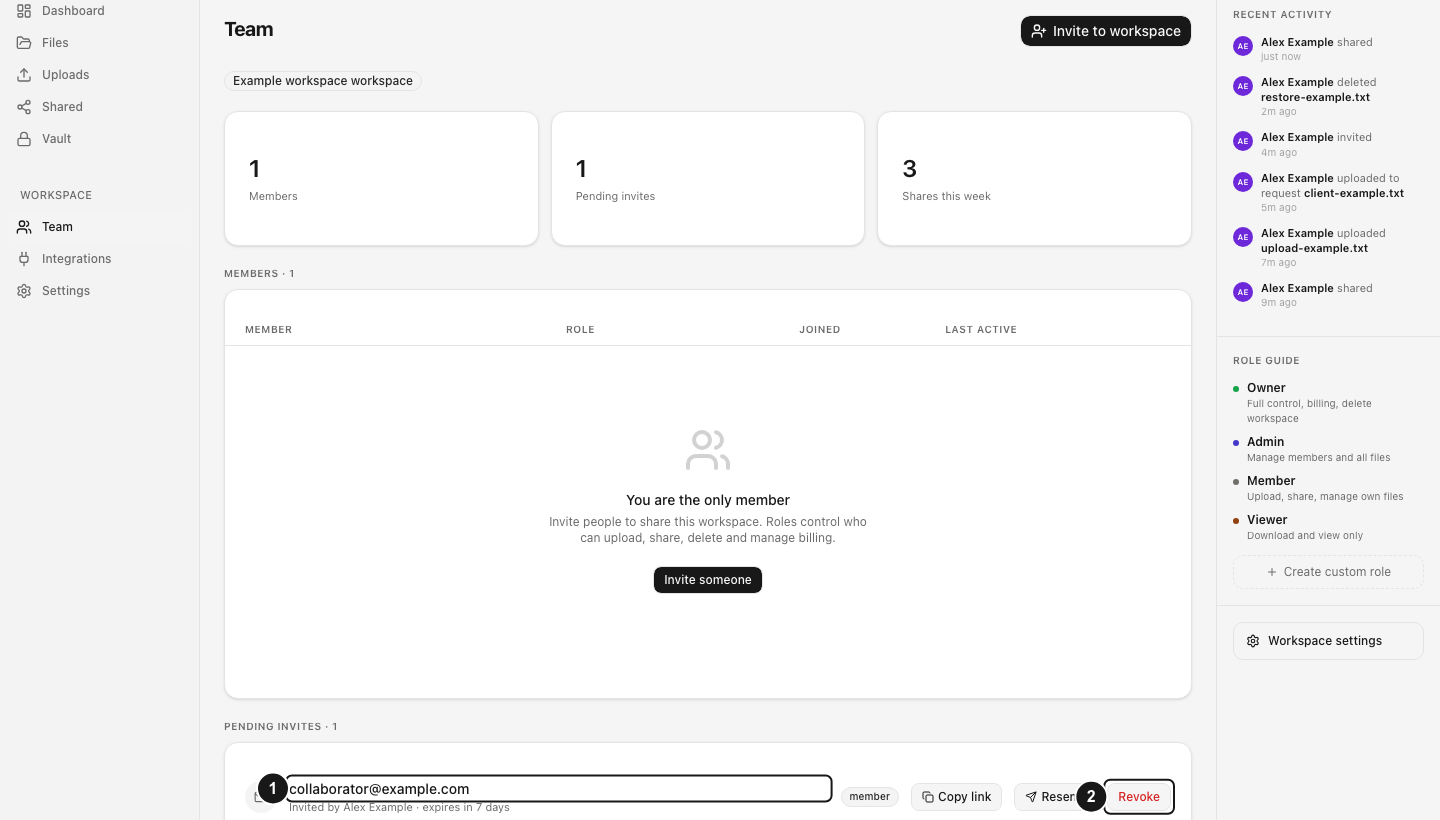
Correct a finding
Select Revoke and confirm the dialog when any immutable field is wrong. Revocation is immediate and irreversible; the old URL cannot be reactivated. Create a new email invitation for the correct address or role after the unwanted record leaves the active list.
Use Resend only for a valid request whose recipient missed the message. This operation cannot extend the deadline and is rate-limited to once per invite every five minutes. Copy link is useful for controlled manual delivery, but it exposes the same live bearer URL, so send it only to the approved recipient.
An active duplicate cannot be created for the same email in the same workspace. Dosya reports An invite is already pending for this email. If the person already joined, the create endpoint instead answers This person is already a member; review their member role rather than issuing another invite.
After revocation, an invited address that maps to an existing account gets an in-app cancellation notice. A non-user is not sent a separate withdrawal message. Record your organizational approval and evidence outside Dosya if your access-review policy requires it; the Team page supplies the current product state, not a compliance attestation.
Expected result
The refreshed pending count equals the approved invitation inventory, every live row has an authorized recipient and least-privilege role, and all rejected URLs fail immediately after revocation.
Related guides
Was this helpful?
Loading helpfulness results…
Voting saves a necessary ballot cookie for up to 180 days so you can change your answer.
Questions and replies
Ask about the steps in this guide. Questions are reviewed before publication.
Keep account details, credentials and private files out of public questions. Use private support for those.
Loading questions…
Sign in to your Dosya account to ask a question.