Retry one failed upload item
Retry one failed row while its bytes remain in the tab, or reselect the same name and size after a reload so completed items stay untouched.
Last reviewed
Use the row-level Retry for an Error item while the current tab still holds that file’s bytes. It requeues only that row, keeps completed rows unchanged, and clears the prior error while the new attempt runs. Retry all failed is a separate batch action.
After a reload, an existing Error row keeps that status but no longer has file bytes, so its row-level Retry is disabled. Retry all failed processes every Error row: byte-less rows become Interrupted, while any failed rows that still have bytes are requeued. Only then does Resume appear per interrupted row. A multipart session keeps server-tracked parts; a single-PUT upload restarts from zero.

Steps
- Expand Upload queue and read the failed row’s complete message before deciding that another attempt can succeed.
- Correct the stated cause: restore connectivity, free storage, change the file to an allowed extension, unlock the destination, or obtain the required permission.
- If the row still offers Retry, press that row’s control once; this is the only path that isolates one Error row before a reload.
- If Retry is disabled after reload, choose Retry all failed knowing it touches every Error row. Byte-less rows become Interrupted; then choose Resume on the intended row and select the same local name and byte size.
- Reject a look-alike that triggers That file does not match (name or size differs). Watch the resumed row move through Queued and percentage progress while completed rows remain Done.
- When the row reaches Done, choose View file or Go to location and compare the destination name and displayed size with the source.
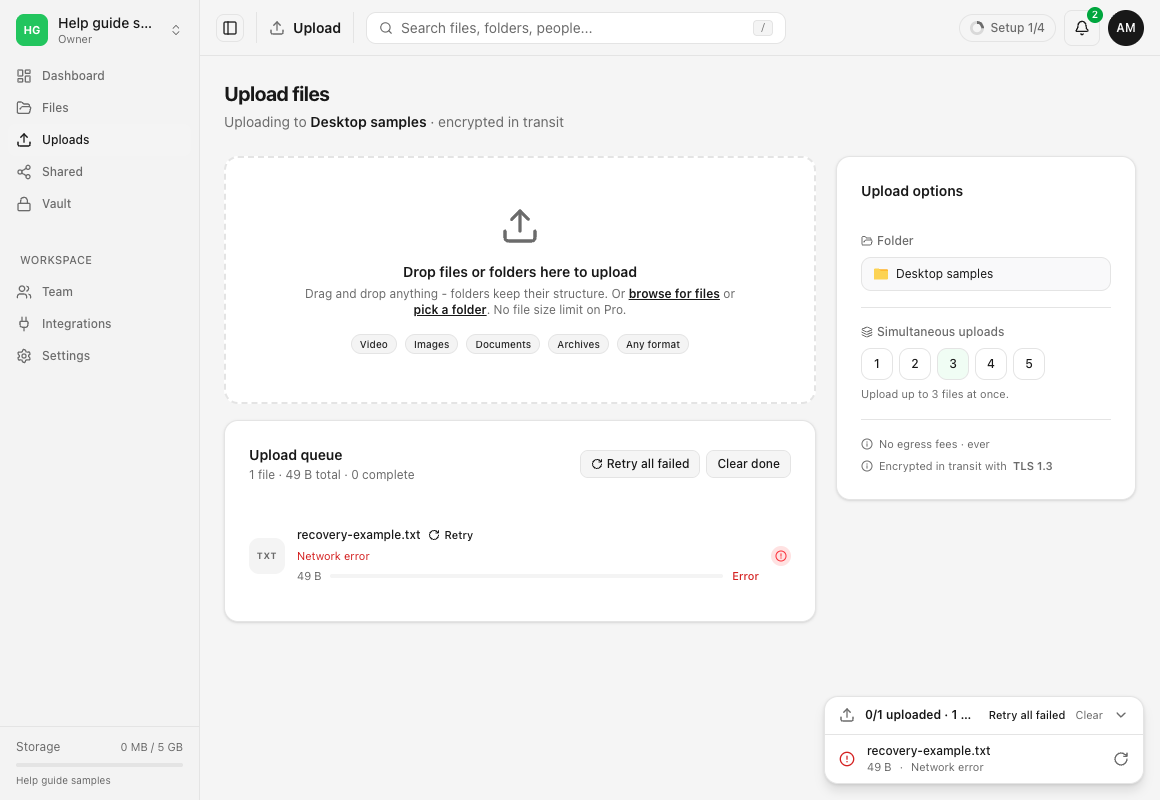
Expected result
A row-level Retry requeues only the selected failure. After reload, the batch recovery action may requeue every failed row whose bytes remain and parks all byte-less failures as Interrupted; Resume then acts on one selected row. A successful attempt reaches Done without restarting earlier completed transfers.
The client automatically waits three seconds and retries a workspace-concurrency refusal up to five times before showing it as an error. Do not repeatedly click Retry during that queued backoff. Canceling or removing the row is different: cancellation stops active requests and marks the row Canceled, while removal only clears the queue entry. A same-name retry can still become a new version if a live item with that name now exists in the destination.
Related guides
Was this helpful?
Loading helpfulness results…
Voting saves a necessary ballot cookie for up to 180 days so you can change your answer.
Questions and replies
Ask about the steps in this guide. Questions are reviewed before publication.
Keep account details, credentials and private files out of public questions. Use private support for those.
Loading questions…
Sign in to your Dosya account to ask a question.