Enter a sharing-link password safely
Enter the sender-provided password, recover from network and lockout errors, and understand the 30-minute browser grant and full-lock privacy behavior.
Last reviewed
Password access is separate from a Dosya account. The page trims surrounding spaces, rate-limits guesses, and grants the current browser 30 minutes after a correct unlock.

Steps
- At This file is password protected or This file is fully locked, confirm the brand matches the sender. Full-lock mode intentionally withholds file details until unlock.
- Obtain the password through the separate channel agreed with the sender. Paste it into Password; the page trims leading and trailing whitespace.
- Choose Unlock once. A wrong secret shows Incorrect password or the fallback That password is not correct. Could not reach the server. Try again. means the response could not be completed or read; it does not prove the server never processed the attempt. Check connectivity before one later retry.
- Do not guess. Dosya allows five password attempts per share token and IP in 15 minutes, and five consecutive wrong attempts lock the link itself for 15 minutes.
- For Too many attempts, try again later., wait for the lockout or ask the sender to update the password in mobile. A password change clears the link’s stored unlock throttle, but does not reset the separate token-and-IP attempt limit.
- After success, confirm the expected content. Dosya stores a signed 30-minute browser cookie, so refreshes skip the gate until it expires; a new private window must unlock again.
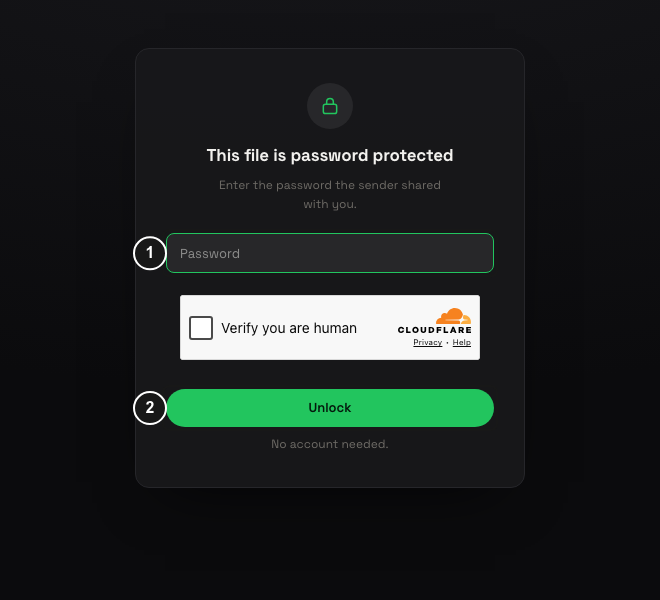
Expected result
The correct password reveals the intended share and grants only that browser temporary access; repeated failures stop with a named 15-minute lockout.
Restricted-and-password-protected links require email verification before this password gate. Never include the password in a problem report or send it in the same message as the share URL.
Related guides
Was this helpful?
Loading helpfulness results…
Voting saves a necessary ballot cookie for up to 180 days so you can change your answer.
Questions and replies
Ask about the steps in this guide. Questions are reviewed before publication.
Keep account details, credentials and private files out of public questions. Use private support for those.
Loading questions…
Sign in to your Dosya account to ask a question.