Open a Dosya sharing link for the first time
Open the complete dosya.dev share URL, distinguish recipient and password gates from terminal link errors, and confirm the revealed item before acting.
Last reviewed
A Dosya public share uses /s/<token> and needs no account. Treat the full URL as sensitive, then follow the gate or terminal status the page actually displays.

Steps
- Check that the address uses the expected
dosya.dev/s/route and includes the complete long token. Links broken across email lines commonly produce Invalid share link or Link unavailable. - Open the URL in a current browser. You do not need a Dosya account; the page is intentionally excluded from search indexing.
- If the page says This file was shared privately, enter the invited email and verify its code. For a link that is both restricted and password-protected, email verification appears first.
- If the page asks for Password, obtain it from the sender through the agreed separate channel and choose Unlock. Full-lock mode hides filename, size, counts, and sender until this succeeds.
- If you see Link expired, Link revoked, File deleted, or Region restricted, stop retrying and send that exact title to the owner; only they can provide another usable link or content.
- After access, verify the top-bar name, size, type, expiry, and sender line before previewing or downloading. Use Copy link only when the sender permits forwarding.
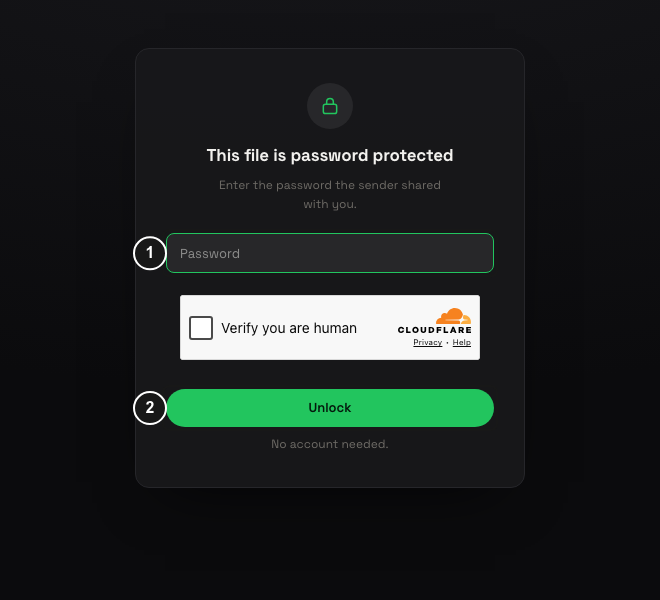
Expected result
The browser either reveals the intended share with its current controls or gives a specific terminal state that tells the sender what must change.
A generic Something went wrong with Could not load the shared file. Try refreshing the page. indicates a network or service failure. Public bearer links can be opened by anyone holding the URL.
Related guides
Was this helpful?
Loading helpfulness results…
Voting saves a necessary ballot cookie for up to 180 days so you can change your answer.
Questions and replies
Ask about the steps in this guide. Questions are reviewed before publication.
Keep account details, credentials and private files out of public questions. Use private support for those.
Loading questions…
Sign in to your Dosya account to ask a question.