Match a recipient to sharing activity
Use recipient verification and the anonymous access log correctly, without assigning individual opens or downloads to a named person without evidence.
Last reviewed
Dosya can show which invited addresses completed verification and can separately show anonymous link events. It cannot prove that a particular Opened or Downloaded row belongs to one named recipient. Use the two panels together without joining facts the product does not store.

What the data means
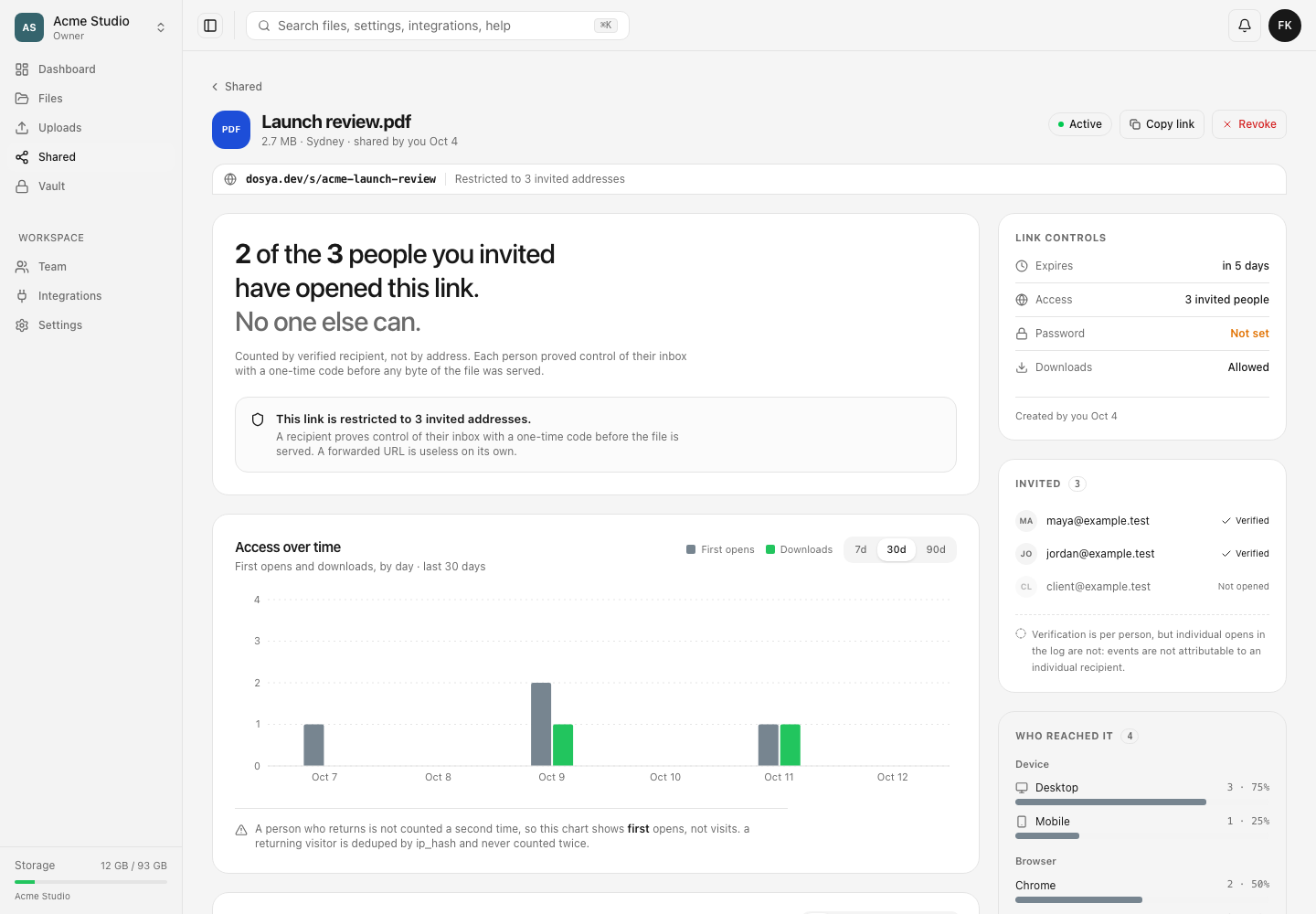
For a restricted link, Invited lists each email as Verified or Not opened. The verified timestamp is written when that address’s one-time code succeeds. It proves control of the inbox and that the person reached the share gate; it is not a timestamp for every later open.
The Access log stores event time, Opened or Downloaded, an eight-character prefix of a hashed network address, country when the edge supplied it, and parsed device information. It has no recipient-email column. The 30-minute recipient grant cookie also does not name the verified address in an event, so even restricted traffic remains unattributed row by row.
For a public link there is no invited list at all. Anyone with the URL may use it, and the analytics headline correctly says that the owner does not know who those people are.
Steps
- Open Shared, select the relevant link, and enter its analytics page.
- Confirm whether Access says N invited people or Anyone with the link. Only the first mode has named verification data.
- On a restricted link, inspect Invited. Record only whether each address is Verified or Not opened.
- Review the headline showing how many invited people verified. Do not treat that count as total visits.
- Use 7 days, 30 days, or 90 days to inspect first opens and downloads in the chosen chart window.
- Under Access log, filter with All, Opens, or Downloads. Read the opaque visitor handle, country, and device as event context.
- If an individual recipient asks whether their download succeeded, use their own confirmation or a separate controlled link. Do not assign an anonymous row to them based only on timing, location, or device.
Counting and privacy limits
An open is deduplicated by the stored address hash, so the chart reports first opens rather than repeat visits. Downloads are not deduplicated. Reach breakdowns read at most 5,000 visitors and display Counted from the first 5,000 visitors. when truncated. The access-log API returns 25 rows at a time; the screen states how many loaded events it is showing out of the total.
Country can be - when the edge could not place an event or the row predates country capture. Browser and device labels are inferred from the recorded user agent. None of these fields is reliable enough to turn the anonymous visitor handle into an identity.
Viewing this page requires View own shared links for the creator’s record or View all shared links for another member’s record, plus workspace and target scope. A hidden target returns the same not-found response as an unknown link.
Expected result
The review distinguishes verified invitees from anonymous access events. Reports may state who completed email verification and how the link was used, but they do not attribute a specific open or download to a named person.
Related guides
Was this helpful?
Loading helpfulness results…
Voting saves a necessary ballot cookie for up to 180 days so you can change your answer.
Questions and replies
Ask about the steps in this guide. Questions are reviewed before publication.
Keep account details, credentials and private files out of public questions. Use private support for those.
Loading questions…
Sign in to your Dosya account to ask a question.