Distinguish a file version from a copied file
Distinguish a new version from a copied record by file ID, folder location, independent timeline, uploader, origin, and later edit histories.
Last reviewed
A version belongs to one file ID and one Versions timeline. Copy creates another file record with its own ID and future history, even when both records initially have identical bytes and names.

Steps
- Locate both candidate records. Record each folder or group context and open them separately so a repeated filename does not collapse your investigation.
- Compare file IDs through the file URL or information surface. Different IDs prove separate records; version rows never change their parent file ID.
- Open Versions for each record. An uploaded replacement increments one timeline, while a copy begins and evolves independently.
- Compare Created, Modified, Uploaded by, and Origin as supporting evidence. Copy preserves source timestamps and content hash internally but records the copying client and actor for the new record.
- Make a harmless test only when necessary: upload a tiny replacement to the known disposable copy, then confirm only its Versions count changes.
- Remove the test record or restore its previous bytes after identification. Do not permanently delete either candidate until its ID and timeline are unambiguous.
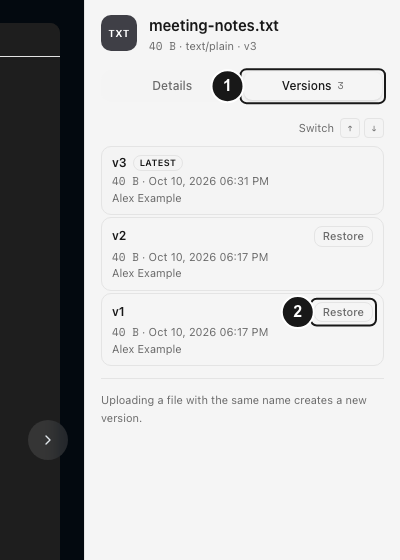
Moves are different again. Moving changes only the folder reference for the same file record, so its ID and version timeline continue. Copy creates another record; Upload new version appends bytes to the existing one.
Expected result
You can name which record continues the original timeline and which is the independent copy using IDs and version histories, without relying on matching names or bytes.
Related guides
Was this helpful?
Loading helpfulness results…
Voting saves a necessary ballot cookie for up to 180 days so you can change your answer.
Questions and replies
Ask about the steps in this guide. Questions are reviewed before publication.
Keep account details, credentials and private files out of public questions. Use private support for those.
Loading questions…
Sign in to your Dosya account to ask a question.