Download a previous file version
Download an older revision from the Files details panel, verify its metadata and local bytes, and avoid the viewer header link that targets Latest.
Last reviewed
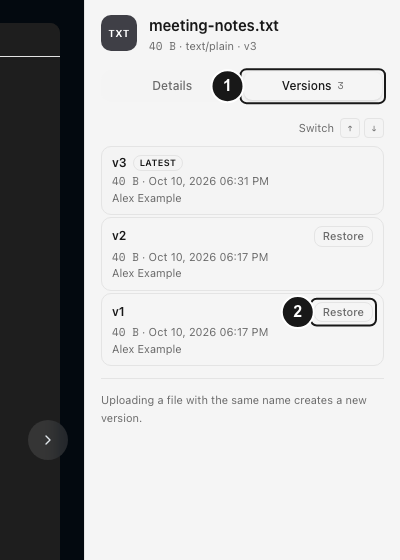
Selecting a file row opens a details panel whose Versions section gives every revision its own download icon. This is the supported visible path for historical bytes.

Steps
- In Files, click the target row once to open its details panel. Confirm the filename, current version badge, folder context, and preview before downloading anything.
- Find Versions in that panel. Each row shows
vN, size, uploader or Unknown, relative time, and a download icon; the current row has green styling. - For a file without
full_lock, choose the download icon on the required historical row. The link includes?version=N, so it requests that row rather than the current file. - Keep the tab open while Dosya checks membership, Files access, folder confinement, download permission, hidden or ancestor locks, and the file’s own lock mode. The per-row link omits the
utunlock token, so afull_lockhistorical download fails even after you unlocked the preview. - Save the response under a distinct local name. The server uses the cloud filename, so add a suffix such as
-v2locally to avoid replacing another download. - Compare the local byte size with the chosen row and open it in a trusted application. If the API returns
Version not found, refresh the panel and confirm that revision still exists.
Viewer-header warning. The full preview viewer also lets you select an older row and inspect its raw bytes, but its header Download link is still built without a version parameter and retrieves Latest. Use the per-row icon in the Files details panel for a historical download.
Full-lock limitation. If you are authorized to manage protection, remove or change the file’s full lock, download the required historical row, and restore the intended protection afterward. Without that permission, the current browser UI has no supported historical-download link that carries the unlock token.
What changes. Downloading meters the selected revision’s bytes against applicable egress allowance. It does not restore the revision, create a version, or change the cloud file.
Expected result
For an eligible file, the saved local copy matches the selected historical row’s content and size, while the cloud record remains on its existing Latest version and its history stays unchanged. A full-locked file remains blocked until its protection is changed by an authorized user.
Related guides
Was this helpful?
Loading helpfulness results…
Voting saves a necessary ballot cookie for up to 180 days so you can change your answer.
Questions and replies
Ask about the steps in this guide. Questions are reviewed before publication.
Keep account details, credentials and private files out of public questions. Use private support for those.
Loading questions…
Sign in to your Dosya account to ask a question.