Understand a pending downgrade
Interpret the Cancelling billing state, confirm the paid-period end date and 14-day storage grace period, and know when Free limits apply on the account.
Last reviewed
On the Dosya Billing page, the pending downgrade state is a subscription scheduled to end at its current paid-period boundary. The page labels the subscription Cancelling and shows Ends [date]. Your plan and all subscription add-ons remain active through that date; this is not an immediate plan reduction.
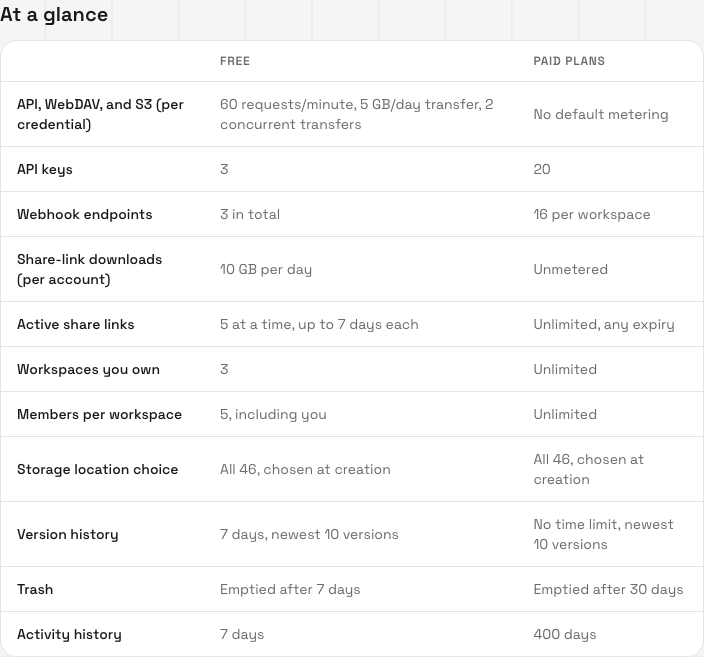
After the paid period ends, Dosya keeps the old storage limit for a 14-day grace period. When that grace ends, the Free plan’s 5 GB limit applies. Files are not automatically deleted. If total use is above the available limit, new uploads are blocked until storage is reduced or paid capacity is restored.

Steps
- Open Billing while signed into the account that owns the subscription. Billing is account-level; changing the active workspace does not select another billing customer.
- Find the amber state panel. Confirm it says Ends [date] and that the subscription badge says Cancelling.
- Read the current storage figure under the end date and compare it with Storage ledger → Total limit and the amount in use.
- Note the paid-period end date. Until then, the current plan, add-ons, and storage entitlement remain active.
- Add 14 days to that boundary for the storage grace window. Use the displayed date as the authoritative start because billing intervals and renewal dates differ by account.
- If you want to keep the subscription, select Resume subscription before the end date. The Billing page should return to Active and show a renewal date.
- If you intend to continue to Free, reduce usage toward 5 GB and empty Trash where necessary before the grace period expires.
What remains and what changes
Scheduling cancellation covers the plan, subscription add-ons, and any custom package carried on the same subscription. It does not delete stored files. Redeemed external packages and other entitlement sources are reported separately in the storage ledger and may continue according to their own status.
The page can show Next invoice only when an upcoming invoice exists and cancellation is not scheduled. Its absence during Cancelling is expected.
Troubleshooting
If Resume subscription fails, the page shows the returned billing error. Refresh Billing before retrying so the local state agrees with the provider record. If the account says No subscription, there is no period-end cancellation to resume.
If usage exceeds the later limit, downloading files alone does not free cloud storage. Delete unneeded cloud items and empty Trash, or restore paid storage before attempting new uploads.
Expected result
You can identify the last paid-plan date, the following 14-day storage grace period, the future 5 GB allowance, and whether resuming is still available.
Related guides
Was this helpful?
Loading helpfulness results…
Voting saves a necessary ballot cookie for up to 180 days so you can change your answer.
Questions and replies
Ask about the steps in this guide. Questions are reviewed before publication.
Keep account details, credentials and private files out of public questions. Use private support for those.
Loading questions…
Sign in to your Dosya account to ask a question.