Resend a workspace invitation
Resend an active workspace invitation, understand the five-minute cooldown, and confirm what the recipient receives without extending its expiry.
Last reviewed
Resend an invitation when the address and role are still correct but the recipient cannot find the first email. Dosya reuses the same email-bound invite and preserves its original expiration date, so resending is different from revoking and creating a replacement.

Before resending
Open the intended workspace and select Team. Loading this page requires both Access Team and View team members. Resending requires Invite members; a custom role can perform the action when that permission is enabled.
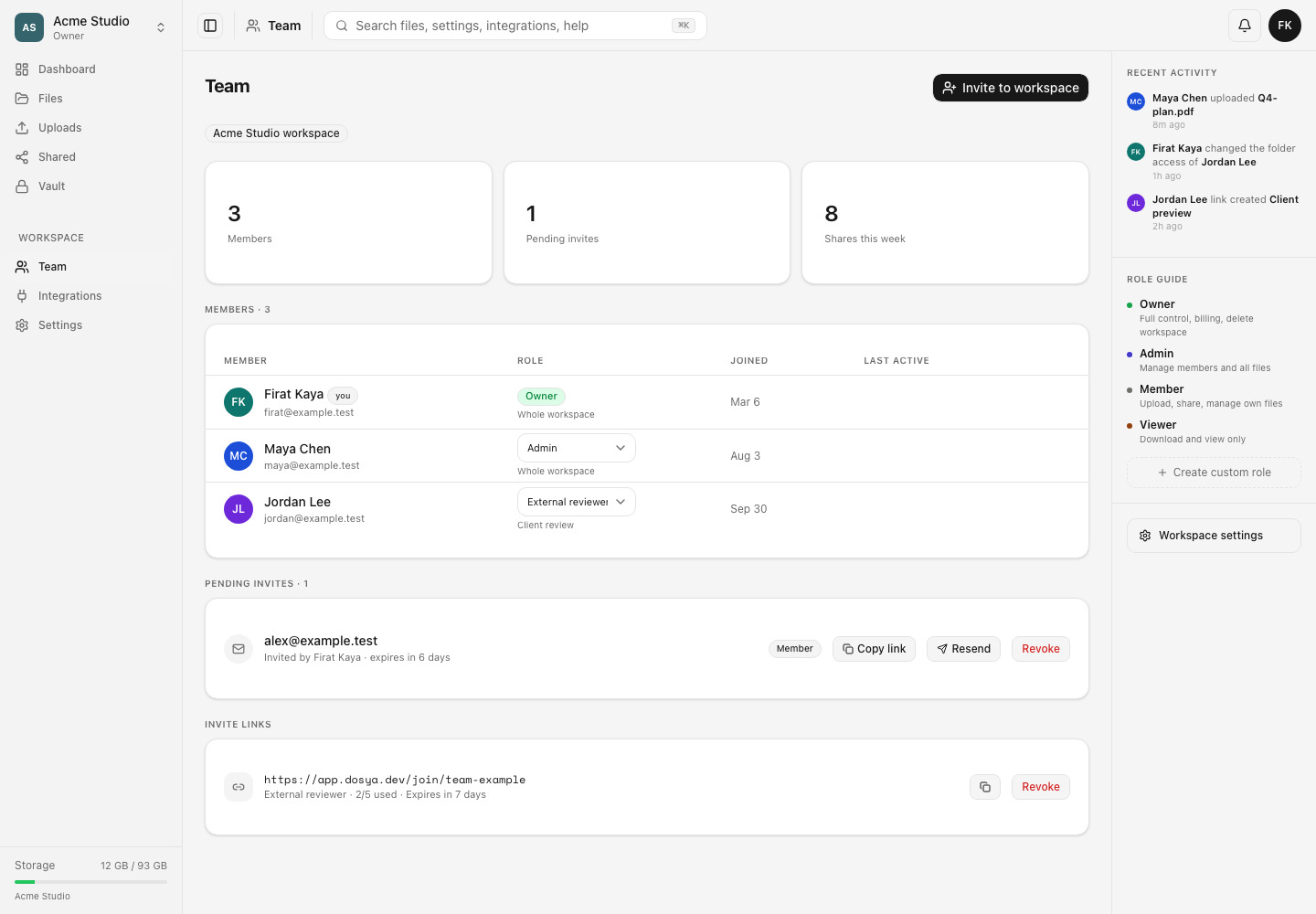
The Pending invites row shows the recipient email, who invited them, an expiry countdown, and the assigned role. It does not show a last-sent timestamp. Only active invitations appear here: an accepted, revoked, or expired record is removed from this list.
Check the email and role before sending. The recipient must sign in with the same email address to accept. If the address or role is wrong, choose Revoke and issue a new invitation instead, because Resend cannot edit either value.
Steps
- On Team, find the address under Pending invites.
- Read the role badge and the expires in countdown on that row.
- Select Resend once. While the request runs, the button is disabled and displays a spinner.
- Look for the Invite resent toast stating that the invitation email was sent to the address again.
- Have the recipient open the newest Dosya invitation email and select Accept invitation before the displayed deadline.
What the recipient gets
Dosya sends another invitation email containing the workspace name, assigned role, accept and decline links, and the existing expiry date. If the address already belongs to a Dosya account, that account also received the original invitation as an in-app notification with an Accept invitation action and a push notification when enabled.
The resend does not reset the seven-day lifetime created with the first invitation. It also leaves the token and role intact. Consecutive sends of the same invite have a five-minute cooldown measured from the original send or latest successful resend.
Resending does not reserve a member place. A free-plan workspace can admit at most five non-owner members, and Dosya enforces that ceiling again when the recipient accepts. If the workspace fills first, acceptance returns Free plan workspaces can have at most 5 members. Upgrade to add more.
If Resend fails
- This invite was just re-sent. Try again in N minutes. Wait for the five-minute window to end; repeated clicks do not shorten it.
- This invite has expired. Send a new one. Open Invite to workspace, use Email invite, and create a replacement. The expired link cannot be revived.
- This invite was already accepted or This invite was revoked means the stored invitation is no longer resendable. Refresh Team to load current membership and pending rows.
- You don’t have permission to resend invites means your role lacks Invite members. A role manager must add that capability or perform the resend.
- Email is not configured on this server or The email could not be sent. Try again later. No successful resend was recorded. Retry later, or use Copy link to deliver the active URL through another channel.
Revoking is immediate and cannot be undone. The revoked link stops accepting users, and an invitee with an existing Dosya account receives an in-app withdrawal notice. A new invitation is required after that action.
Expected result
The sender sees Invite resent, the recipient receives a fresh email for the same pending invitation, and the row keeps its original role and expiry countdown. The resend is also recorded as invitation activity.
Related guides
Was this helpful?
Loading helpfulness results…
Voting saves a necessary ballot cookie for up to 180 days so you can change your answer.
Questions and replies
Ask about the steps in this guide. Questions are reviewed before publication.
Keep account details, credentials and private files out of public questions. Use private support for those.
Loading questions…
Sign in to your Dosya account to ask a question.