Capture sharing analytics for review
Review the available 7-, 30-, or 90-day analytics and capture the visible 25-event table while recognizing that web CSV export is unavailable.
Last reviewed
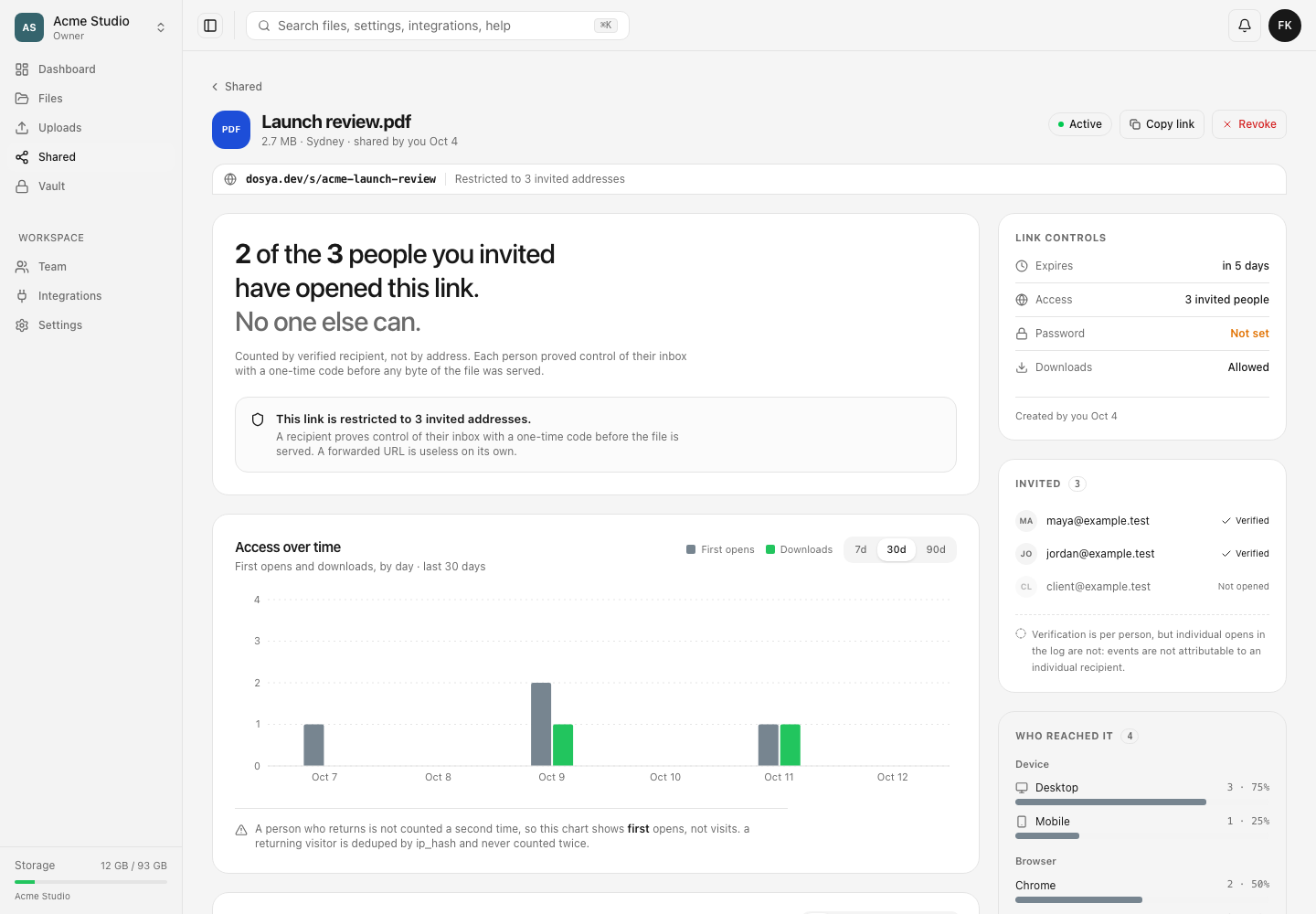
The current web analytics page has no CSV or export control. You can review its range, counters, reach, recipients, and newest 25 events, then preserve that visible evidence.

Steps
- Open Shared → By me, select the link, and confirm its exact URL and status on the analytics page.
- Choose 7d, 30d, or 90d. The timeline shows first opens and downloads by day; a returning hashed IP is not counted as another first open.
- Use All, Opens, or Downloads above the access log. This filter applies only to the rows already loaded; the web page requests 25 newest events and shows Showing N of total events.
- Record the visible columns: When, Event, Visitor, Country, and Device. Visitor is an eight-character fragment of a one-way IP hash; Unknown country covers missing edge location and older rows written before country was recorded.
- Capture the page with your browser’s print or screenshot tools if a review artifact is required. The current web client contains no Export, CSV, or download-analytics action.
- Add the chosen range, capture time, loaded-row count, and total event count to your review note. Do not imply the visible country tally covers events beyond the loaded 25.
Expected result
You have a clearly scoped capture of the analytics that the web app actually displays, including its range and row limit, without a nonexistent export claim.
Reach tallies devices and browsers from at most 5,000 distinct visitor rows and marks truncation. Restricted-link events cannot be attributed to individual recipients.
Related guides
Was this helpful?
Loading helpfulness results…
Voting saves a necessary ballot cookie for up to 180 days so you can change your answer.
Questions and replies
Ask about the steps in this guide. Questions are reviewed before publication.
Keep account details, credentials and private files out of public questions. Use private support for those.
Loading questions…
Sign in to your Dosya account to ask a question.