Save a file-request submission receipt
Save the on-page received stamp with file names, total bytes, local time, and request reference before changing browsers or losing visitor history.
Last reviewed
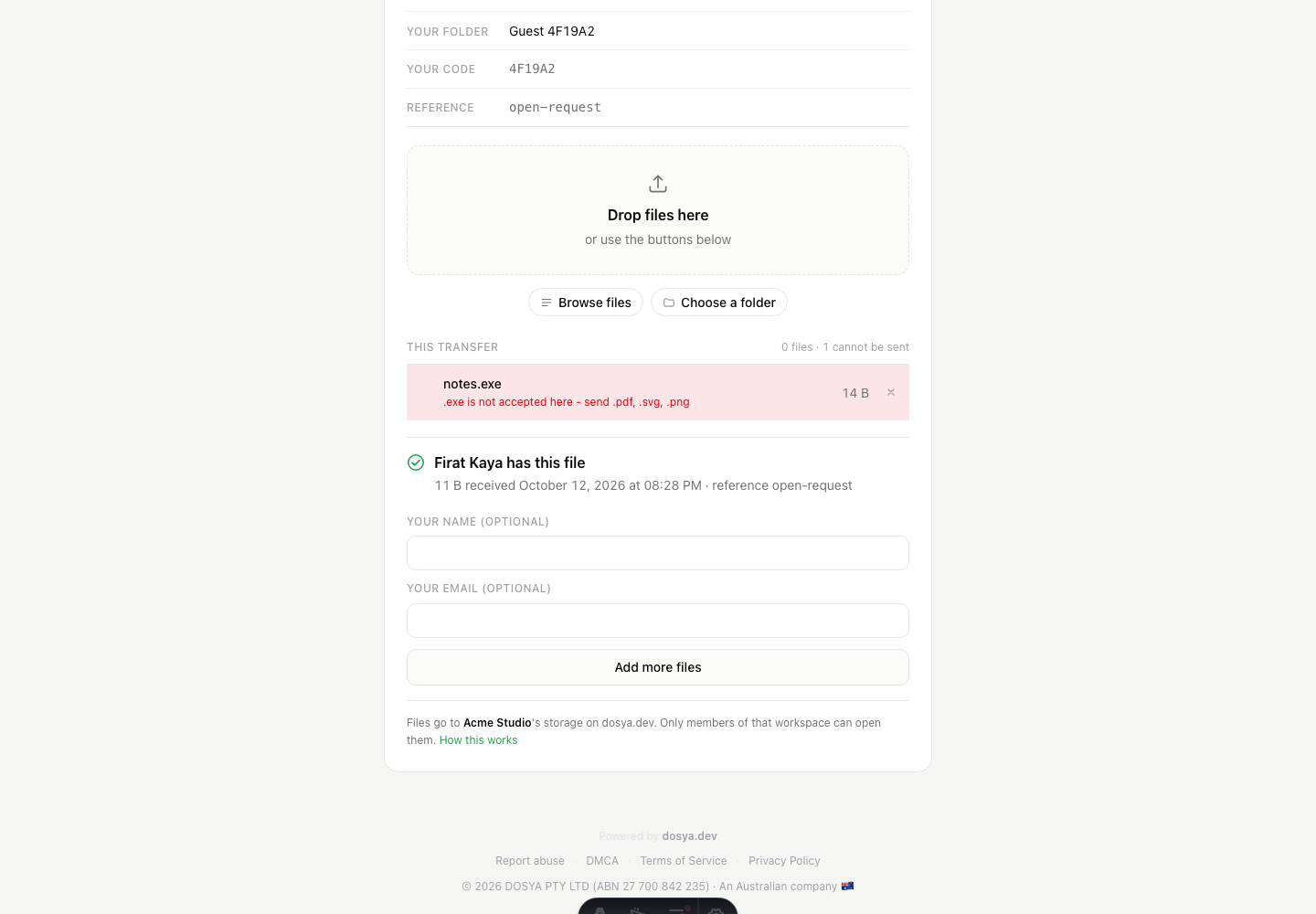
Dosya shows an on-page receipt after at least one file succeeds; it does not download a receipt file. Save that visible record before leaving if you need independent proof.
Steps
- Keep the request tab open while any row shows active percentage and transferred-byte progress. Accepted additions start automatically; there is no final Upload button. Wait until every intended file has a successful checkmark and received record, then inspect the stamp. Leaving during transfer can lose anything that has not landed, and the browser may warn before unloading.
- Confirm every intended file appears under Earlier today or another dated divider with Received. Failed, paused, or rejected rows are not proof of delivery.
- Read the receipt stamp beneath the ledger. It names who has the files, totals the successful count and bytes, shows the local received date and time, and includes the first 12 characters of the request token as reference.
- Compare the receipt count and bytes with the received rows. A mixed run can announce both received and failed counts; save evidence only after handling every failed line.
- Use a screenshot or the browser’s print-to-file command to preserve the visible stamp and filename list. Do not include the request password, email code, or full private URL in a ticket.
- If you return later, use the same browser or the emailed recipient URL. Recipient identity works across devices; anonymous history depends on a per-request visitor cookie that lasts up to 30 days.
Expected result
The saved evidence contains the accepted filenames, aggregate bytes, receipt time, and short request reference, without claiming rejected or failed items arrived.
The receipt is page state plus the server’s prior-upload ledger, not an emailed or downloadable certificate. Removing a prior upload permanently deletes that file and gives one request slot back.
Related guides
Was this helpful?
Loading helpfulness results…
Voting saves a necessary ballot cookie for up to 180 days so you can change your answer.
Questions and replies
Ask about the steps in this guide. Questions are reviewed before publication.
Keep account details, credentials and private files out of public questions. Use private support for those.
Loading questions…
Sign in to your Dosya account to ask a question.