Search inside the correct folder
Search file and folder names in one Dosya folder, understand the non-recursive scope and 300 ms delay, and recover when expected matches do not appear.
Last reviewed
The regular Search files… field searches file and folder names directly inside the folder in the breadcrumb. There is no separate scope selector, and matching items in descendant folders are not included.

Steps
- In web Files, use the breadcrumb or open folders until the target folder is current. A folder-confined member’s apparent root is the assigned anchor, so searches cannot move above it.
- Click Search files… and enter any part of the filename. Matching is case-insensitive for ASCII text, and % or _ is searched as an ordinary character rather than as a wildcard.
- Wait 300 milliseconds after the final keystroke. Dosya writes the query to q in the URL and resets the result page to 1.
- Review the matching file and folder rows directly in that folder. The name query also filters folder rows; files inside a matching subfolder are not included until you open it.
- Use Previous or Next if Page X of Y appears. The web request asks for 100 rows per page; the API itself accepts page sizes from 10 through 500.
- To search another folder, navigate there while leaving the query in place. Folder navigation preserves q, reruns it against the new direct children, and resets pagination.
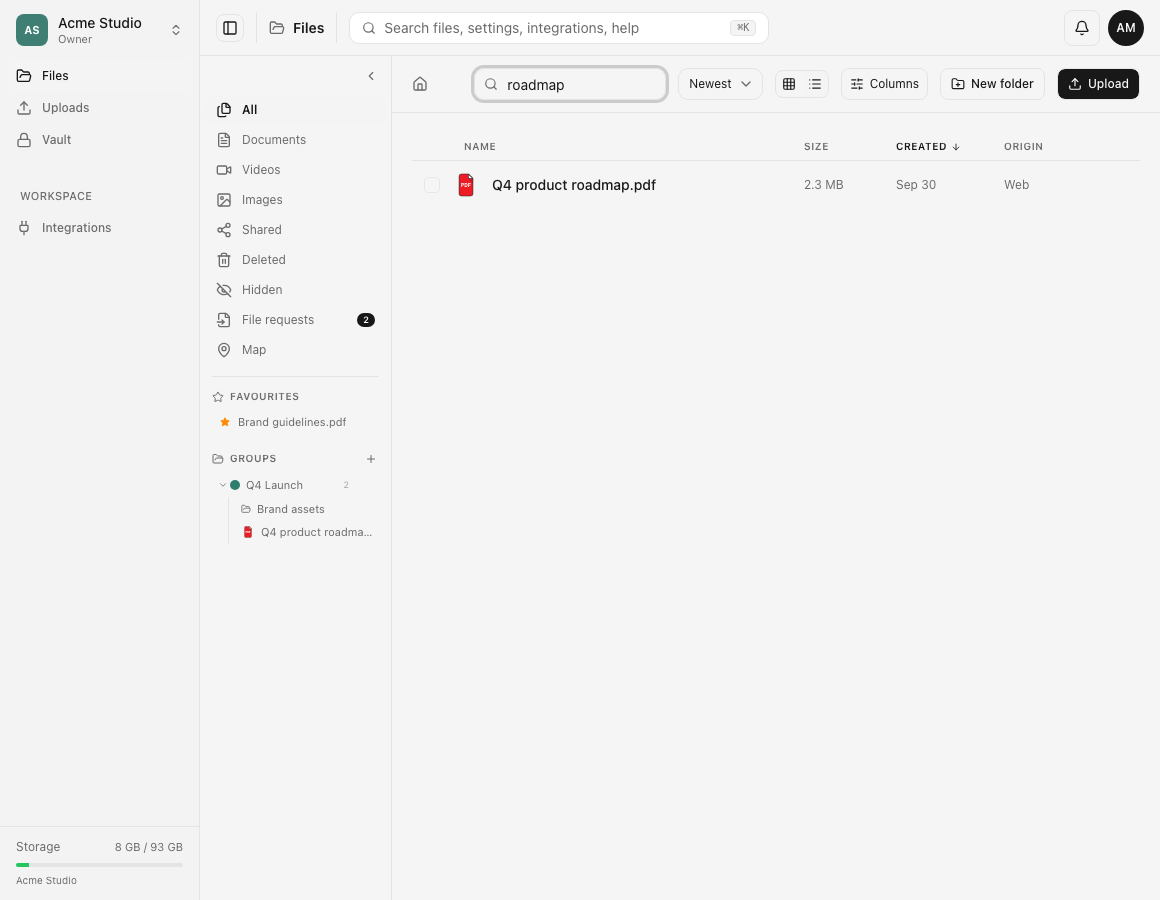
Expected result
The result contains listed, non-deleted file rows whose names contain the query and whose folder ID exactly matches the current location. An item can still appear as a restricted row when its own lock mode is full_lock; unlock it before opening file bytes. At workspace root, the same folder rule applies to root-level files. Search does not examine document text, audio tags, comments, or other metadata.
The operation is read-only. It respects file-page permission, folder confinement, hidden-file rules, and full-lock visibility, so clearing the query cannot expose content beyond the member’s access.
Troubleshooting
- A match in a child folder is absent. Open that child folder and let the preserved query run there; current-folder search is deliberately non-recursive.
- Folders appear beside matching files. The name query filters both file and folder rows. A matching folder is a navigation choice, not a recursive match for the files inside it.
- No files match your search appears. Remove punctuation or shorten the filename fragment, then wait for the debounce.
- Could not load this folder appears. Read the specific error beneath it and press Try again. If access changed, return to a folder within your assigned scope.
Related guides
Was this helpful?
Loading helpfulness results…
Voting saves a necessary ballot cookie for up to 180 days so you can change your answer.
Questions and replies
Ask about the steps in this guide. Questions are reviewed before publication.
Keep account details, credentials and private files out of public questions. Use private support for those.
Loading questions…
Sign in to your Dosya account to ask a question.