Recognize devices in your Dosya session list
Decode Dosya session device and browser labels, compare app rows with web rows, and decide which credentials belong to you before revocation.
Last reviewed
Dosya derives browser device labels from the stored user-agent string. These labels describe software claims, not a verified hardware identity, and privacy tools can reduce their accuracy.

Steps
- Open Profile → Sessions and first mark the row carrying Current.
- Browser parsing recognizes Firefox, Edge, Chrome, and Safari. If none matches, the browser field becomes Unknown.
- Device classification recognizes iPhone, iPad, Android phone/tablet, Mac, Windows PC, and Linux. Everything else is listed as Unknown device.
- A native-token row keeps a recognized platform label, such as iPhone or Android Phone. If its user-agent classification is unknown, the label falls back to Mobile app. Its metadata identifies dosya.dev app in either case.
- Compare the label with location/IP context and time. Two browsers on one computer can be separate credentials, and signing in again can create another row.
- Do not use order alone as identity. The list is sorted by creation time, while mobile metadata can use later token activity.
- If a row is unknown, secure the account rather than waiting for its 30-day web expiry or 60-day mobile refresh window.
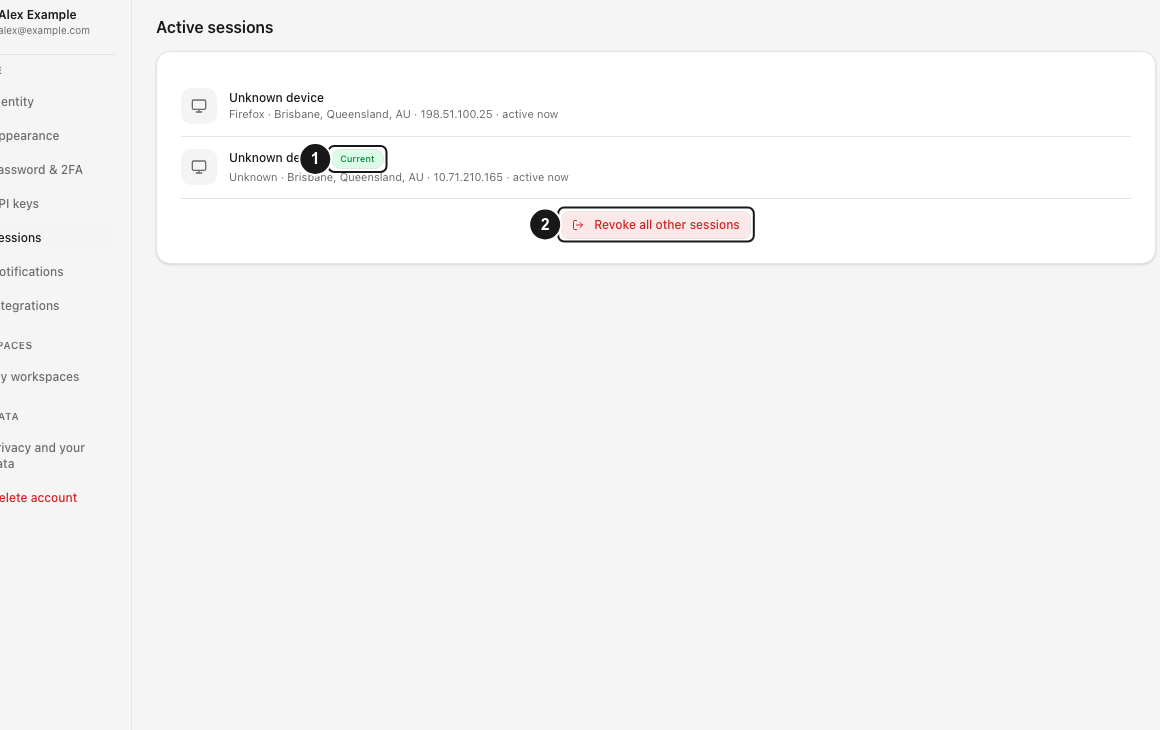
Dosya does not display serial numbers, operating-system device names, or precise hardware models in this web list.
Expected result
Every familiar row has an explainable credential type, device class, browser/app label, and time context. Any unexplained entry is treated as a security incident and removed through password change or bulk revocation.
Related guides
Was this helpful?
Loading helpfulness results…
Voting saves a necessary ballot cookie for up to 180 days so you can change your answer.
Questions and replies
Ask about the steps in this guide. Questions are reviewed before publication.
Keep account details, credentials and private files out of public questions. Use private support for those.
Loading questions…
Sign in to your Dosya account to ask a question.