Contacting support with useful information
Open a private support ticket with reproducible steps, safe diagnostics and redacted screenshots so the team can investigate without receiving account secrets.
Last reviewed
Use Dosya’s signed-in Get help page for a private account, billing or technical question. A useful ticket explains the task, the expected result, what happened instead and when it happened. Include enough context to reproduce the problem while keeping passwords, verification codes, keys and private links out of the message.
Check status.dosya.dev first when several pages fail at once. A known incident may already explain the behavior and can save you from repeating a risky action.
Before you start
- Sign in to the affected Dosya account. The ticket is attached to that account and can include the active workspace context.
- Try the action once more only when repeating it is safe. Record the exact error instead of repeatedly submitting a payment, invitation, deletion or large transfer.
- Note the approximate date, time and timezone. For an intermittent issue, note when it last worked.
- Redact screenshots before attaching them. Hide private filenames, email addresses, share tokens, recovery codes, payment details and content unrelated to the problem.
- Never send a password, six-digit verification or two-factor code, recovery code, session cookie, API key, WebDAV/S3 secret, private share URL or complete payment-card number.
Steps: open a private support ticket
- In the web app, open the profile menu in the upper-right and choose Get help.
- Select New ticket.
- Write a short subject that names the action and result, such as “Upload stops after reconnecting.” Avoid a subject such as “Help” that does not identify the problem.
- Choose the category that best matches the issue. Use Technical issue for broken behavior; select the account, billing, feature-request or other category when that is a closer match.
- In the description, give the task, exact steps, expected result, actual result, time and timezone, app or browser and operating-system version, and the visible error text.
- Attach only redacted images that help locate the control or error.
- Review the message for secrets, then select Create ticket once.
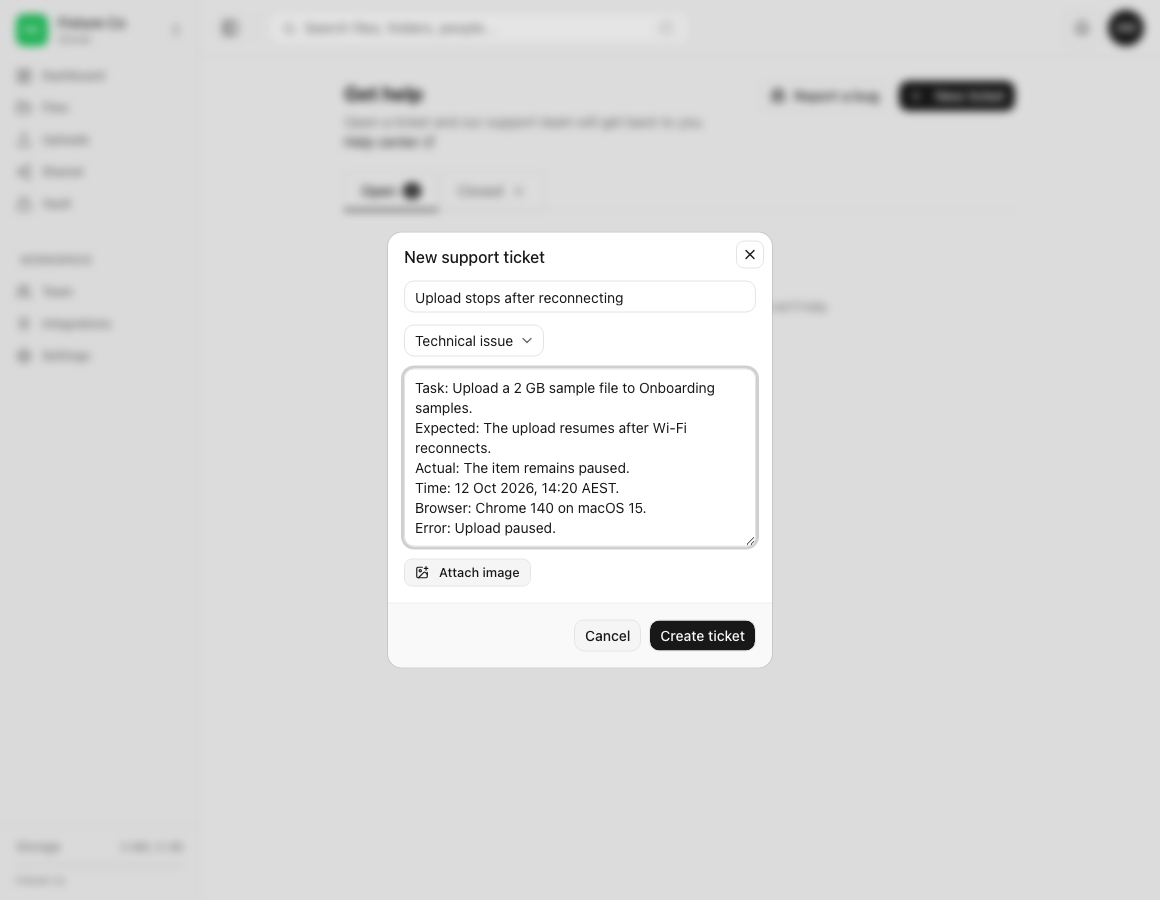
Use this description template
Copy the headings that apply and replace the examples:
Task: Upload a 2 GB sample file to Onboarding samples.
Steps: Open Uploads, choose the file, disconnect Wi-Fi, then reconnect.
Expected: The upload resumes.
Actual: The item remains paused.
Time: 12 Oct 2026, 14:20 AEST.
Environment: Chrome 140 on macOS 15.
Error: Upload paused.
Frequency: Reproduced twice with this sample file.
Already tried: Reloaded once and confirmed enough workspace storage.
Use a harmless sample filename where possible. If only one confidential file triggers the issue, describe its type and approximate size first. Support can tell you whether a private transfer is needed; do not attach the source file to an ordinary screenshot control.
Useful details by problem type
| Problem | Include | Keep out |
|---|---|---|
| Upload or download | File type, approximate size, destination, connection change, progress state, exact error | Confidential file contents, signed download URLs, session cookies |
| Share link | Whether the problem affects creation, opening or downloading; browser; expiry setting; time | The private link token or link password in the first message |
| Desktop sync | Desktop app version, operating system, sync mode, affected relative path, last successful sync | Full home-directory paths when they reveal names, passwords or key files |
| API, WebDAV or S3 | Protocol, request method or client, HTTP status, timestamp, redacted request identifier | Authorization headers, API keys, access-key secrets or complete request bodies with private data |
| Account access | Account email, sign-in method, approximate time and displayed error | Passwords, verification codes, recovery codes or identity-provider tokens |
| Billing | Plan, invoice date or last four digits only when needed, displayed error | Complete card number, security code or bank credentials |
Ticket and attachment limits
The subject accepts up to 200 characters and the description up to 10,000 characters. Each message can include up to three images. Supported image types are PNG, JPEG, WebP and GIF, and each image must be under 5 MB.
Crop or compress an image if it is too large, but keep the control label and error readable. A short screen recording or document is not accepted by the image attachment control; describe the sequence in text and wait for support to request another transfer method if needed.
For a product defect, Report a bug on the Get help page opens a separate reporting flow that can collect structured diagnostics. Review those details before sending them. Use New ticket when you need a support conversation or the issue involves account-specific help.
Expected result
The new ticket appears under Open with the selected category and your first message. Return to Get help to read replies and add requested information in the same ticket. After the issue is resolved, the conversation can move to Closed.
Security and privacy limits
Support staff do not need authentication secrets to investigate. A legitimate response should not ask for your password, two-factor code, recovery code or complete API secret. If a diagnostic log contains authorization headers, cookies, private URLs, local usernames or file paths, remove those values before pasting it.
A screenshot attachment belongs to the support conversation but can still expose information to staff handling the ticket. Include the smallest relevant area and use fictional or redacted data when reproducing a visual problem.
Troubleshooting
Get help does not open. Confirm that you are signed in and reload the web app once. Check the public status page. If account access itself is broken, use the support path offered by the sign-in or verification screen.
Create ticket stays disabled. Enter both a non-empty subject and description. Keep the subject within 200 characters and the description within 10,000.
An image is rejected. Attach PNG, JPEG, WebP or GIF only. Keep each image under 5 MB and the message at no more than three images.
The issue involves a private share link or API key. Do not paste the secret. Describe the action, time and redacted identifier. Revoke a value immediately if it was already exposed, then tell support that it was rotated.
The same issue has an existing ticket. Reply in that ticket so the history stays together. Include new timestamps or reproduction results instead of opening duplicates.
A browser or app error has no visible details. Record the page or feature, time, version and last successful action. Use Report a bug if its diagnostics cover the failure, or ask support which additional log is safe to provide.
Frequently asked questions
Should I email my password so support can reproduce the problem?
No. Support does not need your password or any temporary authentication code.
Can I attach the file that fails to upload?
The ticket form accepts images, not arbitrary source files. Describe the type and size and attach a redacted screenshot. Wait for support to provide an approved private transfer method if the original file is necessary.
Should I open another ticket for an update?
No. Add the update to the existing Open ticket so the investigation and timestamps remain together.
What time information is useful?
Give the date, local time and timezone. This lets support align your action with service and audit records.
Related guides
Was this helpful?
Loading helpfulness results…
Voting saves a necessary ballot cookie for up to 180 days so you can change your answer.
Questions and replies
Ask about the steps in this guide. Questions are reviewed before publication.
Keep account details, credentials and private files out of public questions. Use private support for those.
Loading questions…
Sign in to your Dosya account to ask a question.