Inviting file-request uploaders and tracking submissions
Send recipient-specific request URLs, read pending and uploaded status, resend reminders and understand what recipient tracking proves.
Last reviewed
Use New request → By email when you want Dosya to send recipient-specific request URLs and show who is pending or uploaded. Recipient invitations provide delivery and attribution signals. They do not turn the request into an invitation-only upload page.
Add a request password when possession of the URL alone should not be enough to reach the upload form.
Before you start
- Confirm every address and obtain permission to send the request.
- Choose a title and message that recipients will recognize.
- Decide whether the request also needs a password, expiry, file limits or separate uploader folders.
- Remember that email status is operational evidence, not proof of a person’s legal identity.
Steps: send a tracked request
- Open File requests and select New request.
- Keep By email selected.
- Enter an address and press Enter, comma or Space to add it. Addresses are normalized to lowercase and duplicates in the dialog are ignored.
- Add the request title, message, password if needed, expiry, destination and upload rules.
- Select Send request. Dosya creates the request and sends each recorded recipient a URL containing their own recipient token.
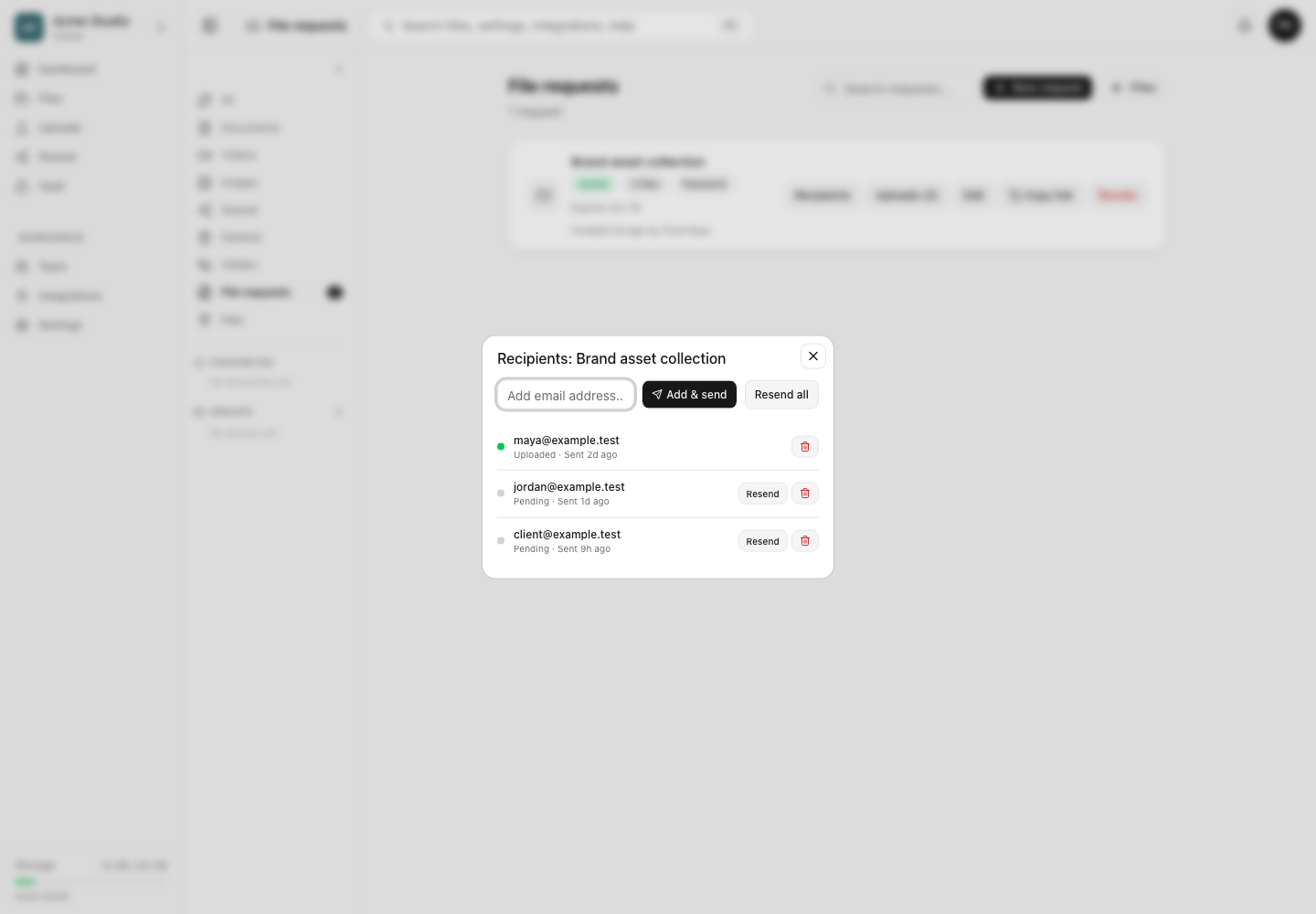
- Open Recipients on the request row to review the list. New recipients begin as Pending.
- Use Resend beside one pending address or Resend all for every pending recipient.
- Use Add & send to invite another valid address after creation.
- Remove an address with its delete control when it should no longer appear in the tracked list.
Read recipient and upload status
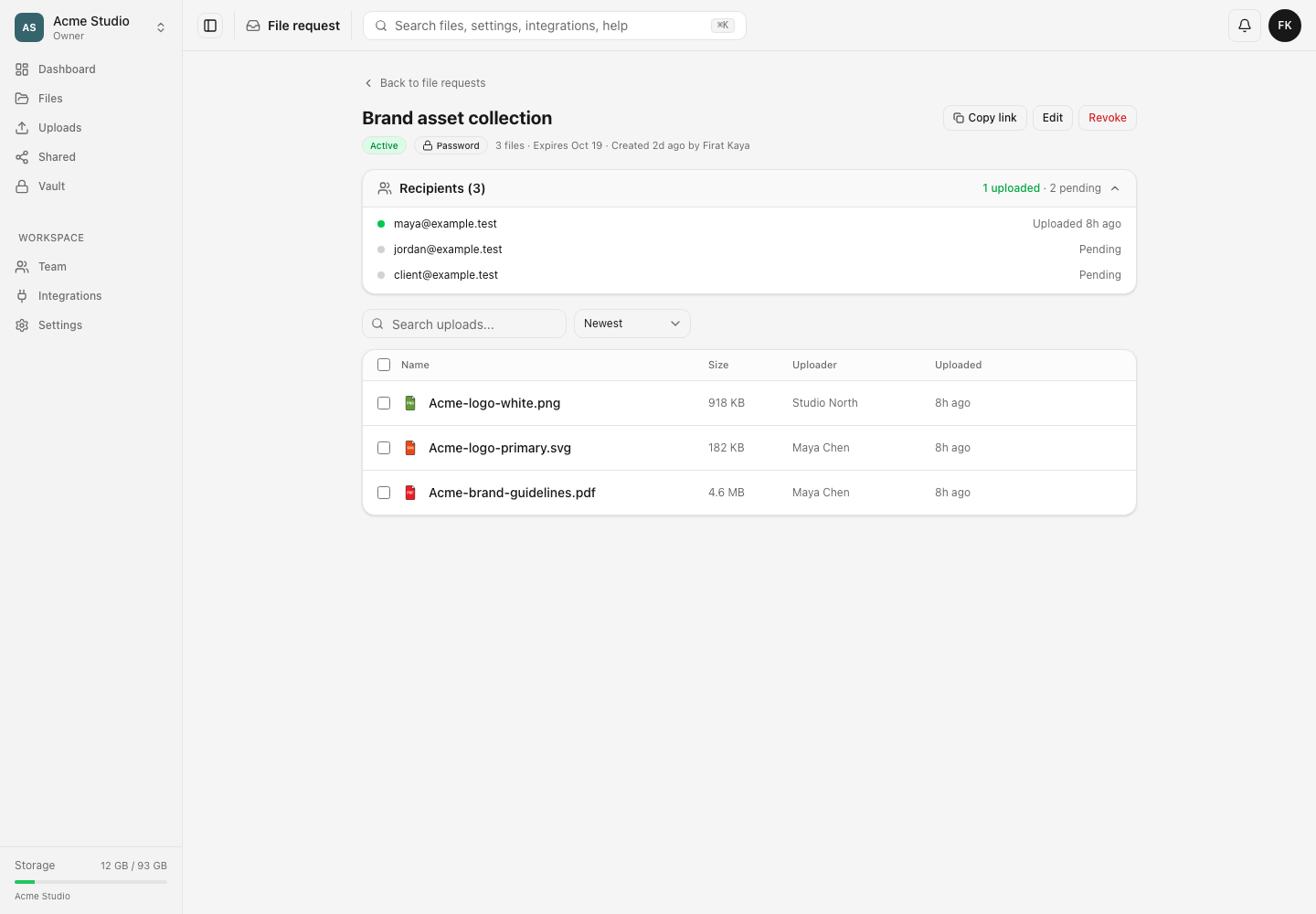
Open the request’s detail page and expand Recipients. The summary shows how many invited addresses have uploaded and how many remain pending. The upload table below shows the uploader label associated with each received file.
When someone opens their recipient-specific URL, the public page shows Sending as with the invited address and removes the free-text email field. A completed upload through that URL marks the recipient as uploaded. The optional name can still describe the person or team sending the files.
What recipient tracking does
Each invitation carries a unique recipient token. The API resolves that token to the invited email and records completed submissions against it. The public page does not ask that recipient to create or sign into a Dosya account.
At creation, the API accepts up to the first 100 valid recipient addresses. Later additions are managed one address at a time. An address already recorded for that request is rejected case-insensitively rather than added twice.
Expected result
The recipient list shows invitation delivery timing and either Pending or Uploaded. Completed files appear in the request detail and selected destination. The owner can identify the invited address associated with a recipient-token upload while still treating any free-text name as unverified.
Limits and privacy behavior
- A file request remains a public token URL. Removing a recipient removes tracking for that recipient token; it does not revoke the base request URL or files already received.
- Forwarding a recipient-specific URL can cause later uploads to be attributed to that invited address. Add a password and share it separately when forwarding risk matters.
- Pending means no completed upload has been recorded for that recipient. It does not prove the email was unread or undelivered.
- Uploaded does not mean every requested file arrived. Review the actual filenames, sizes and message requirements.
- Resending a reminder does not create a new request or reset its expiry and limits.
Troubleshooting
The recipient says no email arrived. Confirm the spelling, ask them to check spam and suppression preferences, then use Resend. Send the base URL privately only if losing recipient attribution is acceptable.
An address says it is already a recipient. The comparison is case-insensitive. Find the existing row and resend it instead.
A recipient remains pending after sending files. Confirm they used the recipient-specific URL and reached a completed receipt. A base link, interrupted transfer or different invitation will not update the expected row.
I removed a recipient but their URL still opens the form. Recipient removal is not access revocation. Revoke the whole request or add/change its password when access must stop.
Frequently asked questions
Are By email requests private to the listed addresses?
No. Invitations add delivery and tracking. Use a password for an additional access gate and revoke the request when it must close.
Can one recipient upload more than one file?
Yes, subject to the request’s remaining file slots, per-file size, accepted types and workspace storage.
Does Uploaded prove who held the device?
No. It links the submission to the recipient token in the URL, not to a signed-in Dosya identity.
Related guides
Was this helpful?
Loading helpfulness results…
Voting saves a necessary ballot cookie for up to 180 days so you can change your answer.
Questions and replies
Ask about the steps in this guide. Questions are reviewed before publication.
Keep account details, credentials and private files out of public questions. Use private support for those.
Loading questions…
Sign in to your Dosya account to ask a question.