Install the Dosya mobile app
Install Dosya on iOS 15.1+ or Android 7.0+ from its official store or supported Android APK, then verify the build before signing in on that device.
Last reviewed
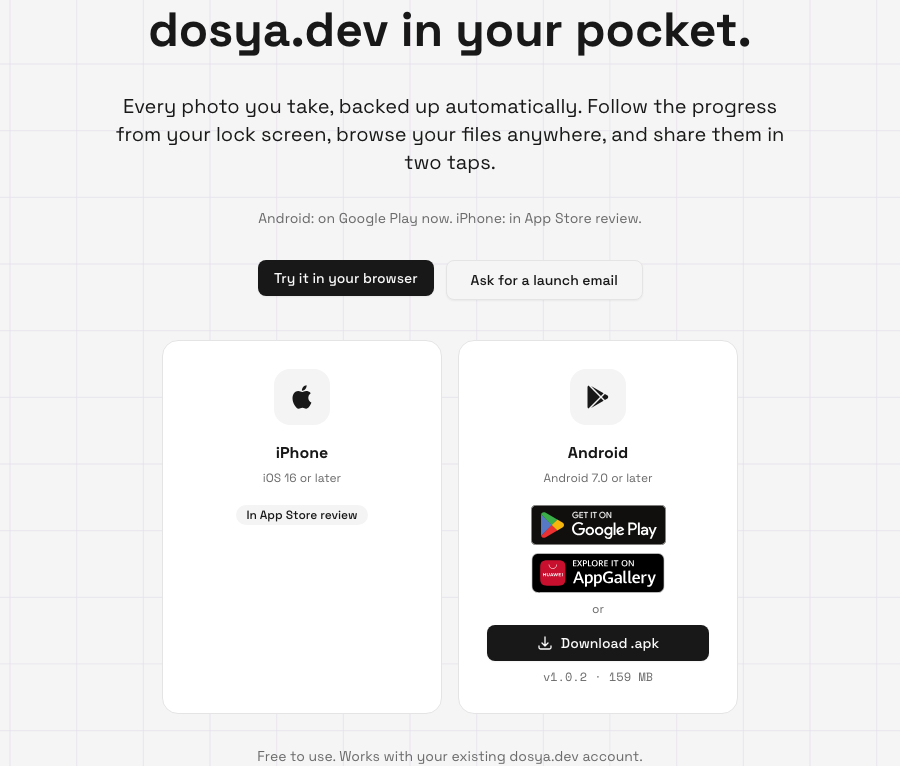
Dosya mobile supports iOS 15.1 or later and Android 7.0 or later. The iPhone app is distributed through the App Store. Android users can install from Google Play, Huawei AppGallery, or the current direct APK linked by Dosya.
Use the buttons on https://dosya.dev/mobile/ instead of searching by name. The maintained destinations identify the iPhone listing as App Store ID 6796702157, the Android store package as dev.dosya, and the direct build as the latest file served by the Dosya API.

Steps
iPhone or iPad
- Open
https://dosya.dev/mobile/and find the iPhone card. - Confirm the device runs iOS 15.1 or newer, then tap Download on the App Store.
- Check that the destination uses App Store ID
6796702157and displays Dosya: Cloud Backup & Storage. - Install the app through Apple’s normal confirmation flow.
- Open Dosya. The first app screen should offer the signed-out welcome or authentication flow; installation alone does not request access to the photo library.
Android from a store
- On the same mobile page, use Get it on Google Play for package
dev.dosya. Huawei phones without Play can use the AppGallery badge for listingC119259287. - Confirm Android 7.0 or later, then let the chosen store install the app.
- Keep the Google Play or AppGallery installation in that same channel so its marketplace supplies future Dosya updates.
Android from the direct APK
- Select Download .apk on the Dosya mobile page. If a SHA-256 value is displayed, compare it before installation with
shasum -a 256 <file>on macOS or Linux, orcertutil -hashfile <file> SHA256on Windows. - Open the APK from the browser notification or Files → Downloads.
- When Android asks which app may install unknown applications, allow the source that opened the file, such as Chrome or Files, then go back.
- Tap Install and allow Play Protect to scan the package if offered.
- Open Dosya and later check Settings for the installed Version value. The app reads this from the installed binary.
Expected result
The installed application opens as dosya.dev, shows its build number under Settings, and presents the mobile sign-in experience. No cloud file, account membership or workspace content changes until you authenticate and perform an action.
Android channel rules
- Google Play signs its build with a different key from the direct APK. Android will not install one over the other and can show App not installed or
INSTALL_FAILED_UPDATE_INCOMPATIBLE. - Switching between the Play and direct channels requires uninstalling the existing copy first. That deletion removes local tokens, cached files, queued work and backup configuration from the phone; files already in the Dosya account remain in cloud storage.
- A direct APK installation is not updated by Google Play. The app checks for a newer direct build every few hours and shows an item in Settings when one is available.
- Removing the direct build’s install-source permission after setup does not uninstall Dosya. Android will ask again only when that source needs to install another APK.
- iOS has no supported direct package route in this project. Use the App Store listing on Apple devices.
Troubleshooting
The store says the device is unsupported. Verify the operating-system version: the published requirements are iOS 15.1+ and Android 7.0+.
Android reports “App not installed.” If a Play build and direct build are being mixed, finish any cloud uploads, uninstall the current app, and install from the chosen channel. You will need to sign in and configure backup again.
The downloaded APK does not match the checksum. Delete it and download a fresh copy from the official mobile page. Do not install a file with a different SHA-256 result.
No version appears in Settings. Reopen the installed release build. The app deliberately reads the runtime package version rather than a guessed configuration value.
Related guides
Was this helpful?
Loading helpfulness results…
Voting saves a necessary ballot cookie for up to 180 days so you can change your answer.
Questions and replies
Ask about the steps in this guide. Questions are reviewed before publication.
Keep account details, credentials and private files out of public questions. Use private support for those.
Loading questions…
Sign in to your Dosya account to ask a question.