Understanding Free-plan allowances
Understand Free storage, protocol transfer, share-link, workspace, member and retention allowances, where to check usage and what happens when a limit is reached.
Last reviewed
The Free plan is permanent and starts with 5 GB of storage. It has no card requirement, expiry or countdown. Referrals can add 5 GB each for up to five referrals, giving up to 25 GB of additional storage under the current published policy.
Every product feature remains available on Free, including the apps, API, WebDAV, S3, SFTP, share links and Vault. Fair-use allowances limit sustained transfer, object counts, team size and history retention. Check the live Fair use page before designing an automated or high-volume workflow because allowances can change after this guide’s review date.
Before you start
- Confirm that the active workspace shown in the web app is the one whose storage you want to inspect.
- Separate storage used from data transferred. A 2 GB file stored once uses about 2 GB of storage; downloading or transferring it later can count against a daily transfer allowance without creating another stored copy.
- Separate direct app use from a credential. API, WebDAV and S3 allowances apply per credential on Free, while public share-link downloads are counted per account.
- Use the live pricing page for current paid-plan capacity and price.
Steps: check which allowance applies
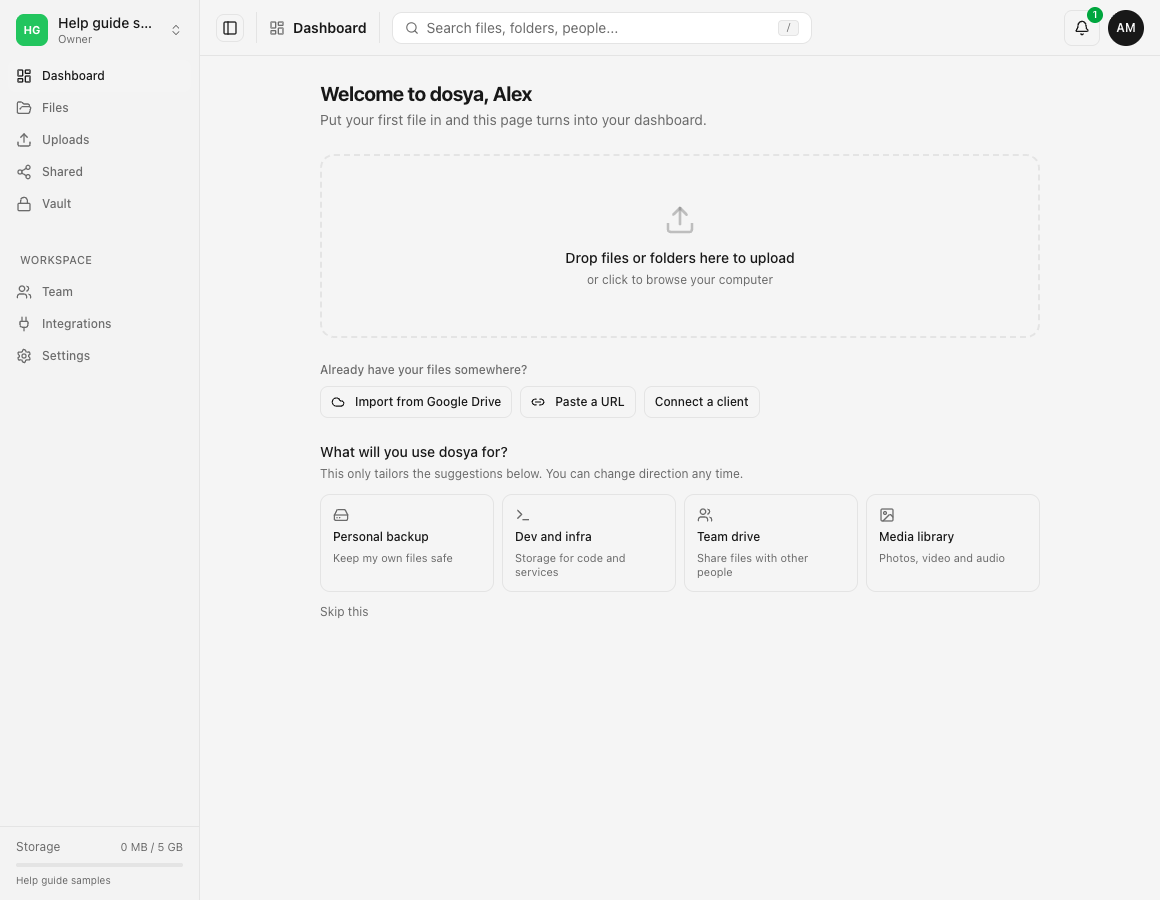
- Open the web app and read the active workspace name at the top of the sidebar.
- Check the storage indicator at the bottom of the sidebar for that workspace’s used and available capacity.
- Identify the action that stopped: an API or protocol transfer, a share-link download, creation of a key or link, a workspace invitation, or access to older history.
- Match it to the table below and read whether the allowance resets, frees when an item expires or is removed, or requires a different plan.
- Read the message shown by Dosya before retrying. A daily allowance resumes after its window resets; an object cap usually requires an old object to be removed or allowed to expire.
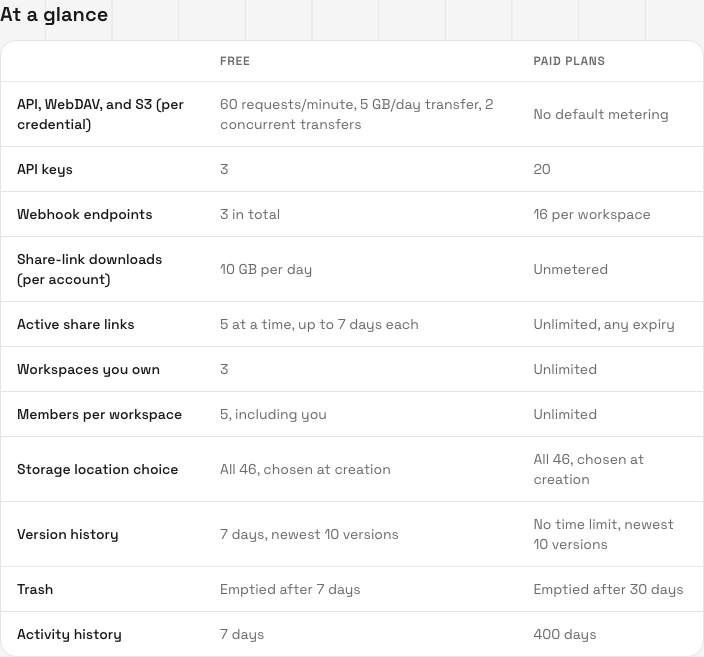
Current Free allowances
The following values were reviewed on 2026-10-12:
| Area | Free allowance | What frees or resets it |
|---|---|---|
| Base storage | 5 GB, permanent | Delete data you no longer need, empty trash when appropriate, add referral storage or change plan. |
| Referral storage | 5 GB per referral, up to 5 referrals | Added capacity is governed by the referral program; see the account’s referral screen for status. |
| API, WebDAV and S3 per credential | 60 requests per minute, 5 GB transfer per day, 2 concurrent transfers | Minute and daily windows reset; a running transfer is allowed to finish. |
| API keys | 3 | Delete a key that is no longer used, then create another. |
| Webhook endpoints | 3 in total | Delete an unused endpoint, then create another. |
| Share-link downloads | 10 GB per day per account | The daily window resets. Visitors see a temporary busy page after the allowance is used. |
| Active share links | 5 at a time, each for up to 7 days | Revoke an unused link or wait for one to expire. |
| Workspaces you own | 3 | Existing workspaces remain. Ownership of another person’s workspace does not count unless you own it. |
| Members in each workspace | 5 including you | Remove an unneeded member or change plan. Membership in someone else’s workspace is not part of the three-workspace ownership cap. |
| Storage locations | All 46 published locations | Choose at workspace creation; the plan does not reduce the catalog. |
| Version history | 7 days and the newest 10 versions by default | Scheduled cleanup removes older versions; the current file version remains. Workspace policy can affect the version-count cap. |
| Trash | 7 days | Deleted files are permanently removed after the retention window. |
| Activity history | 7 days | Older activity leaves the visible retention window. |
What happens when an allowance is reached
Fair-use transfer allowances pause further work instead of slowing every transfer. Requests over a limit are refused until its time window resets, and a share link can show a temporary busy page. A transfer already in flight is allowed to finish. Reaching a transfer allowance does not delete files or revoke the credential.
Count limits behave differently. At three API keys, for example, existing keys keep working but another cannot be created until one is deleted or the plan changes. At five active Free share links, existing links remain active; revoke one or wait for expiry before creating another.
Retention is scheduled cleanup, not a usage counter. A Free file version older than the retention window can be removed automatically, trash is permanently emptied on its schedule, and old activity leaves the visible history. The current version of a live file is not removed by version-history cleanup.
No egress fee does not mean unlimited Free transfer
Dosya does not add a per-gigabyte egress charge to your bill. The Free plan still has documented daily fair-use allowances for API or protocol credentials and public share-link downloads. When one is reached, work pauses until the relevant window resets; it does not produce a surprise transfer charge.
Paid plans currently show no default plan metering for API, WebDAV and S3, and unmetered share-link downloads. General abuse and safety rate limits can still apply to every plan. Check the developer reference for a protocol workload and contact support before treating a personal storage account as a public distribution backend.
Expected result
You can identify whether storage capacity, a time-based transfer allowance, an object count or a retention window explains the behavior. You know where the current workspace storage is shown and whether to wait for a reset, remove an unused item, restore something still inside retention or review the live paid plans.
Limits and review date
This guide records the public policy reviewed on 2026-10-12. The production Fair use page and pricing page are authoritative for later changes. Exact reset timing and the relevant counter are communicated by the product or protocol response; do not assume that creating another credential changes an account-level share allowance.
Troubleshooting
An upload says there is not enough storage. Check the active workspace and its sidebar indicator. Remove unneeded data, review trash and stored versions, or add capacity. Switching workspace changes which capacity is displayed.
An API, WebDAV or S3 client receives a rate-limit response. Stop automatic rapid retries. Each Free credential currently has request, daily transfer and concurrency allowances. Allow existing transfers to finish and retry after the indicated minute or daily window.
A public share link shows a temporary busy page. The account may have served its 10 GB daily Free share-link allowance. The link and source file remain intact; visitors can return after the daily window resets.
Dosya will not create another share link. Free allows five active links at a time. Revoke an unused link or wait for its expiry. Free links can last up to seven days.
Dosya will not create another workspace or invite another member. Free currently allows ownership of three workspaces and five members per workspace including the owner. Reaching a cap does not remove existing workspaces or members.
An old version, deleted file or activity entry is missing. Check the applicable seven-day Free retention window. Restore items before the deadline; expired history cannot be brought back by changing plan after cleanup.
Frequently asked questions
Does the Free plan expire?
No. The published Free plan is permanent, starts with 5 GB and does not require a card.
Are features disabled on Free?
The current policy makes the product features available on every plan. Free differs through allowances, object counts, team size and shorter retention.
Will Dosya charge me after I transfer too much data?
No per-gigabyte egress charge is added. The relevant Free allowance pauses further requests or downloads until it resets.
Does joining someone else’s workspace use one of my three owned workspaces?
No. The published cap is on workspaces you own.
Related guides
Was this helpful?
Loading helpfulness results…
Voting saves a necessary ballot cookie for up to 180 days so you can change your answer.
Questions and replies
Ask about the steps in this guide. Questions are reviewed before publication.
Keep account details, credentials and private files out of public questions. Use private support for those.
Loading questions…
Sign in to your Dosya account to ask a question.