List folders and files with the REST API
Call GET /api/files with a read-capable key, page through one workspace or folder, and interpret access, lock, hidden-content and scope failures.
Last reviewed
Use GET https://api.dosya.dev/api/files to list the folders and files visible in one workspace location. The request returns metadata, breadcrumbs, permissions, and file-page pagination; it does not return file bytes or create a share link.
Credential and access requirements
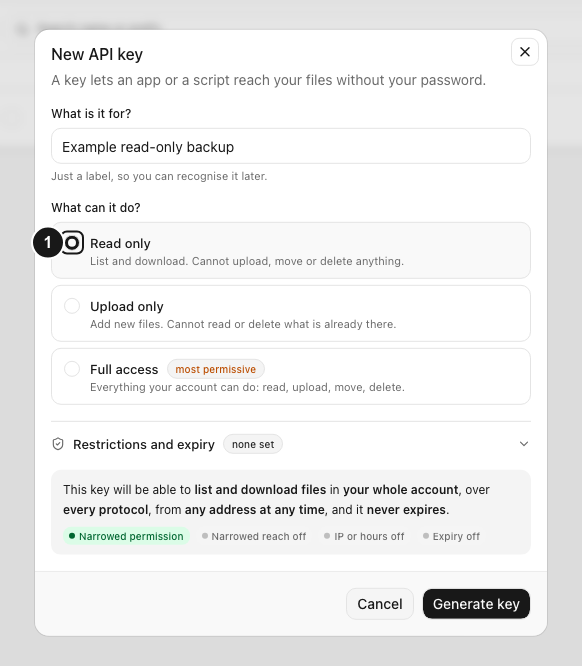
Create a Read only or Full access API key with REST API allowed under Protocols. Pin it to the intended workspace when the integration should not enumerate other workspaces. Ordinary folder-anchored API keys are refused over REST, so use a workspace pin without a folder anchor for this endpoint.
The key narrows the account that created it. The account must still be a workspace member, and its role needs access_files. Folder confinement, hidden-folder rules, full locks, and workspace membership are enforced before the listing is returned.
An Upload only key cannot call this GET endpoint. Its refusal names the exact operation: This credential's scope is 'upload' and cannot perform GET /api/files.

Steps
Set the secret privately and use a workspace ID returned by GET /api/workspaces:
read -r -s -p 'API key: ' DOSYA_API_KEY
printf '\n'
export DOSYA_API_KEY
export DOSYA_WORKSPACE_ID='ws_REPLACE_ME'

curl --fail-with-body --silent --show-error --get \
  'https://api.dosya.dev/api/files' \
  -H "Authorization: Bearer $DOSYA_API_KEY" \
  --data-urlencode "workspace_id=$DOSYA_WORKSPACE_ID" \
  --data-urlencode 'page=1' \
  --data-urlencode 'per_page=100' \
  --data-urlencode 'sort=name' \
  --data-urlencode 'dir=asc' \
  -o files-page-1.json

python3 -m json.tool files-page-1.json
workspace_id is required; omitting it returns workspace_id is required. With no folder_id, the route lists the workspace root, or the member’s confined root when that human account is folder-confined.
The successful JSON contains:
folders: child folder metadata for the current location.files: the current page of file metadata, including IDs used by later file routes.breadcrumbs: root-to-current folder labels when listing a subfolder.workspace_idand the resolvedfolder_id.can_lock,can_hide, andfolder_view_onlyfor the caller’s current role and folder state.pagination.page,per_page,total_files, andtotal_pages.
Folders and files are separate arrays. total_files and total_pages describe the file page, not the number of child folders.
List a subfolder or filter by name
Pass a known folder ID to list that folder’s direct children:
DOSYA_FOLDER_ID='fld_REPLACE_ME'
curl --fail-with-body --silent --show-error --get \
  'https://api.dosya.dev/api/files' \
  -H "Authorization: Bearer $DOSYA_API_KEY" \
  --data-urlencode "workspace_id=$DOSYA_WORKSPACE_ID" \
  --data-urlencode "folder_id=$DOSYA_FOLDER_ID" \
  --data-urlencode 'q=invoice' \
  --data-urlencode 'page=1' \
  --data-urlencode 'per_page=100'
q is trimmed and matched case-insensitively against names. Special wildcard characters are treated as search text rather than raw SQL patterns. A confined member who explicitly names a folder outside the permitted subtree receives This folder is outside the folder you're confined to with HTTP 403.
Supported sort keys include name, size, created, modified, taken, type, extension, version, uploader, region, origin, shares, and comments. Use dir=asc or dir=desc with a bare key. Legacy values such as newest, oldest, largest, and smallest are also accepted. Unknown sort input safely falls back to newest-first.
Fetch every file page
The default page size is 100. per_page is clamped to 10–500, and page starts at 1. Continue until the returned page reaches pagination.total_pages:
import json, os, urllib.parse, urllib.request

base = 'https://api.dosya.dev/api/files'
workspace = os.environ['DOSYA_WORKSPACE_ID']
key = os.environ['DOSYA_API_KEY']
page = 1

while True:
    query = urllib.parse.urlencode({
        'workspace_id': workspace,
        'page': page,
        'per_page': 500,
        'sort': 'name',
        'dir': 'asc',
    })
    req = urllib.request.Request(base + '?' + query,
        headers={'Authorization': 'Bearer ' + key})
    with urllib.request.urlopen(req) as response:
        body = json.load(response)
    for item in body['files']:
        print(item['id'], item['name'], item['size_bytes'])
    if page >= body['pagination']['total_pages']:
        break
    page += 1
Files can change between offset-based pages. For a stable export, avoid concurrent renames, uploads, and deletes during the run, and deduplicate collected rows by file ID.
Interpret access and lock responses
| Response | Meaning and next action |
|---|---|
401, Not authenticated or invalid-key text | Restore the complete bearer token and check expiry or revocation. |
403, This API key is not permitted to use the api surface | Create a key whose protocol selection includes REST API. |
403, Not a member of this workspace | Confirm the workspace ID and restore membership; a key cannot grant membership. |
403, You don't have access to the files page | The current role lacks access_files; ask a workspace administrator to adjust it. |
403 with error: "folder_locked" and lock_mode: "full_lock" | Unlock the folder through an authorized flow and supply its current ut token if the integration supports locked folders. |
404, Folder not found | The folder does not exist for this requester, including a hidden folder or one under a hidden ancestor. Do not use the response to infer hidden content. |
Hidden files and folders are removed from ordinary results unless the caller has permission to manage hidden content. A view_only folder can still be listed, and the response sets folder_view_only: true so clients can suppress download actions.
Expected result
Each request returns HTTP 200 with only the folders and files the credential owner may see in the requested location. Following pagination.total_pages yields the accessible file set without downloading bytes or modifying the workspace.
Related guides
Was this helpful?
Loading helpfulness results…
Voting saves a necessary ballot cookie for up to 180 days so you can change your answer.
Questions and replies
Ask about the steps in this guide. Questions are reviewed before publication.
Keep account details, credentials and private files out of public questions. Use private support for those.
Loading questions…
Sign in to your Dosya account to ask a question.