Understand workspace storage region and routing
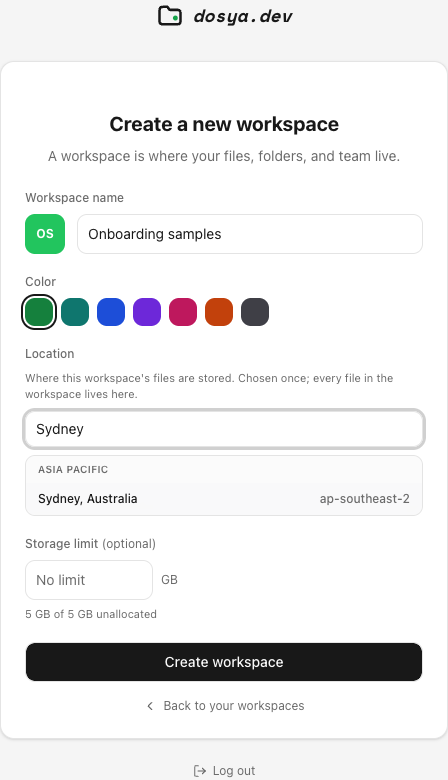
Identify the durable workspace storage location, distinguish it from transfer routing, and plan a new workspace when a different location is required.
Last reviewed
The workspace region is the durable storage choice made at creation; transfer edges or network routes do not silently migrate stored files.
Before you start
- Use the current released client or web app and sign in to the intended account.
- Select the correct workspace and use non-confidential test data.
- Record the current setting or result before changing it.
- Keep passwords, API keys, recovery keys and private links out of screenshots and support messages.
Steps: understand workspace storage region and routing
- Open workspace details and record its storage location.
- Compare it with the region chosen at creation.
- Treat a nearby transfer route as transport rather than durable storage.
- Check current region availability before creating another workspace.
- Plan an explicit verified transfer when location must change.
- Confirm destination copies before removing originals.
Expected result
The understand workspace storage region and routing workflow completes for the test item and its result remains visible after a refresh or reconnect.
Limits and important details
- Available controls depend on the current client version, plan, role and workspace policy.
- A successful connection does not grant permissions beyond its credential and workspace boundary.
- Verify important results with a harmless test before relying on the workflow.
Troubleshooting
The expected control is missing. Confirm the current client, active workspace and role, then check the relevant settings page.
The operation is rejected. Read the exact error and compare credentials, permissions, quota and workspace policy.
The result is still unclear. Repeat with one small test item and contact private support with the time, client version and nonsecret error.
Related guides
Was this helpful?
Loading helpfulness results…
Voting saves a necessary ballot cookie for up to 180 days so you can change your answer.
Questions and replies
Ask about the steps in this guide. Questions are reviewed before publication.
Keep account details, credentials and private files out of public questions. Use private support for those.
Loading questions…
Sign in to your Dosya account to ask a question.