Revoke and replace an API key
Identify the exact client credential, revoke it, confirm requests fail, and issue a narrowly scoped replacement when the integration must continue.
Last reviewed
Revocation stops that credential without changing your Dosya sign-in password or unrelated keys. Replace it only after identifying the client that uses it.
Before you start
- Use a disposable workspace and non-confidential test file.
- Choose the smallest permissions and surfaces the task requires.
- Prepare a password manager or secret store; never place a real key in a screenshot, URL or repository.
- Plan to revoke the test key after verification.
Steps: revoke and replace an api key
- Open Profile → API keys and match the key name, creation time and restrictions to the client.
- Stop the client or job that currently uses it.
- Select Revoke for the exact row and confirm.
- Run a harmless request and confirm the old key is rejected.
- Create a replacement with corrected least-privilege settings if needed.
- Update the client secret store and test before deleting any temporary fallback.
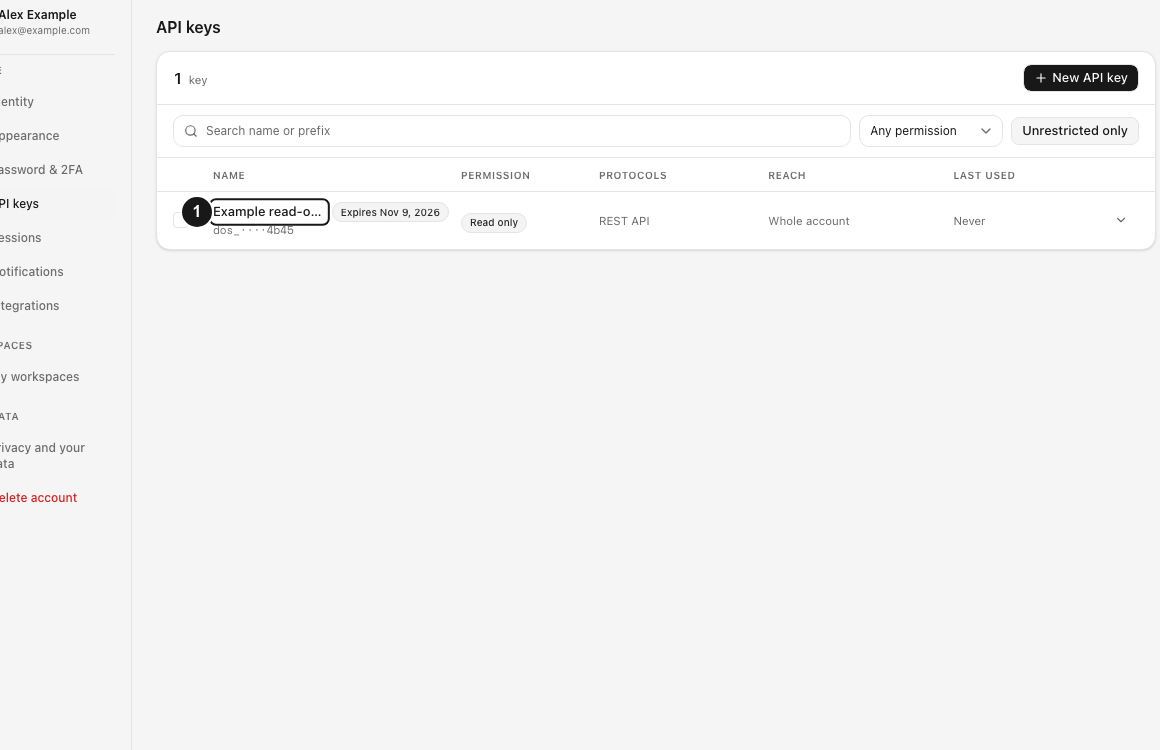
Expected result
The test key performs its allowed operation, rejects an operation outside its boundary, and can be identified and revoked without changing the account password.
Limits and important details
- Revocation cannot erase data a client already downloaded.
- A cached client may continue retrying and produce errors until its configuration changes.
- Rotating one key does not invalidate separate keys or browser sessions.
Troubleshooting
The request returns unauthorized. Check the complete secret, API endpoint and whether the key was revoked.
The request returns forbidden. Compare the operation with the key permission, protocol surface, workspace and folder anchor.
A secret was exposed. Revoke it immediately, create a replacement with least privilege and remove the exposed value from logs and history.
Related guides
Was this helpful?
Loading helpfulness results…
Voting saves a necessary ballot cookie for up to 180 days so you can change your answer.
Questions and replies
Ask about the steps in this guide. Questions are reviewed before publication.
Keep account details, credentials and private files out of public questions. Use private support for those.
Loading questions…
Sign in to your Dosya account to ask a question.